
A bookkeeping cleanup means getting your records back to a state you can trust and prove to HMRC. You reconcile every bank account, find missing paperwork, remove duplicates, fix VAT coding, clear holding accounts and check what is owed to you and by you. Do it in that order, because each step depends on the one before.
If your books feel behind or untidy, you are not alone, and it is almost always fixable. I’m Chris, an AAT-licensed bookkeeper and accountant in Hildenborough, near Tonbridge. This checklist is how I approach a messy set of books, and you can use it to tidy things yourself or to see what a professional review involves.
TL;DR
- Start with the bank: reconcile every account to the statement, month by month, before you touch anything else.
- Chase the gaps next: missing invoices, duplicates, wrongly coded VAT and anything sitting in a suspense account.
- Check the balance sheet items that hide problems: director loan account, aged debtors and aged creditors.
- Corrections to earlier periods need evidence and a careful review. Never simply overwrite history.
- If the file is a tangle or a VAT or payroll deadline is close, a professional review is quicker and safer than guessing.
Table of Contents
- Signs your books need a cleanup
- Before you start: set the scope and protect the file
- The bookkeeping cleanup checklist
- Historical corrections need evidence and a careful review
- Records to keep, and for how long
- Making Tax Digital for Income Tax changes the stakes
- DIY or professional review?
- My perspective: reconcile first, flag what you cannot prove
- How I can help with a bookkeeping review
- Keeping the books clean afterwards
- FAQ
- Need help?
- Sources
Signs your books need a cleanup
Most people know something is wrong before they can say what. These are the warning signs I look for first:
- Bank accounts that do not reconcile. The balance in your software differs from the bank, and nobody knows why.
- A growing suspense or “uncategorised” balance. Transactions have been parked rather than decided.
- Odd balances. A negative bank balance when the account is in credit, a debtor that never clears, or a creditor you paid last year.
- Reports that do not make sense. Profit looks too high or too low compared with how the year felt.
- Missing receipts and invoices. Spending shows in the bank but there is nothing to support it.
- VAT returns prepared from guesswork. Figures typed in from a spreadsheet, or adjusted at the last minute.
- Opening balances nobody can explain. The first entries in the file do not match last year’s accounts.
- Several people entering data with no rules. Different names for the same supplier, different habits for the same type of cost.
If you recognise three or more, a cleanup is worth doing before your next filing deadline rather than after. I have a shorter list in 5 signs your bookkeeping needs professional help.
Before you start: set the scope and protect the file
A calm cleanup begins with a few decisions, not with editing transactions.
- Choose the period. Usually this runs from the start of the current accounting year or, if earlier years were wrong, from the last set of accounts or returns that were filed and accepted.
- Take a backup. Export a copy of the file, or note the current reports (profit and loss, balance sheet, VAT summary) so you can compare before and after.
- Gather source documents. Bank and credit card statements for every account, sales invoices, supplier bills, receipts, payroll reports, loan statements, previous filed returns and the last accounts.
- Note what has already been filed. Anything already sent to HMRC or Companies House is treated differently from an open period. More on that below.
- Lock what is finished. Once a period is reviewed, use your software’s lock date so nothing quietly changes behind you.
The records you need depend on how you trade. GOV.UK sets out what self-employed people must keep, and for companies, the guidance on company and accounting records says you must record all money received and spent, assets, debts, stock and goods bought and sold, along with the supporting records needed for your annual accounts and Company Tax Return.
The bookkeeping cleanup checklist
Work down these in order. Tick each one off only when you can explain it, not merely when the number looks right.
1. Bank reconciliation
This is the foundation. Every other check relies on the bank being right.
- Reconcile each bank account, credit card, PayPal, Stripe or card-processor account to its statement, one month at a time, starting at the earliest month.
- Check that the opening balance for each account matches the statement closing balance for the month before.
- Make sure the closing balance in your software matches the statement on the last day of each month, not just today.
- Investigate every item that does not match. Do not use a “balancing” entry to force it.
- Look for transactions in the software with no match in the bank, such as manual entries that were never real payments.
If you use QuickBooks, my step-by-step guide to QuickBooks bank reconciliation covers the screen-by-screen detail.
Cleaning up a QuickBooks file. Check your bank feed rules before you categorise anything. A rule that was set up wrongly will repeat the same error every month. QuickBooks UK describes AI-assisted categorisation, anomaly detection and VAT checks in its reporting tools. They can point to likely errors, but they suggest and you decide: a suggestion is not evidence. Also check the opening balances, the bank feed start date and any duplicate accounts created when a feed was reconnected.
2. Missing invoices and receipts
Once the bank is right, every line needs support.
- List every payment out with no bill or receipt attached, and every receipt in with no sales invoice.
- Ask suppliers for copies. Most can resend statements or invoices from their portals.
- For sales, check your invoice numbering for gaps. A missing number needs an explanation: cancelled, voided or simply never saved.
- If a receipt is truly lost, record what you know (date, supplier, amount, what it was for) and note why the paperwork is missing. Do not create a document after the event and present it as the original.
- Photograph and attach paper receipts going forward, so the record sits next to the transaction.
This matters because your records are what you rely on if HMRC asks a question. For VAT-registered businesses, HMRC’s record-keeping guidance (VAT Notice 700/21) says records must be complete and up to date so VAT is calculated correctly, with no set format required.
3. Duplicate transactions
Duplicates usually arrive in three ways: a bank feed and a manual entry for the same payment, an imported statement overlapping with a feed, or the same invoice entered twice with slightly different references.
- Sort the bank account by amount and look for matching amounts on close dates.
- Check suppliers whose names appear twice in different spellings.
- Look for two sales invoices to the same customer for the same value in the same week.
- Delete or void the duplicate only after confirming the original is the one that matches the bank. Where the duplicate sits in a locked or filed period, see the section on historical corrections below.
4. VAT coding
If you are VAT registered, coding errors are the ones that cost real money, because they flow straight into your return.
- Check every transaction has the right VAT rate (standard, reduced, zero, exempt or outside scope) and that it matches the supplier invoice, not your assumption.
- Confirm you are not reclaiming VAT without a valid VAT invoice.
- Look at zero-rated or exempt coding on purchases from VAT-registered suppliers. It is sometimes a sign the VAT was left off by mistake.
- Check items that often go wrong: mixed-use costs, business entertainment, vehicle costs, imports and overseas suppliers.
- Reconcile your software’s VAT report to the figures on filed returns, period by period.
If you find errors in returns already submitted, HMRC’s guidance on correcting VAT errors (VAT Notice 700/45) explains when you can adjust on a later return and when you must notify HMRC separately, which depends on the net value of the errors. Read it before you change anything, and ask an accountant if the amounts are close to the limits.
For a plain-English walk-through of the return itself, see my VAT return explained guide, or my VAT returns service if you would rather hand it over.
5. Suspense and uncategorised accounts
A suspense account is a holding pen. It should be empty at every period end.
- Open the balance and list each item in it.
- Match each item to its source: a bank line, a bill, a payroll run, a loan payment.
- Move it to the right account only once you know what it is. If you cannot tell, ask the person who made the payment, check the bank reference or contact the payee.
- If something remains unexplained, leave it flagged and list it as a query for your accountant. Do not push it into “general expenses” to get a zero.
The same applies to accounts called “ask my accountant”, “miscellaneous” or “sundry” when they have become large. They are suspense accounts by another name.
6. Director’s loan account (limited companies)
The director’s loan account shows money you have put into the company and taken out that is not salary, dividends or expense claims. It is one of the first things I check in a company file.
- Check it ties to the bank. Personal payments from the business account should be coded here unless they are salary, dividends or repaid expenses.
- Check the sign: is the company owed money by you (overdrawn), or does it owe you?
- Make sure the balance at the year end agrees with the figure in your draft accounts and last year’s closing balance.
- Look for personal spending that was coded as a business expense. It needs moving to the loan account, which can change the tax position.
- If the account is overdrawn at the year end, talk to your accountant early. An overdrawn loan can lead to extra tax, and the right fix depends on your facts, so I do not recommend guessing.
For wider monthly habits, see bookkeeping for limited company directors.
7. Aged debtors
This report lists who owes you money and how long it has been outstanding.
- Match each outstanding invoice to the bank. Customers often pay without a reference, so a paid invoice can sit open for months.
- Apply unallocated receipts and credit notes.
- Contact customers with genuinely old invoices. If one will never be paid, record a bad debt properly, with a note of the reason, rather than deleting the invoice.
- Check you have not issued an invoice twice for the same job.
8. Aged creditors
This is the same exercise for what you owe.
- Match every unpaid bill against bank payments and supplier statements.
- Remove paid bills that were never allocated.
- Check for old credit notes that were never applied.
- Confirm that bills dated near the year end are in the right period.
If an aged creditors report shows a total much larger than you believe you owe, the likely cause is unallocated payments, not a real debt.
9. Payroll, CIS and tax balances
- Compare payroll journals with payroll reports and with the amounts paid to HMRC.
- Check PAYE and National Insurance liabilities clear after each payment.
- If you are a contractor, check CIS deductions suffered and CIS returns match the books. My pages on CIS services and CIS monthly returns explain the monthly cycle.
- Make sure VAT, PAYE and Corporation Tax liability accounts agree with what HMRC shows.
10. Fixed assets, loans and opening balances
- List equipment, vehicles and other long-lasting purchases. Large items may belong on the balance sheet, not as running costs, depending on your accounting basis. Ask before you reclassify.
- Check loan balances against lender statements, and split interest from capital.
- Check your opening balances against the last filed accounts or return. My guide to opening balances in accounting software shows how I set these up on day one.
11. Review the reports
Finish by reading the numbers as a story.
- Does the profit and loss look like your year? Compare it with last year and with what you expected.
- Does the balance sheet have odd entries: a negative asset, a stale liability, a big “other” line?
- Run the trial balance and check it still balances after your changes.
- Compare the before and after reports from your backup, and write down every material change and why you made it.
Historical corrections need evidence and a careful review
Changing a number in a current month is straightforward. Changing one in a period you have already filed is a different thing.
There are three reasons to slow down.
Filed periods have consequences. A VAT return, a Self Assessment return, a Company Tax Return or a set of filed accounts may all rest on the old figures. Editing the books without telling anyone leaves your records disagreeing with what HMRC or Companies House holds.
Evidence decides what is right. Each correction should be supported by a bank statement, invoice, contract, payroll record or a supplier or customer confirmation. “It feels like it should be this” is not evidence. If you cannot support a change, flag it as a query rather than posting it.
Different corrections follow different routes. An error in a VAT return follows the VAT error-correction rules. An error in a Self Assessment return is dealt with through an amendment, and my guide to correcting tax return mistakes covers that. An error in filed company accounts is a separate question again.
My approach when correcting earlier periods:
- Do not delete. Reverse and repost, or use a journal with a clear description, so there is an audit trail.
- Record what was wrong, what the evidence shows and who agreed the change.
- Work out whether the change affects anything already filed, and how that should be put right.
- Re-run the reports and compare them with the backup.
- Lock the period.
Careless corrections can create a second set of errors on top of the first, so pace matters more than speed here.
Records to keep, and for how long
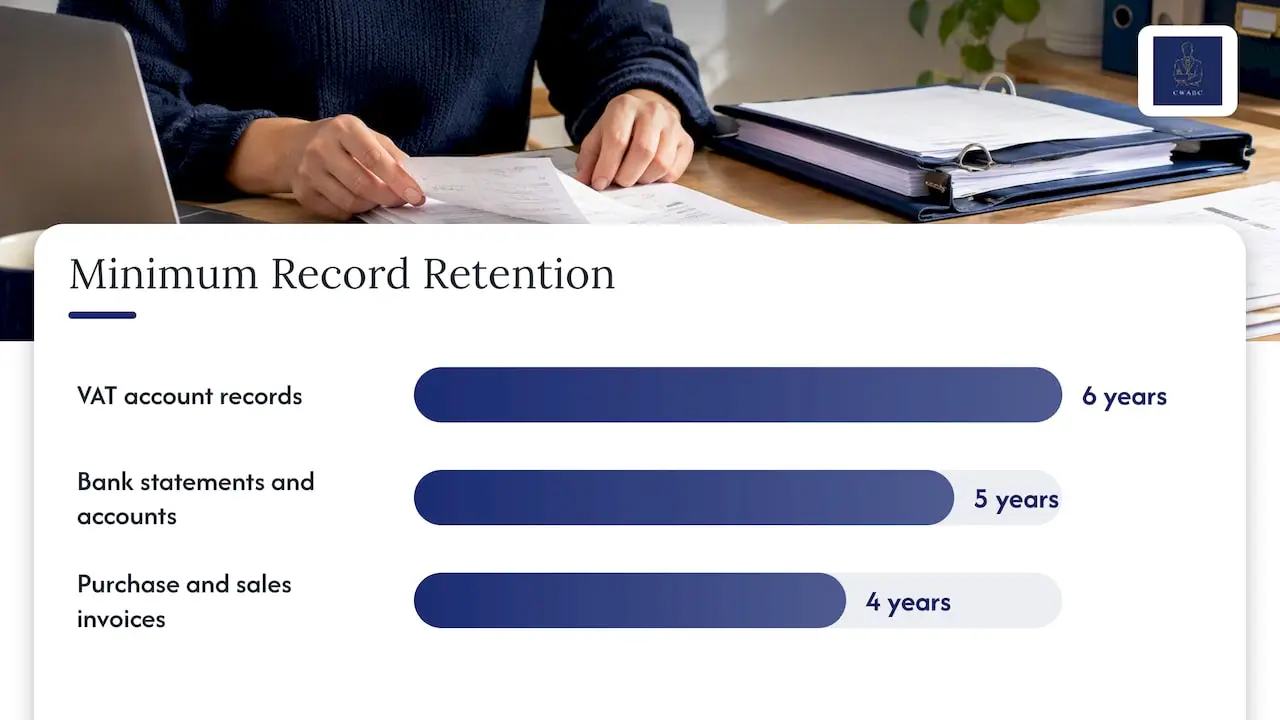
A cleanup is a good moment to decide what you keep and where. HMRC’s compliance handbook sets out how long records must be retained: its minimum for records containing the VAT account is 6 years, bank statements and annual accounts 5 years, and purchase and sales invoices 4 years. Your own situation may require longer, for example for property, capital items or an open enquiry. My article on how long to keep tax records is not needed here: use this retention guide for the detail.
If you are VAT registered under Making Tax Digital, there is one more point. HMRC’s guidance on avoiding penalties for Making Tax Digital for VAT explains that you must keep certain records digitally in compatible software, and that manually copying and pasting data between programs is not permitted, so digital links are needed. A cleanup built on a spreadsheet that gets retyped into the VAT software can break that chain.
Making Tax Digital for Income Tax changes the stakes
If you are a sole trader or landlord, tidy books matter more than they used to. The Income Tax (Digital Obligations) Regulations 2026 set out that, for existing businesses, Making Tax Digital for Income Tax obligations generally start on 6 April 2026, with digital records kept in compatible software and quarterly updates of income and expenses sent to HMRC.
Whether and when it applies to you depends on your income, so check the current rules or ask. My guides to Making Tax Digital requirements and Making Tax Digital explained set it out calmly, and my MTD for Income Tax support page explains how I help.
The practical point is simple. Quarterly updates are only as good as the monthly records behind them. Clean them now and the quarters become a routine task rather than a last-minute mess.
DIY or professional review?
Doing it yourself is reasonable when the file is small, the period is short and the errors are obvious. A professional review is worth considering when:
- bank reconciliations have been out for several months or years;
- you have VAT, payroll or CIS involved;
- a suspense account or director’s loan balance is large or unexplained;
- earlier periods were already filed and may be wrong;
- you are moving software, for example from spreadsheets to cloud accounting;
- you are about to hire an accountant and want them working from reliable numbers.
If you are deciding who you need, bookkeeper or accountant: which do you need and my hiring an accountant checklist will help. My longer piece, cleaning up UK bookkeeping: reconcile first, flag queries, goes deeper on the approach.
My perspective: reconcile first, flag what you cannot prove
The biggest mistake I see is not carelessness. It is the urge to make everything look tidy fast. Someone clears a suspense account by moving it to “sundries”, forces a bank balance with an adjustment, or deletes a duplicate that was actually the real payment. The report looks neat and the problem is now hidden.
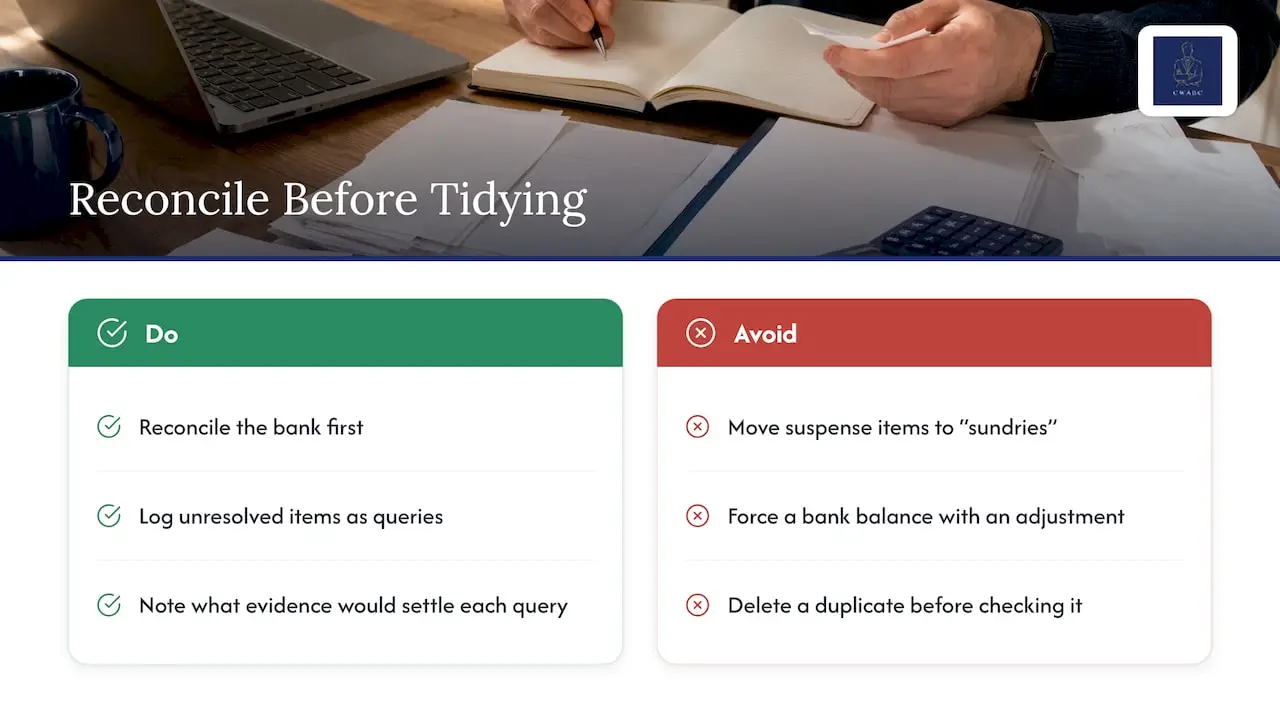
So my rule is the opposite. I reconcile first, because the bank is the one record that is independent of you. Then I work through the gaps and write each unresolved item down as a query: what it is, what I think it might be, and what evidence would settle it. I would rather hand you a short, honest list of open questions than a spotless set of books I cannot support.
You deal with me directly throughout, and I explain what I find in plain English, without jargon. Nothing here is meant to alarm you. Most messy books can be put right with patience, and a clear record of what was changed and why.
— Chris
How I can help with a bookkeeping review
If you would like another pair of eyes, I can carry out a bookkeeping review for you. In practice that means:
- reviewing your bank reconciliations and your software file, whether that is Xero, QuickBooks or FreeAgent;
- identifying discrepancies, such as missing paperwork, duplicates, VAT coding issues, suspense balances and unusual director’s loan or debtor and creditor balances;
- explaining what I have found in plain English;
- recommending corrective action, including which items need evidence first and which affect earlier filings;
- setting up a simple monthly routine so the books stay in order.
My bookkeeping services cover ongoing support, and I work with sole traders, landlords, startups, limited companies and CICs in Tonbridge, Sevenoaks and across Kent, as well as remotely across the UK. Pricing is tailored and agreed clearly upfront. If your problem is a Self Assessment return, Self Assessment tax returns start from £250 one-off.
Keeping the books clean afterwards
A cleanup only lasts if the habits change.
- Reconcile monthly, not yearly. Ten minutes a month beats ten hours in January.
- Attach receipts at the time. Use your software’s app, or photograph and file paper copies the same day.
- Review bank rules quarterly. Rules that were right two years ago may now be miscoding transactions.
- Keep personal and business money apart. Mixed spending is the root of most director’s loan and sole trader problems.
- Use accountant access. In QuickBooks, for example, you can invite your accountant or bookkeeper to see your accounts and schedule monthly reports by email, so problems are spotted early.
- Use a system built for your trade. My guide to avoiding bookkeeping errors as a self-employed person is a good place to begin, and if you are still on spreadsheets, moving from Excel to cloud accounting is the next step.
FAQ
How do I clean up messy bookkeeping?
Start by gathering every statement and invoice for the period, then reconcile each bank account month by month. After that, deal with missing paperwork, duplicates, VAT coding, suspense balances, director’s loan, debtors and creditors, in that order. Keep a list of anything you cannot support with evidence, and ask an accountant about it rather than guessing.
How much does a bookkeeping cleanup cost?
It depends on how many months are affected, how many accounts and whether VAT, payroll or CIS are involved. At CWABC pricing is tailored to your situation and agreed clearly upfront, so you know the scope and the fee before work starts. I do not publish a fixed cleanup price because no two files are alike.
Can I change entries in a period I have already filed?
Only with care. Reverse and repost rather than deleting, keep the evidence, and check whether the change affects a filed VAT return, Self Assessment return or set of accounts. HMRC has separate routes for correcting each, so check the right one before you edit.
What is a suspense account and should it have a balance?
It is a temporary holding account for transactions you cannot yet categorise. It should be empty by each period end. A balance means something has not been identified, and the items need tracing to their source.
Need help?
If your books need a proper review, I am happy to look at them with you and explain the next steps calmly. Please get in touch via my contact page and tell me a little about your situation. I will reply as soon as I can.
Sources
- Business records if you’re self-employed, GOV.UK
- Company and accounting records, GOV.UK
- Record keeping (VAT Notice 700/21), GOV.UK
- How to correct VAT errors and make adjustments or claims (VAT Notice 700/45), GOV.UK
- CH15400 Record keeping: how long must records be retained, HMRC Compliance Handbook
- Compliance checks: how to avoid penalties for Making Tax Digital for VAT, GOV.UK
- The Income Tax (Digital Obligations) Regulations 2026, legislation.gov.uk
- Accounting reports, QuickBooks UK
- Accounting software for small businesses, QuickBooks UK