
You have sent your payroll report to HMRC, and then you spot a mistake. Perhaps the wrong hours went in, an employee’s National Insurance category is wrong, or a leaver was never marked as a leaver. It is a stressful moment, but it is usually fixable. For most errors in the current tax year, you correct your payroll records and let your next regular submission carry the corrected year-to-date figures to HMRC. I help employers across Tonbridge, Kent and the wider UK do exactly that, calmly and in the right order.
TL;DR
- Most mistakes in the current tax year are corrected by fixing your payroll records, so that the year-to-date figures in your next regular Full Payment Submission (FPS) are right. GOV.UK sets this out.
- Correcting your records and reporting updated year-to-date figures are two separate jobs. You need both for pay and deductions, but only the first for start and leaving dates.
- A wrong payment date needs an extra FPS marked “H – correction to earlier submission”, sent by the 19th of the next tax month.
- Mistakes in a previous tax year are corrected with a further FPS showing the right year-to-date figures, within six years.
- A penalty is only charged if you did not take reasonable care or acted deliberately, so act promptly and keep a note of what you found and fixed.
Table of Contents
- What you have actually sent to HMRC
- Two jobs: correcting your records and reporting the figures
- How to correct each type of error
- A worked example
- What happens to payslips and employee tax records
- Underpaid or overpaid employees
- Correcting a previous tax year
- Penalties and charges: what to realistically expect
- A calm routine for any payroll error
- Where payroll errors usually start
- My perspective on payroll corrections
- Need help with a payroll correction?
- FAQ
- Sources
What you have actually sent to HMRC
Two terms come up in every correction, so here they are in plain English.
- FPS (Full Payment Submission): the report you send to HMRC each time you pay your staff. It shows what each person was paid, what tax and National Insurance (NI) was taken, and the running totals for the tax year so far. GOV.UK says it must be sent on or before payday.
- EPS (Employer Payment Summary): a separate report for things that are not about individual payslips, such as a month with no payments to anyone. It is due by the 19th of the next tax month.
The phrase to hold onto is year-to-date (YTD). HMRC does not want a list of changes. It wants the new total, from 6 April to date, for each employee. When you correct a mistake you are not sending a note saying “add £200”. You are sending a fresh set of correct running totals.
If you have not yet set up PAYE at all, my guide on setting up PAYE covers that. This article assumes your payroll is already running and you have found something wrong.
Two jobs: correcting your records and reporting the figures
This is where most confusion starts, so it is worth slowing down.
Job 1: correct your own payroll records. This means the payslip, the employee’s profile, the pay run and your payroll software. If the record is wrong, anything you send to HMRC from it will be wrong too.
Job 2: report the corrected figures to HMRC. Usually this happens through your next regular FPS, because the corrected year-to-date totals go out automatically with it.
Some errors need both jobs. Others need only one:
- A wrong pay amount or deduction needs both: fix the payslip, then the next FPS carries the new year-to-date figures.
- A wrong start or leaving date needs Job 1 only. GOV.UK says to update your payroll records and not to report it in the next FPS.
- A wrong payment date needs a separate extra FPS, because the date itself was what you reported.
I find that employers who understand this split stop worrying about “resubmitting everything”. In most cases, you do not.
How to correct each type of error
The table below follows GOV.UK’s guidance on correcting your FPS or EPS for the current tax year. Your payroll software will have its own menus, but the underlying rule is the same.
| What went wrong | What to do |
|---|---|
| Wrong pay or deductions (including tax and NI) | Correct the figures in your payroll records so the year-to-date totals are right, then send your next regular FPS |
| Wrong payment date | Send an additional FPS with the correct date, “H – correction to earlier submission” in the late reporting reason field, and 0.00 in “pay in period” if the paid-irregularly box is ticked, by the 19th of the next tax month |
| Wrong employee personal details | Correct them in the next FPS, but only one detail at a time |
| Wrong start or leaving date | Update your payroll records only; do not report it in the next FPS |
| Wrong EPS figures | Send a new EPS with the correct year-to-date figures |
GOV.UK also lists other things that can be corrected this way, including NI category letters, advance reports, and Apprenticeship Levy amounts (which apply where the annual pay bill is over £3 million).
Incorrect pay
This is the most common error: the wrong number of hours, a missed bonus, an overtime rate keyed incorrectly. Fix the payslip or pay run in your software. The corrected pay, and the tax and NI that follow from it, flow into the year-to-date figures in your next regular FPS.
Pay close attention to whether the employee has been underpaid or overpaid, because the next step differs. I cover that further down.
Tax codes
A tax code tells you how much tax-free pay to give an employee before deducting tax. If you applied the wrong code, or missed a new code HMRC issued, correct the code in the employee’s payroll record and recalculate from the period where it should have applied. The tax figures change, and the corrected year-to-date totals go to HMRC in the next FPS. Check the code against the notice you actually received before you change anything, and keep the notice with your records.
National Insurance
NI mistakes usually come in two forms: the wrong category letter, or the wrong amount deducted. A category letter is a single letter that decides which rate of NI applies to an employee. GOV.UK lists NI category letters among the things you can correct through the process above. If an employee’s category was wrong, update the record, recalculate, and report the corrected year-to-date NI in your next regular FPS. If you are unsure which category is right for someone, such as a young employee or someone over State Pension age, check it before correcting rather than guessing twice.
Employee details
Name, date of birth, address, NI number and gender should match what HMRC holds. GOV.UK says to correct personal details in your next FPS, but never more than one detail at a time. If a name and a date of birth are both wrong, that is two separate corrections across two submissions. Changing several details at once can stop HMRC matching the record to the right person.
Start and leaving dates
If you recorded the wrong start date or forgot to mark someone as a leaver, update your payroll records. Do not try to report the change in the next FPS. It is a records fix, not a reporting fix.
Previous period adjustments
What if the error is from two or three months ago, within the same tax year? You do not need to rebuild old FPS submissions month by month. Correct the figures in your records so the year-to-date totals are right and send your next regular FPS. HMRC’s guidance is that corrections to earlier months usually adjust the payment for the month in which the corrected FPS is sent, rather than reopening the earlier month’s liability, as set out in HMRC’s guidance on errors and corrections (a 2012 document, so check the live GOV.UK pages for the current procedure).
There is a timing point. HMRC’s internal manual explains that a correction FPS sent by the 19th after the end of the relevant tax month is taken into that month’s liability. For example, a correction received on 20 May amends the month 2 charge, and one received on 20 June amends month 3. Tax months run from the 6th to the 5th, so the 19th falls roughly two weeks after each tax month ends.
A worked example
This is a fictional example to show the mechanics. The names and numbers are made up.
The situation. A small Kent landscaping business pays Priya monthly. In tax month 7, her gross pay should have been £2,200, but £2,000 was entered because an overtime payment was left out. The FPS was sent and Priya was paid £200 gross less than she was owed. The employer notices a few days later.
Step 1: Fix the record. The employer corrects the month 7 pay run so gross pay is £2,200. The software recalculates tax and NI on the higher figure. The employee’s gross pay for the tax year so far goes up by £200, along with the tax and NI that go with it.
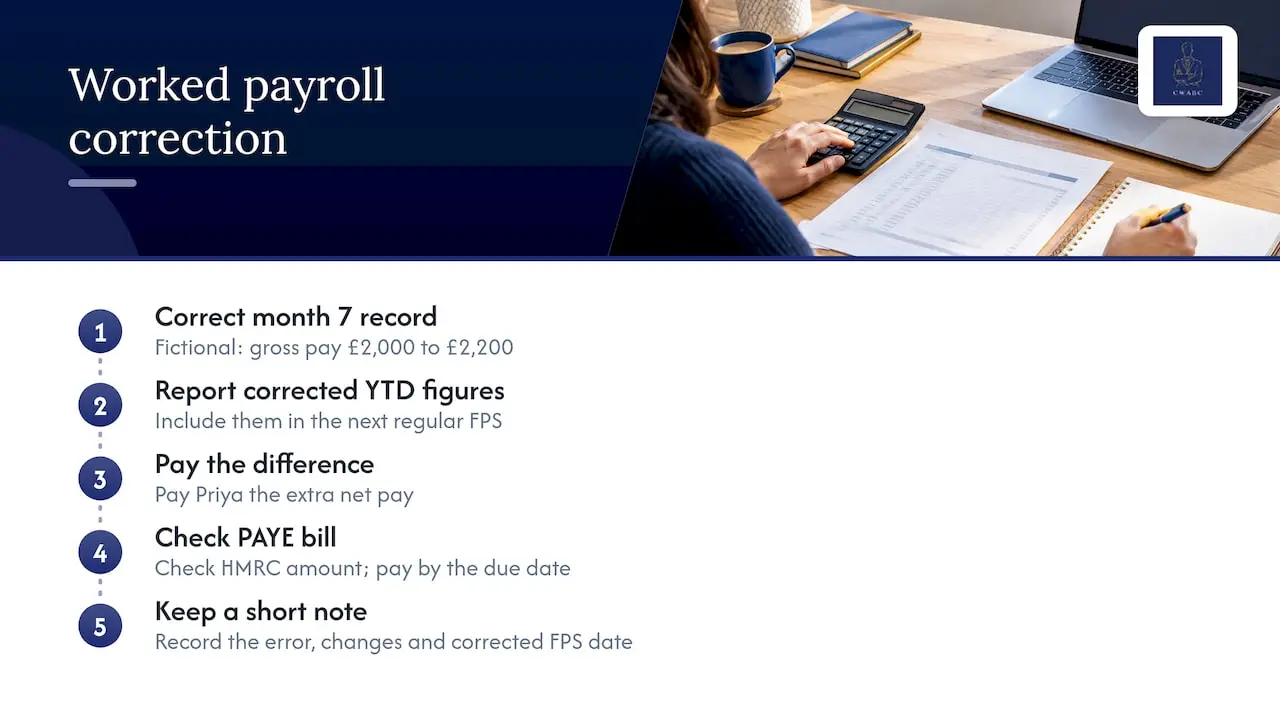
Step 2: Report the corrected year-to-date figures. The corrected YTD pay, tax and NI are included in the next regular FPS. HMRC sees the new running totals and updates Priya’s record. No separate letter is needed.
Step 3: Pay Priya the difference. She is owed the extra net pay for the underpayment. How this appears on her payslip is covered in the next section.
Step 4: Check the PAYE bill. Because the correction was made before the 19th after the end of the tax month, it is taken into that month’s liability. If it had come later, the adjustment would show in a later month. Either way, the employer checks the amount due against what HMRC shows, and pays by the due date, which GOV.UK gives as the 22nd of the month for electronic payments (19th if by post).
Step 5: Keep a short note. The employer writes down what the error was, when it was found, what was changed and when the corrected FPS went out. If HMRC ever asks questions, that note helps to show reasonable care.
Now a variation. Suppose instead the employer had entered the wrong payment date for the whole month’s pay run, say a 31st entered as the 28th. Pay and tax are correct, but the date is not. The fix is different. They would send an additional FPS with the correct date, choose “H – correction to earlier submission”, and make sure it goes by the 19th of the next tax month.
What happens to payslips and employee tax records
Employees notice payroll mistakes, so it helps to know what they will see.
Payslips. When you correct a payslip, your software may reissue it or show the adjustment on the next payslip, depending on how it is set up. The clearest approach for the employee is a short, plain explanation: what was wrong, what has changed, and what extra or reduced amount they will see. A payslip that suddenly shows a different year-to-date figure with no explanation causes worry.
Year-to-date figures. Every future payslip will show the corrected running totals for pay, tax and NI. This matters because those totals feed the employee’s tax record.
Tax records. HMRC uses what you report to hold each employee’s pay and tax for the year. If your corrections are not reported, their record can be wrong, which can lead to an incorrect tax code or a wrong end-of-year position. At the end of the year, the employee’s P60 (the summary of pay and tax for the year) should show the corrected totals, not the original mistaken ones.
Leavers. If you corrected a leaver’s pay after they left, give them an updated P45 or P60 position where needed, and make sure the figures you reported match what you tell them.
For year-end timing, including P60 deadlines, see my payroll year end checklist for small UK employers.
Underpaid or overpaid employees
The correction in your records is only half the story. You also have to deal with the person.
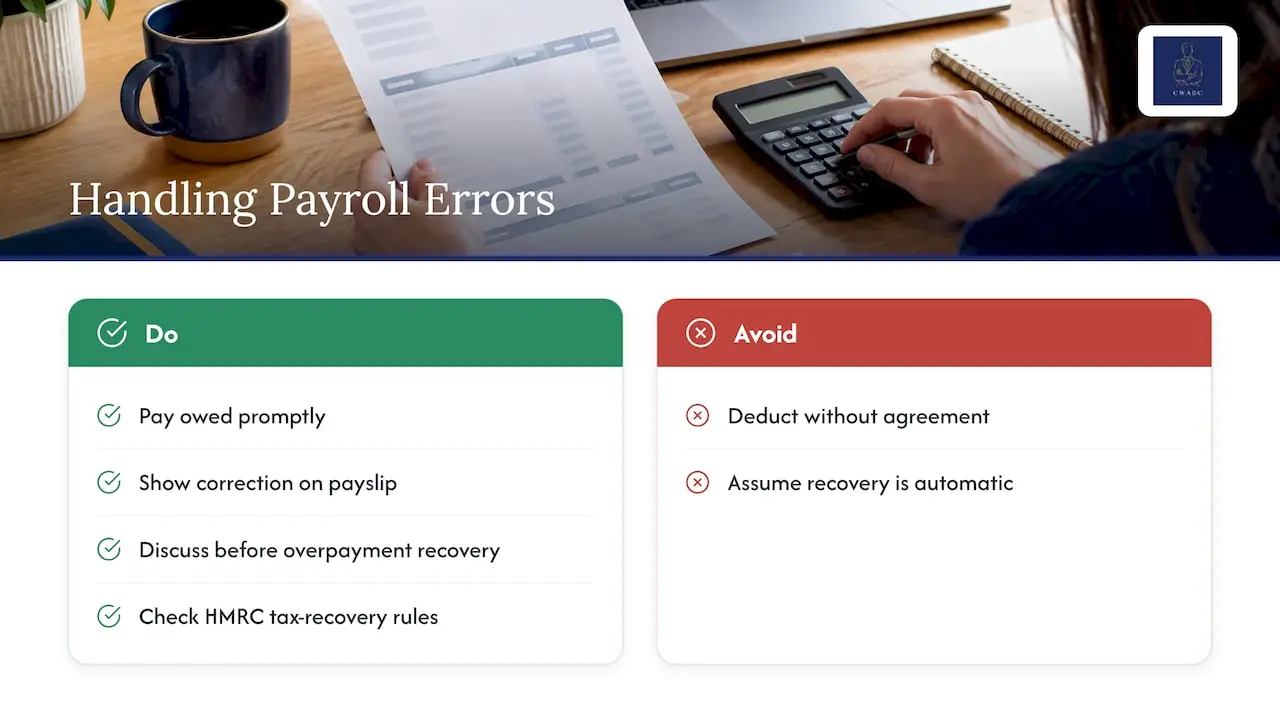
If someone was underpaid, pay them what they are owed as soon as you can, and show it clearly on the payslip.
If someone was overpaid, talk to them before you take anything back. Do not just deduct it from the next payslip without agreement. Make sure the deduction is handled in line with their contract and your own policies, and consider getting advice from ACAS or an employment adviser if there is any dispute.
If too little tax was deducted, HMRC’s manual says an underpayment may be recovered from the employee only where the employer took reasonable care and the failure was a good-faith error, or where the employee knowingly received under-deducted pay. This is covered in HMRC’s manual on amended PAYE returns, which also says an amended return should amend, not replace, the earlier one. For example, if the original showed £100 of tax but should have shown £80, the amendment is for minus £20. The practical takeaway is that when the error was yours, recovery from the employee is not automatic. Think carefully before doing it.
Correcting a previous tax year
Sometimes you find the error after 5 April. The rules are different once the tax year has closed.
- The normal deadline for the final FPS of a tax year is 19 April following the year end, as explained in HMRC’s manual.
- For tax years from 6 April 2020, GOV.UK says you correct a mistake by sending another FPS for that earlier year, showing the correct year-to-date figures.
- Changes to filed payroll for earlier years can be made within six years.
Two cautions here. First, you are sending the full corrected year-to-date totals for that earlier year, not just the difference. Second, you need to be sure your payroll software is set to the right tax year before you submit. Sending a correction for last year into this year’s records is a mistake on top of a mistake.
After a correction like this, you may also need to think about whether the employee’s tax position has changed and whether you need to tell them. If your business records and accounts also contain the same error, my guide on correcting previous year bookkeeping errors covers the bookkeeping side.
Penalties and charges: what to realistically expect
Most employers worry about penalties first. GOV.UK says a penalty for a payroll mistake is only charged if you did not take reasonable care or acted deliberately. An honest slip, corrected promptly, is a different thing from carelessness or concealment.
There is a separate issue to keep apart from corrections: late or missing reports. GOV.UK explains that if you do not send your FPS on time, or do not send an EPS for a month with no pay, HMRC may raise a specified charge based on your previous payment and filing history. Sending the missing FPS or EPS replaces the charge with the amount actually due. Sending updated year-to-date figures in your next FPS, by contrast, leaves the specified charges in place. So if the problem is a missed submission rather than a wrong figure, correct it with the missing submission itself.
A calm routine for any payroll error
When you spot a mistake, work through these steps in order.
- Stop and identify the type of error. Is it pay, deductions, a tax code, an NI category, personal details, a date, or something in your EPS?
- Check the tax year. Current year or earlier? The route differs.
- Fix your payroll records first. Do not try to fix HMRC’s records before your own are right.
- Choose the right submission. Next regular FPS for most pay and deduction errors; an extra FPS marked “H” for payment dates; a new EPS for EPS errors; records only for start and leaving dates.
- Change one personal detail at a time.
- Mind the 19th. Corrections sent by the 19th after the end of the tax month are taken into that month’s liability.
- Do not send repeated duplicate submissions. Send what is needed, once, from the correct record.
- Tell the employee. Explain what changed and when they will see it.
- Check your PAYE bill. Compare what you owe with what HMRC’s online account shows.
- Keep a short note of what happened and what you did.
The errors that cause real trouble are rarely the first mistake. They are the second one, made in a panic: a resubmission from the wrong period, a duplicate record, or several details changed at once.
Where payroll errors usually start
It helps to know the common causes, because fixing the cause saves you repeating the correction.
- Manual keying. Hours, bonuses and deductions typed in by hand are the biggest source of errors.
- Changes not passed on. A pay rise, a new tax code or a change of hours that never reached whoever runs payroll.
- Leavers and starters. Forgotten leaving dates or late starter details.
- Casual and variable hours. Irregular pay patterns are easy to get wrong. My guide to payroll for zero hours workers goes through this.
- Software left unchecked. Rates, thresholds and categories that were never reviewed after a change.
A short checklist before each pay run, comparing this month’s payroll to last month’s and querying any big swings, catches a surprising number of mistakes before they are submitted.
My perspective on payroll corrections
Most employers who contact me about a payroll error are not careless. They are busy, they trust the software, and they spot the problem a few days after the FPS has gone.
What I try to do first is take the panic out. Nearly every correction comes down to two questions: what is wrong in the records, and what does HMRC need to see? Once those are answered, the fix is usually a few careful steps in the right order, and the real risk is making a second error by rushing.
Because I run CWABC myself, you deal with me directly. I explain the correction in plain English, show you what changes on the payslip and the year-to-date totals, and help you keep a clear note of what was done. With over 30 years of finance experience behind me and a paperless, cloud-based way of working, I aim to keep your records accurate and organised so that the next pay run starts from a clean position.
I would also rather help you stop the same error recurring than fix it every quarter. A simple check routine, set up once, often does more than any correction.
Chris
Need help with a payroll correction?
If you have found an error and are not sure whether it needs a records fix, an extra FPS or a correction for an earlier year, I can help. I work with small employers, limited-company directors, CICs and construction businesses on payroll and CIS, using cloud accounting software and secure digital workflows. You can read more about my payroll and CIS services or the wider accounting services I offer in Tonbridge.

Pricing is tailored to your situation and agreed clearly upfront. If you are weighing up handing payroll over entirely, my article on what payroll outsourcing costs UK employers explains the factors involved. When you are ready, get in touch with me here and tell me what you have found. I will tell you honestly what I think is needed, without any guarantee of outcome, since every payroll is different.
FAQ
How do I correct a PAYE submission after it has been sent?
For most pay and deduction errors in the current tax year, fix your payroll records and send your next regular FPS with the corrected year-to-date figures. A wrong payment date needs an extra FPS marked “H – correction to earlier submission”. GOV.UK sets out each case.
What happens when payroll is wrong?
The employee may be underpaid or overpaid, and HMRC’s record of their pay and tax will not match the truth until you report corrected figures. A penalty applies only if reasonable care was not taken or the error was deliberate. Correcting promptly and keeping a note of what you did is the sensible route.
Do I need to correct a mistake from a previous tax year?
Yes, if it affects what you reported. For tax years from 6 April 2020, you send another FPS for that year with the correct year-to-date figures, and changes to filed payroll can be made within six years. Make sure your software is set to the right year first.
Can I take back an overpayment from an employee’s pay?
Talk to the employee first and make sure any deduction is handled in line with their contract. Where too little tax was deducted, HMRC’s manual says recovery from the employee is only allowed in certain circumstances, such as a good-faith error where you took reasonable care. If it is not clear-cut, get advice before deducting anything.
Sources
- GOV.UK: Fix problems with running payroll, correcting your FPS or EPS
- GOV.UK: Running payroll, reporting to HMRC
- HMRC internal manual DMBM519235: PAYE RTI submissions
- HMRC internal manual DMBM522280: PAYE end of year amendments
- HMRC: Errors and corrections to payroll
- GOV.UK: What happens if you do not report payroll information on time
Recommended
- Set Up PAYE in 15 Minutes for First Time UK Employers
- P60s by 31 May: payroll year end checklist for small UK employers, AAT
This article provides general information based on UK tax and accounting rules at the time of publication. It is not a substitute for advice tailored to your individual circumstances. Tax legislation and HMRC guidance may change. If you need advice about your specific situation, please contact me at CW Licensed Bookkeeper & Accountant.