
A VAT return is a form you submit to HM Revenue and Customs (HMRC) reporting how much VAT you have charged your customers and how much VAT you have paid on business purchases. The difference tells HMRC either what you owe or what you can reclaim. Every VAT-registered business in the UK must file one, even if the figures are zero.
What is a VAT return and who must submit one?
Understanding your VAT return obligations is the first step to staying compliant. Here are the key terms and rules you need to know:
- Output VAT: the VAT you charge on your sales and services.
- Input VAT: the VAT you pay on business purchases and expenses.
- VAT to pay or reclaim: output VAT minus input VAT. If the result is positive, you pay HMRC. If negative, HMRC refunds you.
- VAT threshold: you must register for VAT if your taxable turnover exceeds £90,000 in any rolling 12-month period, or if you expect to exceed it within the next 30 days.
- Filing obligation: once registered, you must submit a VAT return by the official deadline each period, even if you have no VAT to pay or reclaim. Most businesses file quarterly, but those on the Annual Accounting Scheme submit only one return per year.
This applies to sole traders, landlords, limited companies, and startups alike. There are no exemptions from filing once you are registered.
How to register for VAT as a small business
Registration is straightforward when you know the steps. The VAT threshold is checked on a rolling 12-month basis, not just at your year end, so monitor your turnover monthly.
- Check your taxable turnover. Add up all sales that are not VAT exempt or out of scope. This includes zero-rated and reduced-rated goods.
- Confirm you have crossed the threshold. If your last 12 months of taxable turnover exceed £90,000, you must register promptly after exceeding the threshold.
- Register online via GOV.UK. Go to the Government Gateway and complete the VAT registration application. You will need your business name, address, National Insurance number or company registration number, and bank details.
- Receive your VAT registration number. HMRC will confirm your registration and effective date. You must charge VAT from that date.
- Consider voluntary registration. If your turnover is below £90,000, you can still register voluntarily. This lets you reclaim VAT on purchases, which can be a real advantage if your customers are themselves VAT registered.
Pro Tip: Voluntary registration works well if you spend heavily on VAT-bearing supplies. You reclaim that input VAT immediately, improving your cash position.
How to calculate a VAT return with a worked example

The calculation itself is simple. What trips people up is keeping the underlying records accurate.
The formula:
VAT to pay (or reclaim) = Output VAT minus Input VAT
UK VAT rates to apply:
- Standard rate: 20% on most goods and services.
- Reduced rate: 5% on items such as domestic energy and children’s car seats.
- Zero rate: 0% on items such as most food, books, and children’s clothing (still taxable, so counts towards your threshold).
- Exempt: no VAT charged and no VAT reclaimed (does not count towards your threshold).
Worked example for a small business:
| Amount | |
|---|---|
| Total sales (ex. VAT) | — |
| Output VAT charged at 20% | £8,000 |
| Total purchases (ex. VAT) | — |
| Input VAT paid at 20% | £3,000 |
| VAT to pay HMRC | £5,000 |
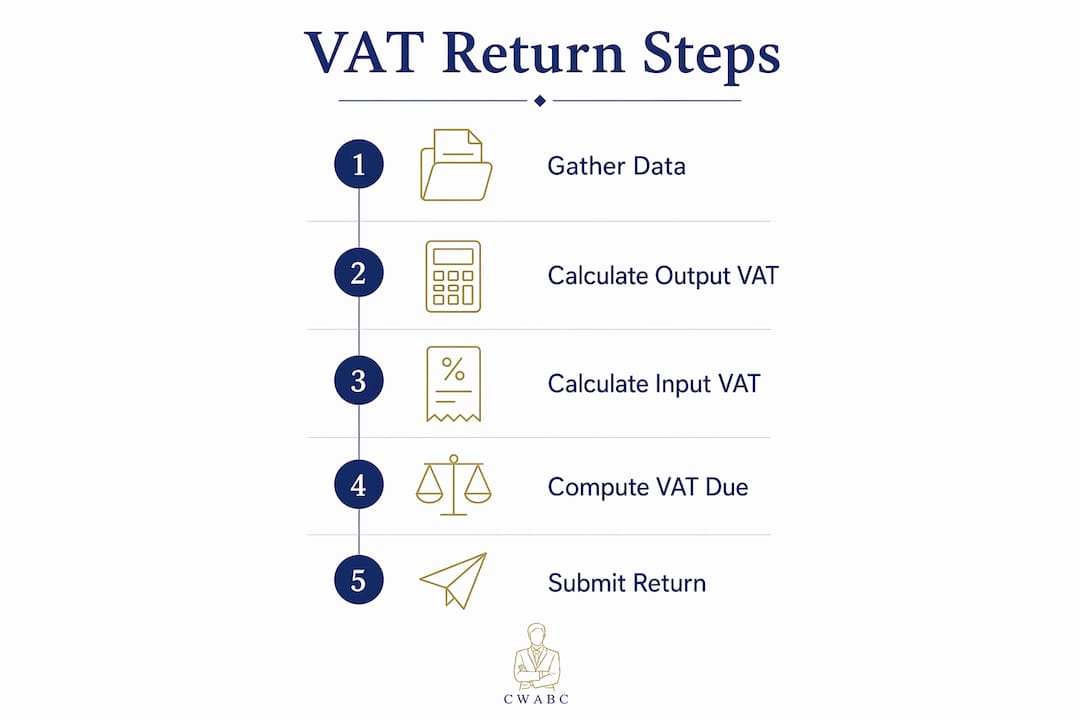
In this example, you collected £8,000 from customers on behalf of HMRC and paid £3,000 to your suppliers. The £5,000 difference goes to HMRC.
What counts towards your VAT calculation:
- Sales of standard, reduced, and zero-rated goods or services.
- Business purchases with a valid VAT invoice.
- Imports and reverse charge transactions where applicable.
Pro Tip: Keep your sales and purchase records updated weekly, not just at quarter end. Last-minute scrambles are where mistakes creep in.
How to submit a VAT return to HMRC and meet your deadlines
Most businesses submit quarterly. The standard deadline for both submitting your return and paying any VAT due is one calendar month and seven days after the end of your accounting period.
Submission channels:
- Your HMRC online VAT account (for businesses not yet on Making Tax Digital).
- MTD-compatible software such as Xero, FreeAgent, or QuickBooks, which submits directly to HMRC.
Deadline table for common quarter-end dates:
| Quarter end | Submission and payment deadline |
|---|---|
| 31 March | 7 May |
| 30 June | 7 August |
| 30 September | 7 November |
| 31 December | 7 February |

Annual Accounting Scheme users: your return is due two calendar months after your year end, with interim payments made throughout the year. Unlike quarterly filers, you submit only one return a year.
Critical point on payment timing: filing on the deadline day is not enough. Payment must clear HMRC’s bank account by the deadline. Pay early to avoid a penalty caused purely by bank processing time. Aiming to pay several working days before the deadline removes that risk entirely.
Steps to submit:
- Log into your HMRC online account or open your MTD software.
- Review each box on the return, especially Box 1 (output VAT) and Box 4 (input VAT).
- Check Box 6 (total value of sales) and Box 7 (total value of purchases) match your records.
- Submit and save your confirmation reference.
Common VAT mistakes and how to avoid them
VAT errors are more common than most small business owners expect, and HMRC does query them. Knowing where others go wrong helps you stay on the right side of the rules.
Frequent mistakes:
- Applying the wrong VAT rate. Charging 20% on zero-rated goods, or vice versa, creates an immediate discrepancy.
- Claiming input VAT without a valid invoice. Pro-forma invoices are not valid for reclaiming input VAT. You need a full tax invoice showing the supplier’s VAT number and a breakdown of the VAT charged.
- Miscoding transactions in software. Posting a purchase to the wrong VAT code means your return figures will not match your actual liability.
- Missing the filing deadline. Even one day late triggers a penalty under HMRC’s current points-based system.
- Forgetting to include all income. Cash sales, barter arrangements, and goods taken for personal use all count as taxable supplies.
Pro Tip: Run a VAT reconciliation before you submit. Compare your VAT return figures to your bookkeeping software totals. If they do not match, find out why before you hit submit.
Avoiding common bookkeeping mistakes is one of the most practical things you can do to protect your business from HMRC queries. Good habits at the record-keeping stage prevent problems at the submission stage.
VAT accounting schemes available for small businesses
Choosing the right VAT scheme can save you time and, in some cases, money. HMRC offers three main options for small businesses.
Standard VAT accounting
You account for VAT on invoices issued and received, regardless of when payment arrives. This is the default scheme and suits most businesses with straightforward trading.
Cash Accounting Scheme
Available to businesses with taxable turnover below a specified high threshold. You account for VAT only when you actually receive or make payment, not when you raise an invoice. This helps cash flow if your customers are slow to pay, because you do not pay output VAT to HMRC until the money lands in your account.
Annual Accounting Scheme
Also available up to £1.35 million turnover. You submit one return per year instead of four, making nine interim payments throughout the year based on your previous liability. The annual accounting scheme suits businesses that prefer predictable payments and less frequent admin, though it can mean a cash flow disadvantage if your liability falls during the year.
Flat Rate Scheme
Available to businesses with taxable turnover below a specified upper limit. Instead of calculating actual input and output VAT, you apply a fixed percentage to your gross turnover. The percentage varies by trade sector. You keep the difference between the flat rate you pay HMRC and the VAT you charge customers, which can produce a small profit. The trade-off is that you cannot reclaim input VAT on most purchases.
Each scheme has its own eligibility rules and exit thresholds. Review your position annually, as your turnover may move you in or out of eligibility.
How Making Tax Digital improves your VAT return accuracy
Making Tax Digital (MTD) is HMRC’s legal requirement for VAT-registered businesses to keep digital records and submit VAT returns using compatible software. It is not optional. Businesses not using MTD-compliant software risk penalties and a higher likelihood of errors.
The practical benefit is real. MTD software pulls figures directly from your digital records and populates your VAT return automatically, removing the manual transcription errors that cause most HMRC queries. You can see your VAT position in real time rather than discovering a surprise liability at quarter end.
Choosing the right software matters. HMRC maintains a list of approved MTD-compatible tools. Xero, FreeAgent, and QuickBooks are all widely used by UK small businesses and integrate directly with HMRC’s systems. If you need help setting up, Cwabc offers accounting software setup support across Kent, including Tonbridge.
Pro Tip: Connect your bank feed to your MTD software from day one. Automated transaction imports reduce manual entry and give you a live view of your VAT liability throughout the quarter.
For a full breakdown of what MTD requires in 2026, the MTD requirements checklist from Cwabc covers everything you need to have in place.
What records do you need to keep for your VAT return?
HMRC requires you to keep VAT records for at least six years. Under MTD, those records must be held digitally. The key documents and data points to retain are:
- Sales records: date, customer details, VAT rate applied, and VAT amount for every transaction.
- Purchase records: supplier name, VAT number, invoice date, net amount, and VAT amount.
- VAT account: a running summary of output VAT, input VAT, and the net position for each period.
- Import and export records: if you trade internationally, retain customs documentation and postponed VAT accounting statements.
- Bank statements: to reconcile payments against your VAT account.
Keeping these records organised throughout the quarter, rather than gathering them in a rush before the deadline, is what separates a clean VAT return from a stressful one.
How to correct errors in a submitted VAT return
Mistakes happen. HMRC expects “reasonable care” in VAT accounting and provides a clear process for corrections.
Method 1 applies to errors with a net value of up to £10,000, or errors between £10,000 and £50,000 that do not exceed 1% of your Box 6 figure. You simply adjust your next VAT return to include the correction. No separate notification to HMRC is needed.
Method 2 applies to errors exceeding £50,000, or errors between £10,000 and £50,000 that do exceed the 1% Box 6 limit, and to any deliberate errors. You must notify HMRC separately in writing, providing full details of how the error arose and the amounts involved.
The time limit for correcting errors is four years from the end of the accounting period in which the error occurred. Disclosing errors voluntarily before HMRC raises an enquiry significantly reduces the risk of a penalty.
Tips for using HMRC’s online VAT return system effectively
The HMRC online VAT account is straightforward once you know your way around it. A few habits make the process much smoother.
Use the account to check your next return due date and payment deadline before each quarter closes. You can also verify that HMRC has received your submitted return, which gives you peace of mind and a clear audit trail. If you are on the Annual Accounting Scheme, set up an email reminder through your VAT online account so the deadline never catches you off guard.
Always save your submission confirmation reference. If there is ever a dispute about whether a return was filed, that reference is your proof. Cross-check the figures on screen against your bookkeeping records before you confirm submission. A two-minute check at this stage is far less painful than an error correction later.
VAT rates for goods and services
Getting the rate right is one of the most practical parts of understanding VAT for your business. The three main rates are:
- Standard rate (20%): applies to most goods and services, including professional fees, software, and most retail products.
- Reduced rate (5%): applies to domestic energy, children’s car seats, and certain energy-saving materials.
- Zero rate (0%): applies to most food, books, newspapers, children’s clothing, and public transport. Zero-rated sales still count towards your taxable turnover and must appear on your VAT return.
Some supplies are exempt from VAT entirely, including most financial services, insurance, and residential property lettings. Exempt sales do not count towards your taxable turnover and you cannot reclaim input VAT on costs directly related to them.
If your business spans multiple rate categories, keep your sales records clearly coded by rate. Mixing them up is one of the most common errors HMRC encounters.
Penalties for late or incorrect VAT returns
HMRC operates a points-based penalty system for late submissions. Each late return adds a penalty point to your record. Once you reach the threshold for your filing frequency (four points for quarterly filers), HMRC issues a £200 financial penalty and a further £200 for each subsequent late return until you clear the points.
Late payment attracts a separate penalty. If payment is between 1 and 15 days late, no penalty applies provided you contact HMRC. From 16 days late, a 2% penalty applies on the VAT outstanding. From 31 days, the rate rises to 4%, and interest accrues on top of that throughout the period of non-payment.
Deliberate errors or persistent carelessness attract behaviour-based penalties, which can be a percentage of the unpaid tax. Voluntary disclosure before HMRC opens an enquiry always results in a lower penalty than being caught. The sole trader tax return errors guide from Cwabc covers the most frequent pitfalls in detail.
Key takeaways
Filing your VAT return accurately and on time protects your business from penalties and keeps your relationship with HMRC straightforward.
| Point | Details |
|---|---|
| Registration threshold | You must register for VAT once taxable turnover exceeds £90,000 in any rolling 12-month period. |
| Submission deadline | Returns and payment are both due one calendar month and seven days after your accounting period ends. |
| MTD compliance | HMRC legally requires digital record-keeping and MTD-compatible software for all VAT-registered businesses. |
| Error correction thresholds | Errors up to £10,000 net can be corrected on your next return; larger or deliberate errors require separate HMRC notification. |
| Penalty structure | Quarterly filers receive a £200 penalty once they accumulate four late-submission points, with separate charges for late payment. |
Need help?
VAT does not have to be stressful. Whether you are newly registered, approaching the threshold, or simply want someone to check your returns are right, Cwabc is here to help. We work with sole traders, landlords, and small businesses across Tonbridge and Kent, keeping your VAT compliance calm and organised from day one.
If you are unsure where to start, our bookkeeping FAQs answer the questions we hear most often. Or, if you suspect your records need a professional eye, take a look at the signs your bookkeeping needs help guide.
Get in touch with Cwabc for a free, no-obligation conversation about your VAT returns.