
A CIS monthly return must reach HMRC online by the 19th of the month following the tax month it covers, or you need a nil return or inactivity request in its place. Do this now if you haven’t already, because the penalty clock starts the moment you’re late.
The return reports every payment you’ve made to subcontractors during a tax month, which runs from the 6th to the 5th, not the calendar month. Miss the deadline and HMRC’s system issues an automatic fine, with no warning letter first.
- File online through the HMRC CIS online service or CIS-capable software.
- Return due by the 19th of the following month; payment usually due by the 22nd if paid electronically, 19th by post.
- No subcontractors paid? File a nil return or set up an inactivity request in advance.
Pro Tip: A single day late triggers a fixed £100 penalty, so treat the 19th as your absolute deadline, not your target date.
TL;DR:
- Filing deadlines are strictly the 19th of each month after the tax period, with automatic penalties starting immediately after unless a nil or inactivity return is submitted in time.
- Accurate verification of subcontractors before payment prevents penalties up to £3,000 and ensures the correct deduction rate is applied.
- Quiet months require you to file a nil return or an inactivity request in advance, as silence without reporting is no longer accepted by HMRC.
- Errors such as entering negative figures or rounding issues can cause rejection; promptly amend mistakes through HMRC or contact the helpline.
- Outsourcing CIS submissions to a payroll bureau can remove the burden of deadlines, calculation accuracy, and record-keeping, ensuring on-time submission every month.
Table of Contents
- How do I file a CIS monthly return?
- When are CIS returns and payments due?
- What if I paid no subcontractors this month?
- How do I verify subcontractors and declare their status?
- How do I correct a mistake on a submitted return?
- A compact monthly workflow for filing on time
- Key Takeaways
- Sources
How do I file a CIS monthly return?
Filing isn’t complicated once you’ve done it a couple of times, but the order you do things in matters. Here’s the process I’d follow whether you’re using HMRC’s own portal or commercial software.
- Sign in to your business tax account. If CIS is not already added as a service, add it before you try to file anything.
- Gather your figures. You’ll need each subcontractor’s UTR or National Insurance number, gross payments made, deductions taken, and a breakdown of materials costs (materials aren’t subject to deduction, so keep that split clear).
- Find the pre-populated return. For contractors who’ve filed before, HMRC often pre-fills the return with subcontractors from recent months. You mainly need to check the details, update payment figures, and correct anything that’s changed.
- Submit and save confirmation. Once you’re happy the figures are right, submit online and keep the confirmation reference somewhere safe, ideally alongside your bookkeeping records.
- Or use commercial software. If your payroll or accounting package handles CIS, make sure it’s built for it, check the RTI integration lines up with your payroll runs, and never let a calculation dip below zero (enter 0 instead).
You’ll rarely need a replacement pre-populated return or a manual paper form. That route exists mainly for edge cases where HMRC’s system hasn’t generated the return you expect, so contact the CIS helpline before assuming you need one.
Pro Tip: If you haven’t yet set up online access, my guide to setting up your HMRC personal tax account walks through the registration steps first.
When are CIS returns and payments due?
The tax month structure trips up a lot of contractors who assume it follows the calendar. It runs from the 6th of one month to the 5th of the next, and your return covering that period is due by the 19th of the month after it ends.
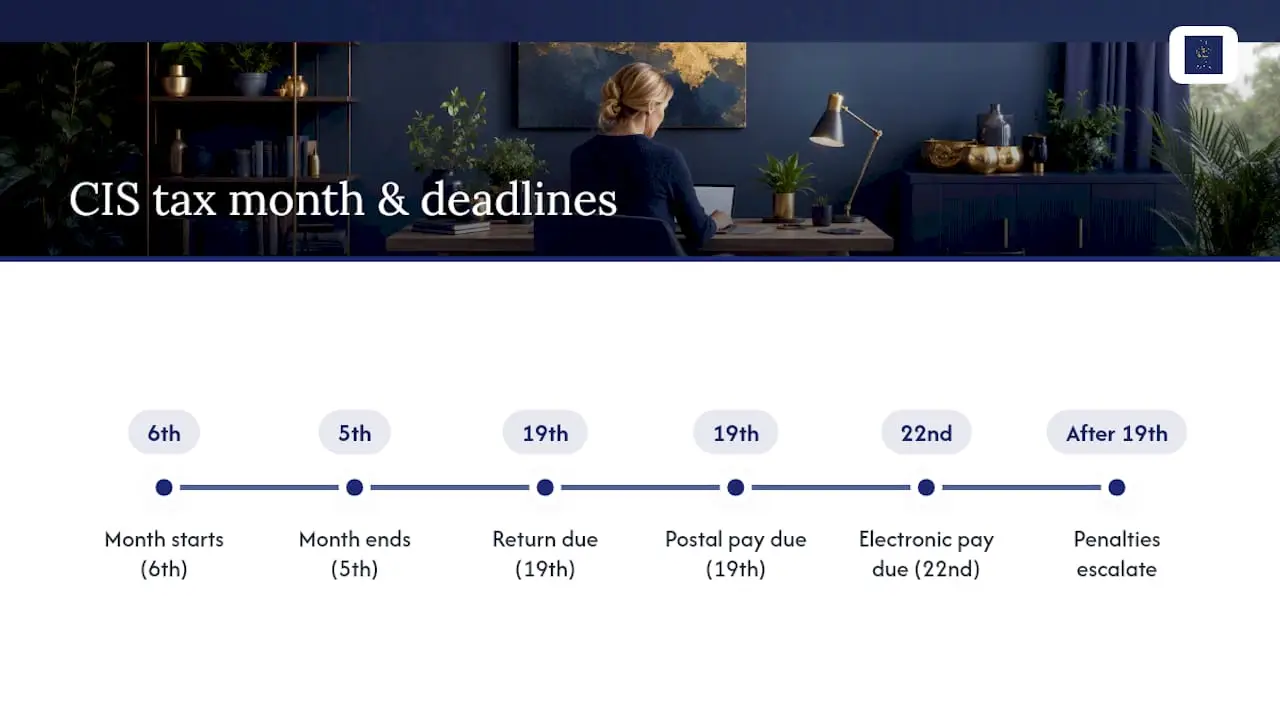
Payment of the deductions you’ve withheld follows a slightly different clock: electronic payments are generally due by the 22nd, postal payments by the 19th. Miss either deadline and you’re exposed to separate consequences, one for late filing and one for late payment.
The penalty schedule for late returns is automatic and doesn’t discriminate between a genuine one-day slip and months of silence, though it does escalate the longer you leave it.
These figures come straight from HMRC’s CC/FS18b penalty factsheet, and returns not received by the 19th are automatically flagged as late by HMRC’s system, which can trigger further debt pursuit if penalties go unpaid. I’d set an internal target of the 15th, giving yourself a buffer for subcontractor verification queries or last-minute corrections before the real deadline bites.
What if I paid no subcontractors this month?
Quiet months happen, especially over winter or between contracts, and HMRC has tightened what you need to do about them. Since 6 April 2026, paying no subcontractors in a tax month no longer lets you simply do nothing.
- File a nil return by the 19th, just as you would a normal return, or
- Notify HMRC in advance, no later than 14 days before the tax month starts, using an inactivity request.
An inactivity request counts as advance notification and can cover up to six months, useful if you know work is drying up for a season. If you end up paying a subcontractor during that inactive window, contact HMRC straight away to cancel the inactivity and file the return for that tax month, otherwise it becomes a missed return with the same penalties as any other.
Pro Tip: Seasonal contractors who regularly go quiet over winter can set inactivity in one go rather than filing nil return after nil return, saving admin and reducing the risk of a missed month.

The consequences of getting this wrong are identical to a normal late return. HMRC’s system doesn’t treat “I had nothing to report” as a valid excuse for silence.
How do I verify subcontractors and declare their status?
Before you put anyone on a return, verify their status with HMRC to confirm whether they’re due gross payment, the standard 20% deduction, or the higher 30% rate for unverified or unmatched subcontractors. Get this wrong and you either underpay HMRC or overdeduct from someone who’s entitled to gross status.
- Verify before the first payment, not after, wherever you can.
- Declare clearly that the subcontractors listed are not employees. Incorrect declarations can trigger penalties of up to £3,000 and possible investigation.
- Keep the verification reference number in your bookkeeping records as proof, not just in your memory.
If you’re unsure whether someone should be on the payroll instead of CIS, my guide on CIS for subcontractors covers the distinction in more detail.
How do I correct a mistake on a submitted return?
Errors happen, particularly when figures come from a software export rather than manual entry. Correcting them promptly matters more than getting flustered about it.
- Use the HMRC CIS online service to amend most straightforward errors yourself.
- For complex changes, such as removing a subcontractor entirely or correcting a verification mismatch, contact the CIS helpline rather than guessing.
- Never enter a negative figure. If a calculation would give less than zero, enter 0 instead, a common trip point when software exports round awkwardly.
- If you’ve missed a return altogether, file it as soon as you realise, then consider appealing the penalty if you have a reasonable excuse and evidence to back it up.
Pro Tip: Rounding differences between your accounting software and HMRC’s system are one of the most common causes of rejected returns, so check totals before submitting rather than after.
A compact monthly workflow for filing on time
This is roughly the rhythm I’d recommend building into your monthly routine, whether you’re doing it yourself or overseeing someone who does.
- Before the 1st: confirm which subcontractors are active, what payments you expect, and that verification statuses are current.
- By the 15th: finish your checks and finalise figures, giving yourself breathing room before the real deadline.
- By the 19th: submit the return; by the 22nd, schedule the deduction payment if you’re paying electronically.
- After submission: save the HMRC confirmation, reconcile the figures in your cloud accounting software, whether that’s Xero, QuickBooks or FreeAgent, and retain records in case of a future check.
Pro Tip: If chasing deadlines every month feels like more admin than the job itself warrants, a payroll bureau can take the timing and calculations off your hands entirely.
Where clients usually slip up, and how I help
The same three mistakes come up again and again: a nil return forgotten during a quiet month, a subcontractor paid before verification came back, and a software export that quietly rounded a figure into the wrong box. None of these are complicated to fix once you know to look for them.
What actually prevents them is a routine, not willpower. I set clients up with cloud bookkeeping that flags active subcontractors automatically, then handle the monthly CIS submission and, where needed, managed payroll alongside it. If your current process feels like it’s held together by memory, get in touch for a no-obligation chat about what a tidier workflow would look like.
— Chris
Let a payroll bureau carry the deadline pressure
Buying CIS-capable software still leaves the calculations, the verification checks, and the monthly deadline sitting on your desk every single month. A payroll bureau removes that entirely: someone else tracks the 19th and 22nd, runs the numbers, and files on time, so a missed date stops being something you have to think about.

That’s the gap CWABC fills. I manage payroll and CIS submissions directly for small employers and contractors across Tonbridge, Sevenoaks and Kent, and remotely throughout the UK, using paperless, cloud-based workflows through Xero, QuickBooks or FreeAgent so your records stay HMRC-ready without manual chasing. The difference between owning software and using a bureau comes down to who carries the liability and the time cost: with software, both sit with you; with a bureau, I handle the deadlines, the deductions and the record-keeping on your behalf.
If your current CIS routine relies on remembering dates rather than a system that remembers for you, take a look at payroll and CIS support in Tonbridge and get in touch to discuss what handing it over would actually involve.
Key Takeaways
Filing a CIS monthly return correctly and on time depends on treating the 19th as fixed, verifying subcontractors before payment, and never leaving a quiet month unreported.
| Point | Details |
|---|---|
| File by the 19th | Submit online through HMRC or CIS-capable software before the deadline to avoid the automatic £100 penalty. |
| Verify before paying | Confirm subcontractor status with HMRC first to apply the correct deduction rate and avoid up to £3,000 in penalties. |
| Handle quiet months properly | File a nil return or set an inactivity request in advance rather than assuming no payments means no action. |
| Never enter negative figures | Replace any calculation below zero with 0 to prevent software errors and rejected returns. |
| Consider a managed service | CWABC’s payroll and CIS bureau support handles deadlines, deductions and record-keeping for employers who’d rather not track them. |
Useful GOV.UK and HMRC links
For direct verification, work from the source rather than a summary: file your monthly returns, the late return penalty manual, and the CC/FS18b penalty factsheet. For related CWABC guidance, see CIS for subcontractors and the small business tax deadline calendar.
Need help? If your CIS returns feel like a monthly scramble, get in touch through my contact page for a straightforward conversation about handing the deadlines over.