
Your first quarterly update is a summary, not a tax demand. Sending it to HMRC through your software does not itself create a payment. What follows is fixed: three more quarterly updates, then a final declaration, with payments following the usual Self Assessment timetable. I’m Chris, and as an AAT-licensed bookkeeper at CWABC, I help sole traders and landlords manage exactly this process.
TL;DR:
- Updates carry year to date totals; standard deadlines fall August 7, November 7, February 7, and May 7, with the final declaration due January 31.
- Choose standard or calendar periods before the first update; the selection cannot change during that tax year, so verify the software setting beforehand.
- Payments remain due January 31 and July 31; first year filers without advance payments may owe the full balance plus an installment on January 31.
- Before the final declaration, include other taxable income and reliefs, verify prefilled figures, and account for accruals or prepayments if you use traditional accounting.
- For 2026 to 2027, late quarterly updates carry no penalty points, but annual return filing and payment penalties still apply in full.
Table of Contents
- The remaining reporting timeline and your final declaration deadline
- How payments on account and the balancing payment actually work
- Correcting records and making year-end adjustments before you file
- Penalties and the soft landing: what happens if you miss an update
- A worked example: from quarterly totals to the final tax bill
- How this differs from MTD for VAT
- Software checklist: settings to confirm straight after your first update
- Why I’m telling clients to stay calm about quarterly updates
- How I can help with MTD, bookkeeping and your tax return
- FAQ
- Need help?
The remaining reporting timeline and your final declaration deadline
Once your first quarterly update is in, the pattern repeats every three months. Each update is cumulative: it covers income and expenses from the start of your tax year up to the end of that update period, not just the three months since your last submission, according to GOV.UK guidance on sending quarterly updates.
For most sole traders and landlords using standard quarterly periods, the pattern looks like this:
- Quarter 1: 6 April to 5 July, due by 7 August
- Quarter 2: 6 July to 5 October, due by 7 November
- Quarter 3: 6 October to 5 January, due by 7 February
- Quarter 4: 6 January to 5 April, due by 7 May
- Final declaration: due by 31 January following the end of the tax year
If you chose calendar update periods instead (aligning with 1 April to 31 March rather than the standard 6 April to 5 April cycle), your quarter dates shift accordingly. That choice matters because it’s permanent for the tax year, according to GOV.UK guidance on getting your software ready. You select calendar or standard periods before sending your first update, and you cannot switch partway through once that first submission has gone in, a point confirmed in guidance on creating digital records.
That’s worth checking now if you’ve just sent your first update. Open your software settings and confirm which period type is active, because correcting a wrong choice later in the year isn’t possible for that tax year.
How payments on account and the balancing payment actually work
Quarterly updates and tax payments run on separate tracks, and conflating them is the most common source of anxiety I see. Submitting an update does not generate a bill or a due date of its own.
Instead, your Income Tax payments continue to follow the long-standing Self Assessment schedule:
- 31 January: your balancing payment for the previous tax year, plus your first payment on account for the current year
- 31 July: your second payment on account for the current year
Payments on account are estimated advance payments towards next year’s tax bill, based on your previous year’s liability, due on 31 January and 31 July each year. Quarterly updates give you a running, estimated tax position inside your software, which helps you plan and set money aside, but they do not alter these statutory dates, according to GOV.UK guidance on submitting your tax return.
If this is your first year of being liable to pay tax under Self Assessment, and you made no payments on account the previous year, you may find yourself paying more than expected on 31 January: the full balance for the year just ended, plus the first payment on account for the year ahead, following the normal rules set out in GOV.UK’s payments on account guidance. It’s a cashflow jolt worth planning for rather than being caught out by. My guide to Self Assessment payments on account walks through the calculation in more detail.
Correcting records and making year-end adjustments before you file
Quarterly updates are running totals pulled from your digital records. They are not the finished article. Before you submit your final declaration, your software needs several adjustments layered in that quarterly updates simply don’t capture.
Here’s the order I work through with clients:
- Add other taxable income, such as dividends or savings interest, which doesn’t appear in your quarterly business updates at all
- Claim reliefs and allowances, including capital allowances on equipment or vehicles, which must be entered in software before the final declaration
- Check anything HMRC has pre-populated, since some data may be added automatically but still needs verifying for accuracy
- Make accounting adjustments if you use traditional (accruals) accounting rather than cash basis, such as prepayments and accruals that shift income or expenses between periods
- Review the fourth update against your actual year-end figures before converting it into your final declaration
That sequence reflects the process set out in GOV.UK guidance on adjusting self-employment and property income. If you’re on cash basis accounting, the adjustments are generally lighter because you’re recording money as it moves, whereas traditional accounting demands more year-end tidying for amounts owed or paid in advance.
If you spot an error in an earlier update, you don’t need to go back and resend it. Because updates are cumulative, your next submission simply carries the year-to-date totals forward, correcting the picture as you go, according to guidance on sending quarterly updates. There’s also a specific route for making changes after your fourth quarterly update, covered in GOV.UK’s updates guidance, for anyone who needs to amend figures once the quarterly cycle has closed.
Pro Tip: Reconcile your bank feed monthly rather than quarterly. It can make each update easier to check and reduce the need to dig through receipts.
Penalties and the soft landing: what happens if you miss an update
HMRC has built in some breathing room for the first year, and it’s worth knowing exactly how far that stretches. For the 2026 to 2027 tax year, no penalty points will be issued for late quarterly updates, according to GOV.UK’s penalties guidance. That’s a genuine easement, not a loophole: it covers the quarterly updates specifically.
What it does not cover is your annual tax return. The usual Self Assessment deadline penalties for late filing or late payment still apply in full during this period, even while quarterly update penalties are paused.
From later tax years, the position tightens:
- Points accumulate for each late quarterly update or late annual return
- Reaching 4 points triggers a £200 penalty, charged for each subsequent missed deadline, according to the same GOV.UK penalties guidance
- Points typically reset after a period of consistent on-time filing
For the 2026 to 2027 tax year specifically, missing a quarterly update deadline won’t cost you a penalty point, but it will leave you playing catch-up on your records, which makes the final declaration harder to get right.
Practical prevention is simpler than it sounds: keep records current rather than batching them, switch on your software’s reminder notifications, and if you use an agent, make sure they’re properly authorised with HMRC so they can see the same submission history you can. My guide to the 2026–27 easement and how penalties apply goes into more depth on the point thresholds and what triggers them.
A worked example: from quarterly totals to the final tax bill
Say a self-employed decorator has quarterly income and expense totals that look like this through the year:
- Quarter 1: income exceeds expenses, creating a cumulative profit
- Quarter 2: add that period’s income and expenses to the running totals to update cumulative profit
- Quarter 3: add that period’s income and expenses to the running totals to update cumulative profit
- Quarter 4: add that period’s income and expenses to the running totals to update cumulative profit
Throughout the year, the software shows a predicted tax figure based on these running totals, useful for setting money aside but not yet final.
After the fourth update, the decorator adds savings interest and claims an appropriate capital allowance on a new van purchase. That brings total taxable profit, once personal allowance and the trading figures are combined properly in the final declaration, to a different number than any single quarterly update showed on its own.
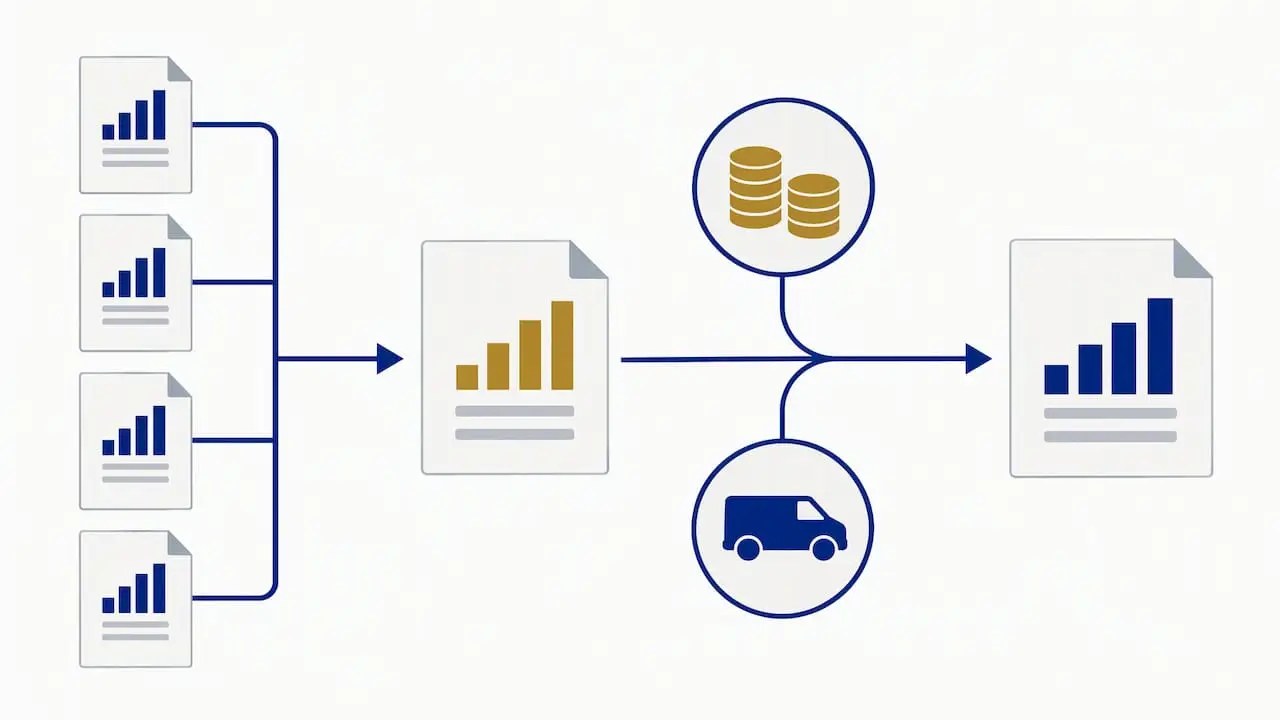
This adjusted figure, not the raw quarterly total, is what feeds the final declaration submitted by 31 January. Payments on account for the following year are then calculated from that finished Self Assessment liability, due in the usual two instalments on 31 January and 31 July, exactly as described in GOV.UK’s submission guidance. My MTD ITSA guide for sole traders runs through a fuller version of this calculation if you want to see more scenarios.
How this differs from MTD for VAT
If you already file VAT returns, it’s natural to expect similar rules, but the two schemes work quite differently.
- Filing frequency: VAT returns follow their own filing schedule; MTD for Income Tax has four quarterly updates plus a separate annual final declaration
- Payment linkage: VAT payment obligations follow the VAT rules; a quarterly Income Tax update does not itself trigger a tax payment.
- Software expectations: both require digital records and compatible software, but Income Tax adds the extra year-end adjustment and declaration step that VAT doesn’t have
Your VAT obligations and deadlines continue entirely separately from your MTD for Income Tax quarterly updates. If you’re registered for VAT and also within scope for MTD for Income Tax, you’ll be running both sets of deadlines side by side without one affecting the other. My guide to VAT returns for small businesses covers the VAT side if you need a refresher.
Software checklist: settings to confirm straight after your first update
Once your first update is submitted, a short settings check now saves awkward corrections later.
- Confirm your accounting period type: calendar or standard, since this cannot change for the tax year once set
- Check your software is properly linked to HMRC and showing your submission history correctly
- Verify agent authorisation if someone else files on your behalf, so they can see the same records you can
- If you signed up mid-year, check whether you need to catch up on earlier periods and resend any overdue updates, following the steps in GOV.UK’s guidance for newly signed-up taxpayers
Pro Tip: Set a recurring monthly reminder to do a mini reconcile of your bank feed against your bookkeeping software. It keeps each quarterly total accurate without a last-minute scramble.
My guide to quarterly reporting under MTD sets out the full catch-up process step by step if you’re behind.
Why I’m telling clients to stay calm about quarterly updates
Quarterly updates are designed to make record-keeping steadier through the year, not to create extra tax bills. That’s a point I keep coming back to with clients, because the anxiety usually comes from assuming each update is a mini tax return when it’s closer to a running total check-in.
Most of the genuine adjustment work, allowances, reliefs, other income, still happens once a year, at the final declaration stage. I help clients with bookkeeping, software setup and preparing that final declaration so nothing gets missed. If you’d rather hand the quarterly admin to someone else, a short conversation is usually enough to work out what you need.
— Chris
How I can help with MTD, bookkeeping and your tax return
Keeping digital records current through the year is far less stressful than reconstructing a year’s paperwork in January, and you can also consider tools to automate invoicing for freelancers to reduce paperwork burdens. I offer practical Making Tax Digital for Income Tax support alongside:

- Ongoing bookkeeping to keep your quarterly totals accurate as you go
- Self Assessment tax return preparation, from £250 one-off, covering your final declaration
- Accounting software setup and training on Xero, FreeAgent or QuickBooks, so your update periods and settings are right from the start
I work directly with sole traders and landlords, so when you contact me you’re speaking to the person who actually handles your records. If you’d like help getting your quarterly updates and year-end declaration sorted properly, get in touch and I’ll talk through what you need.
This article is general information, not a substitute for advice from a qualified financial advisor. Consult a qualified financial professional about your own circumstances before acting on anything here.
FAQ
Does my first quarterly update mean I owe tax straight away?
No. A quarterly update is a running summary of income and expenses sent to HMRC through your software, and it does not itself create a payment demand. Your actual Income Tax is calculated through the annual final declaration and paid according to the usual Self Assessment dates of 31 January and 31 July.
What happens if I miss a quarterly update deadline?
For the 2026 to 2027 tax year, missing a quarterly update will not result in a penalty point, according to GOV.UK’s penalties guidance. From later tax years, points accumulate for late submissions, and reaching 4 points triggers a £200 penalty for each further missed deadline.
Can I change my accounting period after sending my first update?
No. Once you’ve submitted your first quarterly update, your chosen period type, calendar or standard, is fixed for that tax year, as set out in GOV.UK’s software readiness guidance. It’s worth confirming this setting is correct before your next submission.
Is MTD for Income Tax the same as MTD for VAT?
No. VAT returns link filing directly to payment, whereas MTD for Income Tax separates quarterly updates from the annual final declaration and its payment dates. Both require digital records and compatible software, but the obligations and deadlines run independently of each other.
How do I correct a mistake in an earlier quarterly update?
You don’t need to resend a previous update, because each submission is cumulative and carries year-to-date totals forward automatically, according to GOV.UK’s quarterly updates guidance. If you need to amend figures after your fourth update, there’s a specific process for making changes at that stage covered in GOV.UK’s updates guidance.
Need help?
If you’d like support getting your quarterly updates right, correcting records or preparing your final declaration, get in touch and I’ll talk through the next steps with you directly.