
If your combined income from self-employment and property is over £50,000 a year, you must use Making Tax Digital for Income Tax (MTD ITSA) from 6 April 2026. That means choosing compatible software, keeping digital records, and sending quarterly updates to HMRC.
Here is what you need to do first:
- Check your qualifying income on your 2024–25 Self Assessment return (gross turnover, before expenses).
- Choose HMRC-recognised software and set it up before 6 April 2026.
- Sign up for MTD ITSA via GOV.UK (or ask your agent to do it for you).
- Send your first quarterly update by 7 August 2026 for the period 6 April–5 July 2026.
The threshold is phased, starting at £50,000 and reducing in later years to include those with lower qualifying income. If you are not yet in scope, it is still worth preparing in advance.
Table of Contents
- Who needs to sign up for MTD for income tax?
- What counts as income for the MTD threshold?
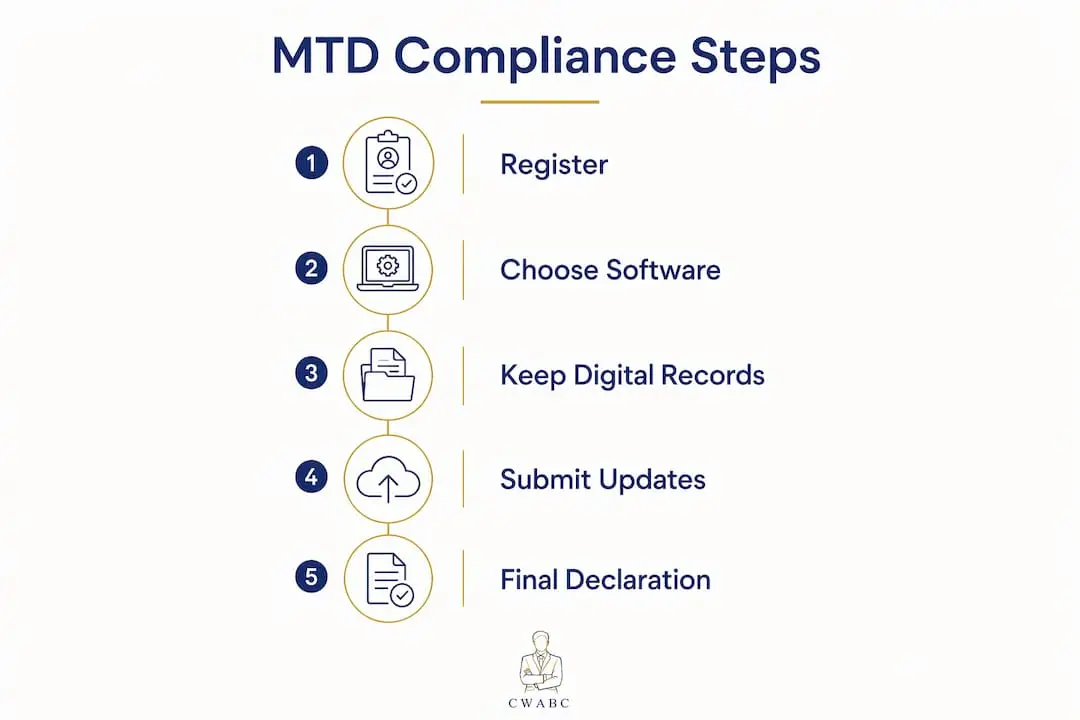
- How to prepare and comply: a step-by-step guide
- What software does HMRC accept, and how do you choose?
- What does a quarterly update actually look like?
- Who can claim an exemption or digital exclusion?
- Penalties and what happens if you miss a deadline
- Compliance checklist and your first-year timeline
- Key takeaways
- An accountant’s honest view on starting MTD the right way
- How Cwabc can take the MTD pressure off you
- Useful sources and further reading
- Need help?
Who needs to sign up for MTD for income tax?
You must use MTD ITSA if all three of the following apply to you:
- You are registered for Self Assessment and have submitted at least one tax return.
- You receive income from self-employment as a sole trader, from property as a landlord, or from both.
- Your qualifying income exceeds £50,000 for the 2024–25 tax year.
HMRC reviews your Self Assessment return each year and will write to you if your income crosses the threshold. However, receiving a letter is not a condition of compliance. If you think you are in scope but have not heard from HMRC, use the eligibility checker on GOV.UK or speak to your accountant.
A few practical points worth knowing:
- If you have multiple sole trader businesses, HMRC adds the turnover from all of them together.
- If you have both self-employment and rental income, those figures are combined.
- You do not need to start until after you have submitted your first Self Assessment return.
- Voluntary sign-up is available now, and advisers strongly recommend it so you can learn the software before the deadline pressure arrives.
Pro Tip: A sole trader with £60,000 turnover but £45,000 in costs still has qualifying income of £60,000. Profit does not determine eligibility — turnover does. Check the gross figure on your tax return, not your bank balance.
For a full walkthrough of the transition, the Cwabc sole trader transition guide covers each step in plain English.
What counts as income for the MTD threshold?
Qualifying income is your total turnover from self-employment and property, measured before expenses, based on the tax return you submitted for the previous tax year. LITRG and HMRC both confirm this: it is gross receipts, not profit that counts.
What is included:
- Turnover from all sole trader businesses
- Gross rental income from UK property (residential and commercial)
- Income from furnished holiday lettings
What is excluded:
- Employment income (PAYE wages and salary)
- Dividends and savings interest
- State Pension and other pension income
- Partnership profit shares (partnerships join MTD at a later date)
- Capital gains
Two quick examples:
- Sole trader: A self-employed plumber earns £55,000 in fees before deducting tools, van costs, and insurance. Qualifying income = £55,000. In scope from 6 April 2026.
- Landlord: A landlord receives £28,000 in rent and also earns £25,000 as a PAYE employee. Qualifying income = £28,000 (rental only). Not yet in scope for 2026, but will be from 6 April 2027 if the £30,000 threshold applies.
If your self-employment or property income has ceased since your last Self Assessment, notify HMRC before the start of the next tax year to avoid automatic enrolment. For landlord-specific income questions, the Cwabc landlord MTD guide goes into further detail.
How to prepare and comply: a step-by-step guide
Getting ready for MTD ITSA is a straightforward process when you break it into stages. Here is the order that works best:
- Work out your qualifying income. Pull up your 2024–25 Self Assessment return and add together your gross self-employment turnover and gross rental receipts.
- Check your start date. Use the GOV.UK eligibility tool to confirm when you must begin.
- Choose compatible software. HMRC does not provide software, so you need to select a recognised product before you sign up.
- Sign up for MTD ITSA. Do this via GOV.UK. If you use an accountant or bookkeeper, they can sign up on your behalf using an Agent Services Account.
- Set up your digital records. Start recording income and expenses in your software from 6 April 2026 (or 1 April if your accounting period ends on 31 March).
- Send quarterly updates. Your software compiles the totals and submits them to HMRC. Updates are summaries, not full tax returns.
- Submit your final declaration. At year-end, check and reconcile all figures, add any other income sources (savings, dividends), and submit your tax return through your software by 31 January 2028 for the first MTD year.
- Pay your tax bill. Payment deadlines remain the same as under Self Assessment.
Quarterly updates do not change when you pay tax. They give HMRC a year-to-date picture of your income and expenses, but they do not trigger tax payments. Your bill is still settled by 31 January.
Pro Tip: Ask your accountant to authorise themselves as your agent in HMRC’s Agent Services Account before your first quarterly deadline. This means they can submit on your behalf and catch errors before they reach HMRC.
The Cwabc quarterly reporting guide explains exactly what goes into each update.
What software does HMRC accept, and how do you choose?
HMRC sets three minimum requirements for compatible software: it must create and store digital records, send quarterly updates, and allow you to submit the final declaration. HMRC does not build or supply the software itself.
There are two main types:
- All-in-one products handle record-keeping, quarterly submissions, and the final return in a single package. These suit most sole traders and landlords.
- Bridging software connects your existing spreadsheets to HMRC’s systems. You keep records in a spreadsheet; the bridging tool sends the data. Useful if you are comfortable with spreadsheets and do not want to change your workflow.
You may use more than one product across your affairs, but only a single product per submission. Check that any product you choose supports all the income sources you report.
Features to look for when choosing:
- Supports multiple income sources (sole trader and property on the same account)
- Bank feed integration to reduce manual data entry
- Clear correction and amendment tools for earlier quarters
- HMRC recognition (use the GOV.UK software finder to verify)
- Agent access so your accountant can review and submit
- Pricing that fits your volume of transactions
Pro Tip: Before committing to any software, run a free trial using last year’s figures. This shows you whether the product handles your income types correctly and gives you confidence before the first live quarter.
Cwabc offers accounting software setup in Kent, including Xero, FreeAgent, and QuickBooks, if you need hands-on help getting started.
What does a quarterly update actually look like?
The best way to understand quarterly updates is to see them in practice.
Sole trader example
Sarah is a self-employed graphic designer. In the first quarter (6 April–5 July 2026) she invoices £8,500 and spends £1,200 on software subscriptions and equipment.
| Item | Amount |
|---|---|
| Turnover (Q1) | £8,500 |
| Allowable expenses (Q1) | £1,200 |
Her software compiles these totals and submits them to HMRC by 7 August 2026. No tax is due at this point. The update simply tells HMRC her year-to-date position.
Landlord example
David rents out a flat. In Q1 he receives £3,600 in rent and pays £450 in letting agent fees and £200 in repairs.

| Item | Amount |
|---|---|
| Rental income (Q1) | £3,600 |
Again, his software submits the summary. At year-end, both Sarah and David reconcile all four quarters, add any other income, and submit the final declaration.
Reconciliation steps:
- Match every bank receipt and payment to a category in your software.
- Review Q1–Q4 totals for any missing or duplicated entries.
- Correct any earlier quarter errors through your software’s amendment function.
- Add non-MTD income (savings interest, dividends) before submitting the final declaration.
Pro Tip: The most common reconciliation error is double-counting an invoice that was raised in one quarter but paid in the next. Set a clear rule in your software — cash basis or accruals basis — and apply it consistently from day one.
Who can claim an exemption or digital exclusion?
Not everyone must join MTD ITSA. HMRC recognises several grounds for exemption.
Grounds for exemption include:
- Digital exclusion: You cannot use digital tools due to age, disability, remoteness, or religious belief.
- Ceased income: All your self-employment and property income has stopped since your last Self Assessment.
- Other reasonable grounds assessed by HMRC on a case-by-case basis.
Steps to apply for digital exclusion:
- Gather evidence of why digital record-keeping is not reasonably practicable for you (medical letter, location evidence, or similar).
- Contact HMRC directly to apply; details are on the GOV.UK exemptions page.
- Keep a copy of your application and any HMRC correspondence confirming the exemption.
- If your income has ceased, notify HMRC before the start of the next tax year to avoid automatic enrolment.
Failure to notify HMRC that your qualifying income has ceased may result in automatic enrolment into MTD ITSA. Act promptly if your circumstances change.
Penalties and what happens if you miss a deadline
HMRC is introducing a points-based penalty system for MTD ITSA. Missing a quarterly update or the final declaration earns you a penalty point rather than an immediate fine. Once your points reach a set threshold, a fixed financial penalty applies.
Importantly, HMRC will not apply penalty points for late quarterly updates during the first MTD year (2026–27). You still need to send your updates before you can submit the final declaration, but the financial sting is reduced while you find your feet.
If you miss a deadline, act quickly:
- Submit the overdue update or return as soon as possible.
- Contact HMRC if you have a genuine reason for the delay and document it.
- Do not wait for a penalty notice before acting.
- Seek help from your accountant or bookkeeper to catch up without making further errors.
Steps to avoid penalty escalation:
- Set calendar reminders for each quarterly deadline (7 August, 7 November, 7 February, 7 May).
- Keep your software up to date throughout the quarter rather than rushing at the deadline.
- Authorise your agent early so they can submit on your behalf if you are unavailable.
- Review your points balance in your HMRC online account regularly.
Late payment penalties also apply and are proportionate to how long the bill remains unpaid. Paying sooner always reduces the penalty.
Compliance checklist and your first-year timeline
Use this checklist to confirm you are ready before 6 April 2026.
Readiness checklist:
- [ ] Confirmed qualifying income from 2024–25 Self Assessment
- [ ] Checked start date using GOV.UK eligibility tool
- [ ] Chosen and tested HMRC-recognised software
- [ ] Signed up for MTD ITSA on GOV.UK
- [ ] Agent authorised (if applicable)
- [ ] Digital records set up and running
- [ ] Run a practice quarter using recent figures
- [ ] Backed up existing records and exported reports
First-year submission timeline:
| Task | Deadline |
|---|---|
| Start digital records | 6 April 2026 (or 1 April for calendar periods) |
| First quarterly update (Q1: 6 Apr–5 Jul) | 7 August 2026 |
| Second quarterly update (Q2: 6 Jul–5 Oct) | 7 November 2026 |
| Third quarterly update (Q3: 6 Oct–5 Jan) | 7 February 2027 |
| Fourth quarterly update (Q4: 6 Jan–5 Apr) | 7 May 2027 |
| Final declaration and tax return | 31 January 2028 |
The Cwabc MTD requirements checklist is available to download and print so you can tick off each step as you go.
Key takeaways
MTD ITSA is mandatory from 6 April 2026 for sole traders and landlords with qualifying income over £50,000, requiring digital records, four quarterly updates, and a final declaration submitted through HMRC-recognised software.
| Point | Details |
|---|---|
| Threshold check | Qualifying income is gross turnover from self-employment and property, before expenses. |
| Phased rollout | £50,000 from April 2026; £30,000 from April 2027 |
| First deadline | The first quarterly update for Q1 (6 April–5 July 2026) is due by 7 August 2026. |
| Software is mandatory | HMRC-recognised software must create records, send updates, and submit the final declaration. |
| Cwabc can help | Cwabc offers MTD setup, quarterly bookkeeping, and agent filing for sole traders and landlords. |
An accountant’s honest view on starting MTD the right way
The biggest mistake I see is treating MTD as something to sort out in the week before the first deadline. By then, you are already behind. The businesses that handle this calmly are the ones that chose their software in January, ran a test quarter in February, and arrived at April with clean records already in place.
MTD is genuinely designed to spread the bookkeeping load across the year rather than creating a frantic January rush. That is a real benefit, but only if you set up the right habits early. Quarterly updates are short summaries — they take minutes when your records are current and hours when they are not.
One thing worth doing immediately: connect your business bank account to your software via a bank feed. This pulls transactions in automatically and removes the single biggest source of missed entries. Pair that with a monthly reconciliation habit and your year-end declaration becomes a straightforward check rather than a forensic exercise.
How Cwabc can take the MTD pressure off you
Getting MTD right from the start is far simpler with the right support alongside you. Cwabc works with sole traders and landlords across Kent and beyond, handling the practical side of MTD so you can focus on running your business.

The firm’s MTD ITSA support service covers software selection and setup, quarterly bookkeeping and update submissions, agent authorisation with HMRC, and the final declaration and reconciliation at year-end. Clear, upfront pricing means no surprises, and you get a named contact who knows your numbers.
If you are unsure whether you are in scope, which software suits your situation, or how to handle multiple income sources, a free, no-obligation conversation with the Cwabc team is the fastest way to get clarity. Visit the Cwabc contact page to book yours today.
Useful sources and further reading
The following GOV.UK pages and professional body resources were used throughout this article. All links were checked in 2026.
- Find out if and when you need to use MTD for Income Tax — GOV.UK eligibility checker and threshold guidance
- Work out your qualifying income — GOV.UK definition of qualifying income and what is included
- Sign up for MTD for Income Tax — GOV.UK sign-up hub for individuals and agents
- Choose the right software — GOV.UK software finder and requirements
- MTD for Income Tax: step by step for sole traders and landlords — GOV.UK step-by-step collection
- Making Tax Digital campaign — HMRC overview of quarterly updates and final declaration
- Who does Making Tax Digital apply to? — LITRG guidance on turnover vs profit eligibility
Need help?
Not sure where to start, or want someone to handle the whole process for you? Cwabc offers a free, no-obligation conversation to assess your specific situation. Get in touch today and take MTD off your to-do list.