
Making Tax Digital for Income Tax (MTD for IT) is defined as HMRC’s mandatory system requiring sole traders to keep digital records and submit quarterly income and expense updates using approved software, replacing the single annual Self Assessment return. The making tax digital sole trader transition applies from 6 April 2026 to anyone with qualifying income above £50,000, with further rollout in 2027 and 2028. This guide walks you through every step calmly and clearly, from understanding whether you qualify, to choosing software, meeting deadlines, and avoiding the most common mistakes.
What is qualifying income and who must transition?
Qualifying income under MTD for Income Tax is the combined gross income from self-employment and UK property before any expenses are deducted. HMRC uses your last completed tax year’s figures to determine whether you fall within scope, so your 2024/25 return is the one that decides your 2026 obligation. If you run multiple income streams, say a freelance design business alongside a rental property, those figures are added together.
The phased mandation thresholds are:
- From 6 April 2026: qualifying income over £50,000
- From 6 April 2027: qualifying income over £30,000
- From 6 April 2028: qualifying income over £20,000
This staged approach means that even if you are not required to join in 2026, you may well be in scope by 2027 or 2028. Starting your preparation now gives you a genuine advantage. For a detailed breakdown of which business types fall within scope, the Cwabc overview of businesses affected by MTD is worth reading before you do anything else.
One point that catches people out: the threshold applies to gross income, not profit. A sole trader turning over £55,000 but spending £30,000 on costs is still above the £50,000 threshold and must comply from April 2026. There is no profit-based exemption.
How do you choose the right MTD-compatible software?
MTD-compatible software is the engine of your digital tax process, and choosing the right one matters more than most guides admit. HMRC does not provide its own free software for sole traders, so you must select from the approved list. The most widely used options are Xero, QuickBooks, FreeAgent, and Sage. Each connects directly to HMRC’s systems and can submit quarterly updates without you needing to log into a government portal manually.

Here is a practical comparison to help you decide:
| Software | Best for | Approximate cost | Bank feed included |
|---|---|---|---|
| Xero | Growing businesses, multiple income streams | From £16/month | Yes |
| QuickBooks | Freelancers wanting simplicity | From £10/month | Yes |
| FreeAgent | Sole traders, included free with some banks | From £19/month | Yes |
| Sage | Established businesses, VAT-registered traders | From £15/month | Yes |
If you currently use spreadsheets, you are not alone. Around 66% of sole traders rely on spreadsheets and will need either to move to dedicated software or adopt bridging software. Bridging software sits between your spreadsheet and HMRC, translating your data into a compliant submission. Tools like 123 Sheets and TaxNav are HMRC-approved bridging options, with 123 Sheets costing around £20 per year and TaxNav around £5 per month.
The critical rule here is digital links. MTD prohibits manual re-keying of data between your records and your HMRC submission. Your software must transfer figures automatically. Copy-and-paste from a spreadsheet into a submission form does not count as a digital link and puts you at risk of non-compliance.
Beyond the submission itself, MTD requires digital records of every transaction, including the date, amount, supplier details, and mileage if you claim vehicle expenses. Setting up a bank feed inside your chosen software from day one means transactions flow in automatically, reducing the chance of missed entries or errors.
Pro Tip: Connect your business bank account to your MTD software via a live bank feed before 6 April 2026. This single step removes the majority of manual data entry and means your records are always up to date ahead of each quarterly deadline.
What are the quarterly deadlines and final declaration dates?
Quarterly updates are not additional tax returns. They are summaries of your income and allowable expenses for each three-month period, submitted digitally to HMRC. Think of them as progress reports rather than new obligations on top of your existing ones.
For the 2026/27 tax year, the submission deadlines are as follows:
| Quarter | Period covered | Submission deadline |
|---|---|---|
| Q1 | 6 April to 5 July 2026 | 7 August 2026 |
| Q2 | 6 July to 5 October 2026 | 7 November 2026 |
| Q3 | 6 October 2026 to 5 January 2027 | 7 February 2027 |
| Q4 | 6 January to 5 April 2027 | 7 May 2027 |
| Final declaration | Full year reconciliation | 31 January 2028 |
The final declaration replaces your old Self Assessment tax return. It is where you add any additional income, claim reliefs, and confirm your total tax position for the year. You cannot file the final declaration until all four quarterly updates have been submitted, which creates a practical dependency worth understanding early.
One of the most common misconceptions about MTD is that it changes when you pay tax. It does not. Tax payment dates remain 31 January and 31 July, exactly as they are under Self Assessment. MTD changes how and how often you report, not when the money leaves your account. For a fuller explanation of this, the Cwabc article on MTD deadlines and timing sets it out clearly.
How do you transition to making tax digital step by step?
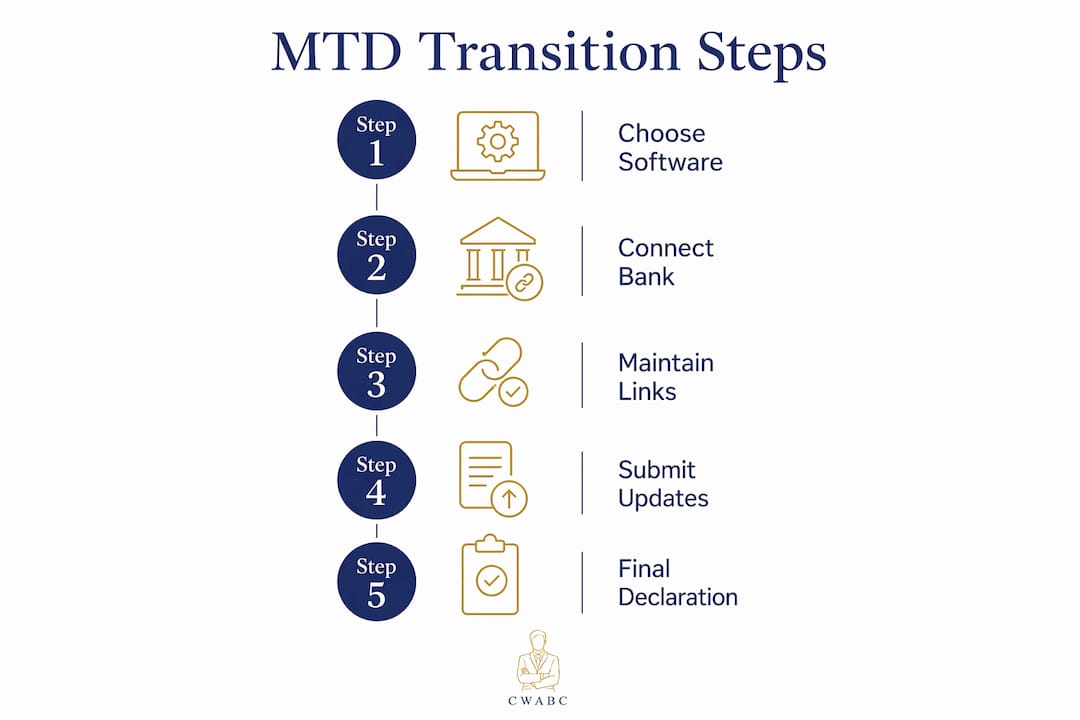
The sole trader digital tax process is straightforward when broken into clear stages. Here is the sequence that works best in practice:
-
Check your qualifying income. Pull your 2024/25 Self Assessment return and add up your gross self-employment and property income. If the total exceeds £50,000, you must register before 6 April 2026.
-
Register for MTD with HMRC. You register through your HMRC online account, or your software provider may handle this on your behalf. You will need your Government Gateway credentials and your Unique Taxpayer Reference (UTR). Registration is separate from your existing Self Assessment enrolment.
-
Choose and set up your software. Select an HMRC-recognised product from the approved list. If you are using Xero, QuickBooks, FreeAgent, or Sage, connect it to your HMRC account through the software’s settings. The Cwabc bookkeeping system setup guide walks through this process in plain language.
-
Begin digital record-keeping from 6 April 2026. Records kept before this date do not need to be digital, but everything from the start of the new tax year must be. Set up your bank feed, create expense categories, and start logging receipts digitally from day one.
-
Set calendar reminders for each quarterly deadline. The dates 7 August, 7 November, 7 February, and 7 May are your four checkpoints. Put them in your phone or calendar now, with a reminder two weeks before each one to review your figures.
-
Submit each quarterly update on time. Log into your software, review the income and expense summary for the quarter, and submit to HMRC. The process takes minutes once your records are in order.
-
File your final declaration by 31 January 2028. Add any additional income sources, claim allowances and reliefs, and confirm your tax position. This replaces your Self Assessment return entirely.
“The biggest mistake I see is people treating MTD as something to deal with later. By the time later arrives, there are four missed quarters to catch up on and a final declaration that cannot be filed until they are all done.”
Pro Tip: During the 2026/27 tax year, HMRC operates a soft landing period meaning no penalty points are applied for late quarterly updates. However, all four updates must still be submitted before you can file your final declaration. Do not let the soft landing create a false sense of security.
The most common errors to avoid are failing to maintain digital links between your records and submissions, underestimating the volume of transaction data you need to capture, and missing the registration step entirely before the April deadline. If you have any doubt about whether your current setup meets the digital link requirement, the Cwabc MTD ITSA guide covers this in detail.
Early adoption of compatible software allows sole traders to avoid last-minute issues and benefit fully from the real-time visibility MTD creates. Automating bank feeds and receipt capture reduces administrative burden and improves accuracy, giving you a near-real-time picture of your business finances throughout the year rather than one stressful scramble in January.
Key takeaways
The making tax digital sole trader transition requires digital records, HMRC-compatible software, four quarterly updates, and a final declaration, with tax payment dates remaining unchanged at 31 January and 31 July.
| Point | Details |
|---|---|
| Income thresholds are phased | £50,000 in 2026, £30,000 in 2027, and £20,000 in 2028 based on gross qualifying income. |
| Digital links are mandatory | Software must transfer data automatically; manual re-keying or copy-and-paste is not compliant. |
| Quarterly updates are summaries | They are not extra tax returns; they report income and expenses for each three-month period. |
| Soft landing applies in year one | No penalty points for late quarterly updates in 2026/27, but all four must be filed before the final declaration. |
| Tax payment dates are unchanged | Payments on account and balancing payments remain due on 31 January and 31 July as before. |
My honest view on the MTD transition for sole traders
I have worked with sole traders through several rounds of tax change, and the pattern is always the same. The people who struggle are not the ones who find technology difficult. They are the ones who wait until the last quarter to set anything up, then discover their records are incomplete and their software is not connected properly.
MTD is genuinely less complicated than the anxiety around it suggests. Once your bank feed is live and your expense categories are set up, the quarterly update takes around ten minutes. The real benefit, which most guides underplay, is that you stop being surprised by your tax bill. When your records are current every quarter, you can see your likely tax position in real time. That visibility changes how you make decisions about spending, pricing, and saving.
The fear I hear most often is “I’m not good with technology.” In my experience, the software options available today are designed for people who are not accountants. FreeAgent in particular is built around the sole trader experience and requires very little accounting knowledge to use day to day.
My practical advice is this: do not wait for HMRC to chase you. Register, choose your software, and connect your bank account before April. If you are genuinely unsure whether your income puts you in scope, or if you have multiple income streams that complicate the calculation, speak to a bookkeeper or accountant now rather than in March. The cost of getting it right early is always lower than the cost of fixing it under pressure.
— Chris
Ready to make your MTD transition straightforward?
Cwabc supports sole traders and landlords across Tonbridge and Kent through every stage of the MTD transition, from checking whether you are in scope to setting up your software and keeping your quarterly submissions on track.

Whether you need help choosing between Xero, QuickBooks, or FreeAgent, or you want someone to handle your quarterly updates and final declaration for you, Cwabc offers clear, upfront pricing with no jargon. Visit the sole trader accounting service page to see how we can support you, or explore the accounting software setup service if you need hands-on help getting your digital records in order before April 2026.
FAQ
Who must register for MTD for Income Tax in 2026?
Sole traders and landlords with qualifying gross income above £50,000 in the 2024/25 tax year must register for MTD for Income Tax before 6 April 2026. The threshold drops to £30,000 in 2027 and £20,000 in 2028.
Can I still use spreadsheets under MTD?
Yes, but only with HMRC-approved bridging software such as 123 Sheets or TaxNav, which creates the required digital link between your spreadsheet and HMRC’s systems. Direct copy-and-paste submission is not permitted.
Does MTD change when I pay my tax bill?
No. Tax payment deadlines remain 31 January and 31 July. MTD changes how often and how you report your income, not when you pay.
What happens if I miss a quarterly update deadline?
During the 2026/27 tax year, HMRC’s soft landing means no penalty points are issued for late quarterly updates. However, all four updates must be submitted before you can file your final declaration, so delays still create practical problems.
Can I apply for an exemption from MTD?
Yes. HMRC allows digital exclusion exemptions for individuals where using digital tools is not reasonable or practical, such as due to age, disability, or remote location without reliable internet access. You must apply to HMRC directly.