
Bank reconciliation is the process of matching your sole trader business records with your bank statement to confirm financial accuracy and tax compliance. For UK sole traders, this process sits at the heart of sound bookkeeping and is the clearest way to prove your profit figures are correct when HMRC comes calling. Done monthly, it takes as little as 1–2 hours and saves you from the chaos of reconstructing a full year of transactions in january. Keeping a separate business bank account is the single most practical step you can take to make reconciliation straightforward from day one.
How to reconcile your sole trader bank account: what it means and why it matters
Bank reconciliation, known formally as the bank reconciliation process, is the act of comparing every entry in your accounting records against every line on your bank statement for the same period. The goal is simple: both records must show the same closing balance. If they do not, something is missing, duplicated, or posted incorrectly.
HMRC requires sole traders to keep accurate financial records including bank statements, invoices, receipts, and bills. There is no explicit statutory duty to perform a formal bank reconciliation, but it is the most reliable control you have to prove those records are correct. Without it, your Self Assessment profit figures could be wrong, and that means either overpaying tax or underpaying and facing penalties.
A monthly routine is the standard recommendation. Leaving reconciliation for longer creates a backlog that is genuinely painful to unwind. A disciplined monthly schedule also makes your quarterly Self Assessment estimates far easier to produce, especially as Making Tax Digital for Income Tax approaches.
What do you need before you start reconciling?
Getting organised before you sit down saves time and reduces frustration. Gather everything listed below before you open a single spreadsheet or log in to your accounting software.
Documents and records you need:
- Your bank statement for the period you are reconciling (digital download or paper)
- Your cash book, accounting ledger, or software transaction list for the same period
- All receipts and purchase invoices for the period
- Sales invoices you have issued
- Any bills, loan statements, or direct debit schedules
Accounting software and digital tools:
Cloud accounting platforms such as Xero, FreeAgent, and QuickBooks all offer bank feed connections. These feeds pull transactions directly from your bank into your software, which cuts manual data entry and reduces the risk of typos. Setting up a bank feed is the fastest way to improve your bookkeeping system from the start.
Date alignment matters more than most sole traders realise. Your bank statement must cover exactly the same period as your accounting records. If your statement runs to the 30th but your ledger runs to the 31st, you will see a false discrepancy. Always match the period end dates before you begin.

Organising your proof documents:
Create a simple digital folder structure: one folder per month, with subfolders for sales invoices, purchase receipts, and bank statements. Name files consistently, for example “2026-03-Invoice-ClientName.” This makes it easy to locate any document during a HMRC enquiry.
Pro Tip: Set a recurring calendar reminder on the first working day of each month to reconcile the previous month. Treat it like a fixed appointment. Sole traders who do this consistently report far less stress at year end.
Step-by-step guide to reconciling your sole trader bank account
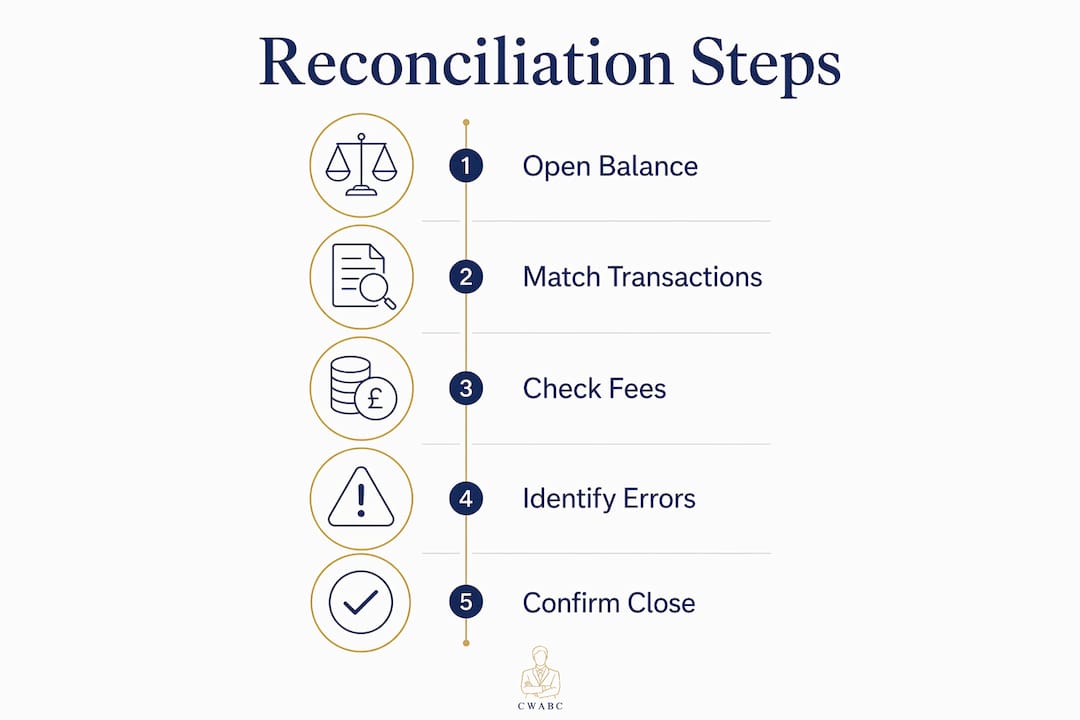
The reconciliation process follows a clear sequence. Work through each step in order and do not skip ahead.
-
Confirm your opening balance. Open your bank statement and note the opening balance for the period. Open your accounting ledger or software and confirm the opening balance matches exactly. If they differ, your previous reconciliation has an unresolved error. Fix that first.
-
List all transactions on your bank statement. Go through every line: income received, payments made, bank charges, interest, and any direct debits. Do not skip small amounts. A £3.50 bank fee that is not posted in your books will cause a discrepancy.
-
Match each bank transaction to a ledger entry. Tick off each bank statement line against the corresponding entry in your accounting records. In Xero, FreeAgent, or QuickBooks, this is done through the bank reconciliation screen where you match or create transactions. In a manual cash book, use a tick or highlighter.
-
Identify unmatched items. Any bank statement line without a matching ledger entry needs attention. Common causes include bank fees not yet posted, a payment from a client you have not yet recorded, or a direct debit you forgot to log. Any ledger entry without a matching bank line may be a timing difference or a duplicate.
-
Investigate and resolve discrepancies. A small discrepancy, for example £575, must be explained fully before you can close the reconciliation. Do not guess. Check whether the amount relates to an uncleared cheque, a deposit in transit, or a posting error. Timing differences such as uncleared cheques and deposits in transit are legitimate reconciling items. Document them rather than deleting them.
-
Post correcting entries. Once you have identified the cause of each discrepancy, post the correcting entry in your accounting records. Examples: add a missing bank charge, reverse a duplicate invoice payment, or record a refund that appeared on the bank statement but was not yet in your books.
-
Verify the closing balance. After all corrections, your ledger closing balance must match your bank statement closing balance exactly. If they match, the reconciliation is complete.
-
Save your reconciliation statement. Print or export a reconciliation report from your software, or save your completed spreadsheet. Store it with your other financial records for that period. HMRC can request records going back six years, so keep everything.
Reconciliation checklist:
| Step | What to check | Done? |
|---|---|---|
| Opening balance | Ledger matches bank statement opening balance | ☐ |
| Transaction matching | Every bank line has a corresponding ledger entry | ☐ |
| Timing differences | Uncleared cheques and deposits in transit documented | ☐ |
| Correcting entries | All discrepancies posted and explained | ☐ |
| Closing balance | Ledger closing balance equals bank statement closing balance | ☐ |
| Records saved | Reconciliation statement filed with period documents | ☐ |
Pro Tip: If you use Xero or FreeAgent, run the bank reconciliation report immediately after completing each session. It creates a dated audit trail automatically, which is useful if HMRC ever queries your records.
What are the most common bank reconciliation errors?
Common reconciliation issues include missing transactions, duplicate entries, bank fees not posted in the books, and mismatched dates. Each has a straightforward fix once you know what to look for.
Timing differences
Timing differences occur when a transaction appears on your bank statement in one period but in your ledger in another. An unpresented cheque is a classic example: you wrote and posted the cheque in march, but the recipient did not bank it until april. The cheque appears in your april bank statement but was recorded in your march ledger. This is not an error. Document it as a reconciling item and carry it forward.
Missing transactions
A missing transaction usually means a purchase or payment was never entered into your books. Check your email for digital receipts, your wallet for paper ones, and your direct debit schedule for regular payments. Sole traders who keep thorough financial records throughout the month rarely face this problem at reconciliation time.
Duplicate entries
Duplicate entries happen when a transaction is posted twice. This is particularly common when you use a bank feed alongside manual entry. If you import a bank feed and also type the same transaction manually, you end up with two entries for one payment. Always check for duplicates before finalising.
Bank feed import issues
Bank feeds in Xero, FreeAgent, and QuickBooks occasionally import transactions with the wrong date or fail to sync for a day or two. If your feed shows a gap, log in to your online banking and compare the dates manually. Mismatched period dates between your bank statement and your software are one of the most common causes of unnecessary discrepancies.
Timing differences such as unpresented cheques and deposits in transit are not errors. They are normal parts of the reconciliation process. The key is to document them clearly so that anyone reviewing your records, including HMRC, can follow the logic without confusion.
Unexplained balances
If you cannot explain a discrepancy after checking all of the above, contact your bank. Banks do make errors. If you suspect fraud, report it to your bank immediately and document everything. Never write off an unexplained balance without a clear reason.
What are the best practices for sole trader bank reconciliation in 2026?
Efficient reconciliation comes down to good habits built before you sit down to do the work. The following practices reduce the time you spend each month and improve the accuracy of your records.
-
Use Open Banking bank feeds. API-based bank feeds connect your bank directly to your accounting software and reflect transactions in near real time. This removes the need to import CSV files manually and cuts the risk of import errors. Most UK banks now support Open Banking connections with Xero, FreeAgent, and QuickBooks.
-
Adopt a “No Receipt, No Reimbursement” policy. The “No Receipt, No Reimbursement” rule is the most effective way to prevent reconciliation errors before they start. Every transaction must have a receipt or invoice attached. No exceptions.
-
Reconcile monthly without fail. A disciplined monthly routine significantly eases year-end tax preparation and reduces the cost of professional accounting support. Leaving it for three or six months multiplies the work and the risk of errors.
-
Organise digital records immediately. When you receive a receipt by email, save it to the correct monthly folder the same day. When you make a purchase, photograph the paper receipt immediately using your phone. Accounting apps such as Xero and FreeAgent have built-in receipt capture features that attach the image directly to the transaction.
-
Align reconciliation with quarterly reporting. If you are preparing for Making Tax Digital for Income Tax, your quarterly submissions will be far easier if your reconciliation is current. Reconciling monthly means your figures are always ready. For more on how small businesses use automation to reduce this workload, the shift toward automated matching is worth understanding.
-
Check your invoicing records match your bank receipts. Payments received should match your invoicing records exactly. If a client paid a different amount from the invoice total, you need to record the difference as a partial payment or a write-off.
Pro Tip: At the end of each reconciliation session, note any recurring issues in a short log. If the same bank fee keeps catching you out, set up a standing entry in your software. Patterns are easier to fix than one-off surprises.
Key takeaways
Reconciling your sole trader bank account monthly is the most reliable way to keep your records HMRC-ready, catch errors early, and make your Self Assessment straightforward.
| Point | Details |
|---|---|
| Reconcile monthly | Monthly sessions of 1–2 hours prevent year-end backlogs and reduce tax stress. |
| Match period dates exactly | Mismatched statement and ledger dates create false discrepancies that waste time. |
| Document timing differences | Unpresented cheques and deposits in transit are normal items, not errors. |
| Use bank feeds | Open Banking API feeds reduce manual errors and reflect transactions in near real time. |
| Keep all records | Store reconciliation statements and supporting documents for at least six years. |
Why reconciliation is the habit that changes everything
I have worked with sole traders at every stage, from those just starting out to those who have been trading for a decade without ever doing a formal reconciliation. The pattern I see repeatedly is this: the ones who reconcile monthly are calm at tax time. The ones who do not are not.
What surprises most people is how much information a completed reconciliation gives you beyond just tax compliance. When your records are clean, you can see exactly which clients pay late, which expenses are creeping up, and whether your cash position is healthy. That is business intelligence, not just bookkeeping.
The tools available in 2026 make this process genuinely easier than it was five years ago. Open Banking feeds have removed most of the manual data entry. Receipt capture on mobile phones has eliminated the shoebox of paper. But the technology only works if you use it consistently. I have seen sole traders with Xero set up perfectly who still end up with 11 months of unreconciled transactions because they never built the habit.
My honest advice: do not wait until you feel ready. Set the calendar reminder, open your software, and work through the first month. It will take longer the first time. By month three, it will feel routine. If you get stuck, that is exactly the moment to ask for help rather than abandon the process.
— Chris
Cwabc can help you get your reconciliation right
Running a business leaves little time for bookkeeping, and reconciliation is one of those tasks that is easy to defer until it becomes a real problem.
Cwabc works with sole traders across Kent and beyond to set up accounting software, including Xero, FreeAgent, and QuickBooks, so that bank feeds connect correctly and reconciliation becomes a straightforward monthly task rather than a quarterly panic. If your records are already behind, Cwabc can help you catch up, resolve discrepancies, and put a system in place that keeps you compliant. If you are not sure whether your bookkeeping is on track, the signs your bookkeeping needs help guide is a good place to start.
Need help?
If reconciliation feels like too much to manage alongside running your business, Cwabc offers a free, no-obligation conversation to help you work out the best approach. Get in touch today and we will take it from there.
FAQ
What is bank reconciliation for a sole trader?
Bank reconciliation is the process of comparing your accounting records with your bank statement to confirm every transaction matches and your closing balances agree. It is the primary control that keeps your Self Assessment figures accurate.
How often should a sole trader reconcile their bank account?
Monthly reconciliation is the standard recommendation. Regular monthly sessions typically take 1–2 hours and prevent the much larger task of reconstructing a full year of records before your tax return deadline.
What causes discrepancies during bank reconciliation?
The most common causes are timing differences such as unpresented cheques, missing transactions, duplicate entries, and bank fees not posted in your books. Bank feed import issues in Xero, FreeAgent, or QuickBooks can also create date mismatches that look like errors.
Do I need special software to reconcile my sole trader bank account?
You do not need software, but it makes the process significantly faster and more accurate. Platforms such as Xero, FreeAgent, and QuickBooks connect directly to your bank via Open Banking feeds, matching transactions automatically and flagging items that need your attention.
What records do I need to keep after reconciling?
HMRC requires sole traders to keep bank statements, invoices, receipts, and bills, and records should be retained for at least six years. Save your reconciliation statement alongside these documents each month so your audit trail is complete.