Getting your finances under control as a sole trader is not just about knowing your numbers. A proper sole trader bookkeeping system setup is the difference between calm, confident tax filing and a last-minute scramble through shoeboxes of receipts. With Making Tax Digital (MTD) for Income Tax arriving in April 2026, the stakes are higher than ever. This guide covers the bookkeeping basics explained in plain language, from choosing the right tools to avoiding the mistakes that catch most sole traders out. By the end, you will have a clear, practical path forward.
Table of Contents
- Key takeaways
- Setting up your sole trader bookkeeping system
- How to implement your system step by step
- Preparing for Making Tax Digital quarterly updates
- Common bookkeeping mistakes to avoid
- The real benefits of getting this right
- My honest take on bookkeeping habits
- How Cwabc can help you get set up
- FAQ
Key takeaways
| Point | Details |
|---|---|
| Separate your finances early | Open a dedicated business bank account before recording a single transaction to avoid costly confusion later. |
| Choose software that meets MTD rules | Use HMRC-approved accounting software to maintain digital records and submit quarterly updates from April 2026. |
| Reconcile monthly, not annually | Monthly bank reconciliation catches errors early and prevents a stressful year-end correction process. |
| Keep records for at least five years | HMRC requires you to retain all income and expense records for five years after each tax year deadline. |
| Build a weekly review habit | Spending 20 minutes each week reviewing your records beats relying entirely on software automation. |
Setting up your sole trader bookkeeping system
Before you open a spreadsheet or sign up for software, there are a few foundations to get right. Miss these and you will be fixing problems later rather than preventing them.
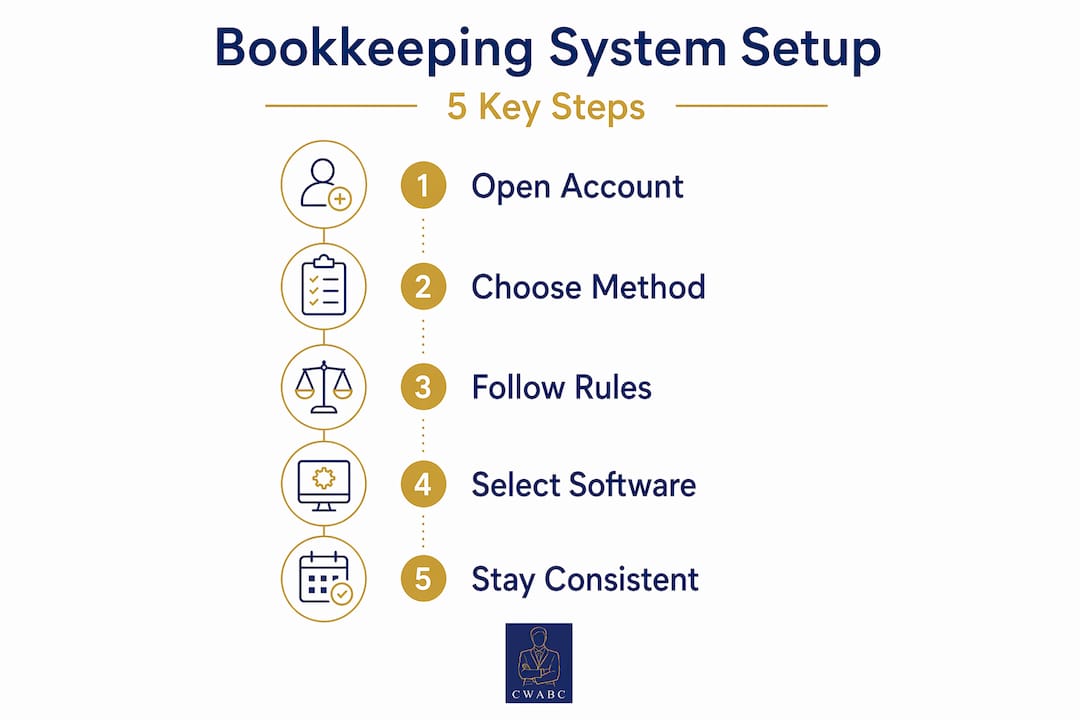
Open a dedicated business bank account
This is the single most impactful step you can take. A dedicated business account supports easier categorisation and smoother HMRC reviews. When your business income and personal spending share the same account, every transaction becomes a guessing game. Open a separate account from day one, even if it is a free business current account from a high-street bank.
Choose your accounting method
You have two options: cash basis or accruals. Cash basis is simpler and the default for most small sole traders. You record income when you receive it and expenses when you pay them. Accruals accounting records transactions when they are earned or incurred, regardless of when money actually moves. Most sole traders starting out will do well with cash basis, but if your business is growing or you carry stock, accruals may give you a clearer picture.
Understand HMRC record-keeping rules
HMRC requires you to keep records for at least 5 years after the 31 January deadline for each tax year. That means income, expenses, invoices, and receipts, all stored and accessible. Under MTD, those records must be digital.
Pick the right software
Your software needs to be HMRC-approved and compatible with MTD requirements. The three most popular options for sole traders are Xero, FreeAgent, and QuickBooks. Each has its strengths. If you are unsure which suits your business best, this Xero vs FreeAgent vs QuickBooks comparison is a good starting point.
| Software | Best for | MTD-ready | Price range |
|---|---|---|---|
| Xero | Growing businesses, multiple income streams | Yes | From £16/month |
| FreeAgent | Freelancers and simple sole traders | Yes | From £19/month |
| QuickBooks | Flexible reporting, VAT-registered traders | Yes | From £14/month |
Pro Tip: Segregate business and personal finances before you set up your software. Trying to untangle mixed transactions after the fact is one of the most common sole trader bookkeeping mistakes to avoid, and it costs real time and money.
How to implement your system step by step
Once your foundations are in place, setting up bookkeeping for sole traders follows a clear sequence. Work through these steps in order.
-
Connect your bank feed. Most MTD-compatible software allows you to link your business bank account directly. This pulls transactions in automatically, saving manual data entry and reducing the risk of missed items.
-
Set up your chart of accounts. This is simply a list of categories for your income and expenses. Keep it simple: sales income, materials or stock, travel, phone and internet, professional fees, and so on. You do not need dozens of categories. Clear, consistent categorisation is what matters.
-
Enable receipt capture. Apps like Hubdoc or the built-in receipt scanning tools in Xero and QuickBooks let you photograph receipts on your phone. The software reads the data and matches it to a transaction. This replaces the shoebox entirely.
-
Record income and expenses consistently. Every invoice you raise and every business expense you pay should be recorded at the time it happens, not saved up for later. Consistency here is everything.
-
Schedule monthly reconciliation. At the end of each month, compare your software records against your actual bank statement. Monthly reconciliation catches mistakes early and helps ensure accuracy. It also flags any transactions that slipped through.
-
Run a basic report. Most software generates a profit and loss report with one click. Review it monthly so you always know where your business stands financially.
Pro Tip: Set a recurring 20-minute slot in your diary each week to review new transactions, check categorisation, and clear any unmatched receipts. Efficient bookkeeping practices rely more on disciplined daily data capture and weekly reviews than on sophisticated software alone.
Preparing for Making Tax Digital quarterly updates
Making Tax Digital for Income Tax (MTD ITSA) is not a distant concern. MTD starts from 6 April 2026 for sole traders with income over £50,000, with the first quarterly update due by 7 August 2026. If your income is between £30,000 and £50,000, you will follow in April 2027.
The shift matters because MTD moves away from a single annual tax return and towards quarterly digital summaries of your income and expenses. Your bookkeeping system needs to produce clean, accurate quarterly totals rather than relying on a year-end tidy-up.
Here is what your system must handle under MTD:
- Digital record-keeping. Every transaction must be recorded digitally. Paper records alone will not meet the standard.
- Digital links. You cannot manually copy figures from one system to another. Manual data transfer breaks MTD digital links, so your software must submit directly to HMRC or use approved bridging software.
- Quarterly updates. You submit a summary of income and expenses for each quarter. This is not a full tax return, just a running total.
- End-of-period statement. At year-end, you finalise your figures and submit your full tax position.
- Audit trail. Your software must maintain a traceable record of every transaction supporting your submitted figures.
If you have more than one income stream, such as self-employment and rental income, each must be reported separately. This is where a well-organised chart of accounts pays off.
| MTD ITSA milestone | Date | Action required |
|---|---|---|
| MTD mandatory for income over £50,000 | 6 April 2026 | Software in place, digital records active |
| First quarterly update due | 7 August 2026 | Submit Q1 summary to HMRC |
| Second quarterly update due | 7 November 2026 | Submit Q2 summary to HMRC |
| Third quarterly update due | 7 February 2027 | Submit Q3 summary to HMRC |
| End-of-period statement | 31 January 2027 | Finalise and submit annual figures |
You can find a full breakdown of what this means for your business in this MTD ITSA guide for sole traders.
Common bookkeeping mistakes to avoid
Even with good software in place, certain habits will undermine your records. These are the mistakes Cwabc sees most often when helping sole traders get their finances in order.
-
Mixing personal and business spending. Using your personal card for a business lunch and forgetting to record it, or paying a personal bill from your business account, creates confusion that compounds over time. Separate accounts are the simplest fix.
-
Losing receipts. HMRC can ask for evidence of any expense you claim. A missing receipt means a disallowed expense. Use receipt capture software to photograph every receipt the moment you receive it.
-
Delaying reconciliation. Leaving bank reconciliation until January means months of errors, duplicates, and missing transactions to untangle. Monthly is the minimum. Weekly is better.
-
Using non-approved software. Not all accounting software meets MTD standards. If your current tool cannot submit directly to HMRC or maintain a digital audit trail, you need to switch before April 2026.
-
Ignoring backups and security. Cloud software handles backups automatically, but if you use spreadsheets, you need a reliable backup system. A corrupted file with no backup is a serious problem at tax time.
-
Miscategorising transactions. Putting a mobile phone bill under “equipment” rather than “phone and internet” is not the end of the world, but consistent miscategorisation distorts your profit figures and can affect your tax position. Review categories regularly and correct errors as soon as you spot them.
If you are currently using a spreadsheet and wondering whether to move to cloud software, this guide on moving from Excel to cloud accounting explains the transition clearly.
The real benefits of getting this right
A well-set-up sole trader financial system does more than keep HMRC happy. The practical benefits show up throughout the year, not just at tax time.
Your Self Assessment tax return becomes straightforward. When your records are clean and up to date, completing your return takes hours rather than days. You can also spot tax-saving opportunities, such as expenses you may have forgotten to claim, because everything is visible in one place.
You gain confidence in your finances. Knowing your profit position at any point in the year means you can make better decisions about spending, pricing, and growth. Cashflow planning becomes realistic rather than guesswork.
The risk of HMRC penalties drops significantly. Errors and late submissions carry financial penalties. Bookkeeping completeness and traceability of individual transactions is vital for supporting accurate taxable profit calculations, whatever accounting basis you use.
Perhaps most importantly, you meet MTD requirements without a last-minute scramble. Sole traders who build good habits now will find the April 2026 changes straightforward rather than stressful.
My honest take on bookkeeping habits
I have worked with a lot of sole traders over the years, and the pattern is almost always the same. They invest time choosing the right software, connect their bank feed, and then assume the system will run itself. It does not.
Automated receipt capture requires a human quality check to prevent miscategorisation and OCR errors causing reporting mistakes. Software reads a receipt and makes its best guess at the category. That guess is wrong more often than people realise. I have seen fuel receipts filed under “entertainment” and software subscriptions lumped into “materials.” Multiply that across a year and your profit figure is meaningless.
My preferred approach for sole traders starting out is simple: good software, a dedicated bank account, and a weekly 20-minute review. That is it. You do not need complex systems or expensive add-ons. What you need is consistency. The traders who stay on top of their books are not the ones with the fanciest tools. They are the ones who treat bookkeeping as a regular habit rather than an annual event.
Start simple. Get the basics working well. Then add complexity only when your business genuinely needs it.
— Chris
How Cwabc can help you get set up
Getting your bookkeeping right from the start saves a great deal of stress later on. At Cwabc, we work with sole traders across Tonbridge and Kent to set up practical, compliant bookkeeping systems tailored to how you actually work. Whether you need help choosing and setting up your MTD-compatible software, understanding your quarterly reporting obligations, or simply getting your records into a clean, organised state, we are here to help.

We offer clear, upfront pricing with no jargon and no surprises. Our sole trader accounting support covers everything from initial software setup through to Self Assessment filing and MTD compliance. If you are ready to get your bookkeeping sorted, or you just want to talk through where to start, take a look at our accounting software setup service or get in touch directly. We make the process calm and manageable.
FAQ
What records must a sole trader keep for HMRC?
Sole traders must keep records of all income and expenses for at least five years after the 31 January deadline for each tax year. Under MTD, these records must be stored digitally.
When does Making Tax Digital apply to sole traders?
MTD for Income Tax becomes mandatory from 6 April 2026 for sole traders with annual income above £50,000, requiring HMRC-approved software and quarterly digital updates.
What is the best accounting software for sole traders?
The best choice depends on your business. Xero, FreeAgent, and QuickBooks are all HMRC-approved and MTD-ready. FreeAgent suits freelancers well, while Xero and QuickBooks offer more flexibility for growing businesses. See the full software comparison for a detailed breakdown.
How often should a sole trader reconcile their accounts?
Monthly reconciliation is the recommended minimum. It catches errors early and prevents a build-up of discrepancies that become difficult to resolve closer to your tax deadline.
Can I use a spreadsheet for MTD bookkeeping?
You can use a spreadsheet with approved bridging software, but manual copying of figures between systems breaks the required digital link. Switching to dedicated MTD-compatible software is the simpler and safer option for most sole traders.