
The single most important action on day one is this: set a conversion date, then import or journal an agreed closing trial balance at that date and reconcile your bank and key schedules before you go live. Skip this and you risk duplicated invoices, missing VAT figures, or a balance sheet that looks tidy but is quietly wrong. HMRC and ICAEW guidance all point the same way: get the opening numbers right first, because everything else builds on them.
TL;DR:
- Choose a month or quarter end for the conversion date when possible; use year end to match statutory accounts, and avoid midmonth cutoffs.
- Import unpaid customer invoices and supplier bills individually, rather than as lump sums, so future payments can still be matched to the correct balances.
- A balanced trial balance confirms only that debits equal credits; reconcile bank, VAT, payroll, debtor, creditor, and asset figures against supporting records before go live.
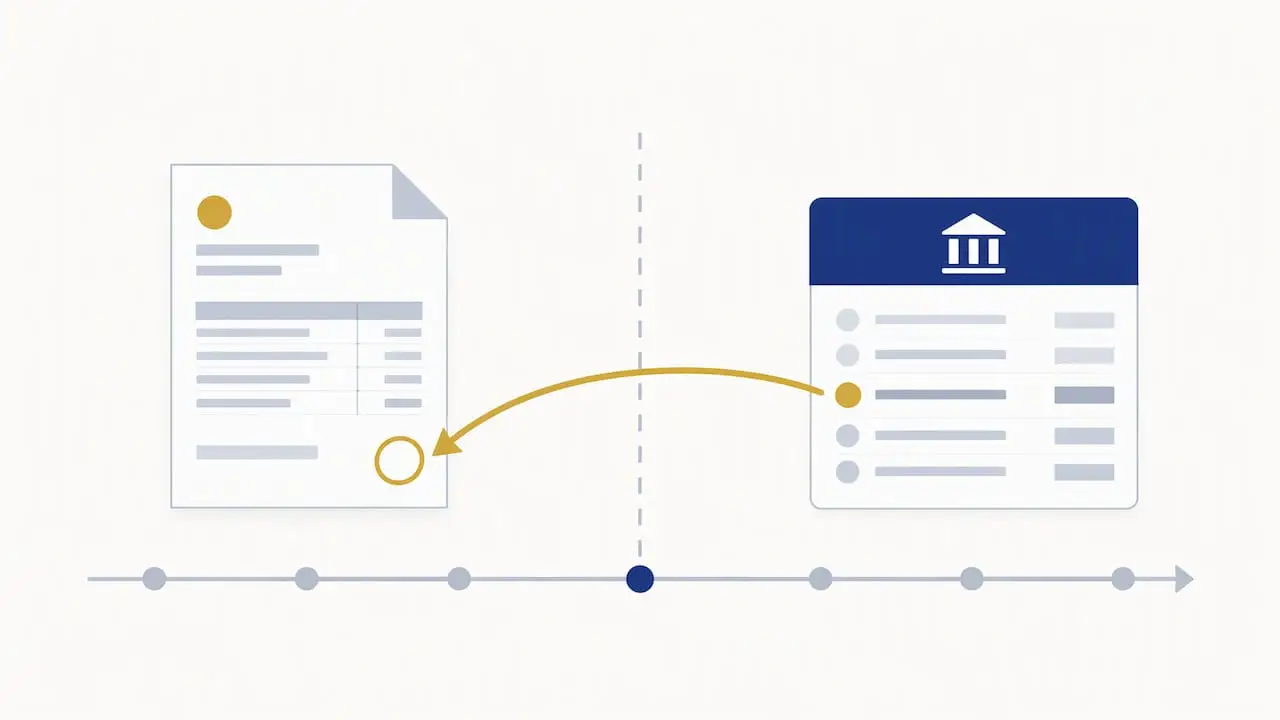
- Keep each crossover transaction in one system, place preconversion bank activity in the opening balance, and match later payments to imported invoices.
Table of Contents
- What opening balances are and how a new start differs from a migration
- What to include: bank, debtors, creditors, VAT, payroll, assets, stock, loans and equity
- Choosing a conversion date and using an agreed closing trial balance
- How to enter opening balances: step by step and what to watch for
- Why a balanced trial balance doesn’t guarantee accuracy
- Practical handover checklist for migration or go-live
- Common mistakes, red flags and when to get help
- How I approach opening balances and migrations
- What small business owners get wrong about opening balances
- How I can help with your software setup and migration
- FAQ
- Sources
What opening balances are and how a new start differs from a migration
An opening balance is simply the figure you enter into new software to represent where your finances stood on a particular date, before any transactions are recorded in that system. Put together, these figures form your opening trial balance: a list of every account (bank, debtors, creditors, assets, loans, equity) with its balance at the conversion date, where total debits equal total credits.
The approach differs sharply depending on your starting point. If you’re a genuinely new business with no prior trading, your opening balances might be nothing more than the cash you’ve put in and perhaps a small loan or piece of equipment. There’s no history to reconcile, just a clean starting point.
If you’re moving an established business from one system to another, or from spreadsheets to cloud software, it’s a different job entirely — understanding the digital audit process can help you manage data integrity and backup needs during migration. You’re not starting fresh, you’re transferring a snapshot of everything the old system or your accountant’s working papers already show. That means every balance needs to tie back to something checkable.
Before you touch your new software, gather:
- Your most recent trial balance or year-end accounts
- Current bank statements up to the conversion date
- Lists of unpaid customer invoices and supplier bills
- A fixed-asset register, loan statements and your last VAT return
Readers planning their first system should look at how to set up accounting software for a new business, while those leaving spreadsheets behind will find more detail in moving from Excel to cloud accounting.
What to include: bank, debtors, creditors, VAT, payroll, assets, stock, loans and equity
Getting each category right matters more than getting the whole exercise done quickly. Work through them methodically.
- Bank balances. Use the exact balance shown on your bank statement at the conversion date, not the balance in your old software, which may include uncleared items. Reconcile this figure before you import anything else.
- Unpaid customer invoices (debtors) and supplier bills (creditors). Where possible, enter these as individual line items rather than one lump sum. Practitioner communities consistently recommend this because it preserves your ability to match payments against invoices later, rather than leaving you with an unmatchable blob of debt.
- Fixed assets and accumulated depreciation. Enter each asset at net book value (cost less accumulated depreciation), supported by an asset register. Carry forward your existing depreciation policy rather than restarting it, or your profit figures will be distorted from year one.
- Stock. Value stock at the lower of cost and estimated selling value wherever you can establish cost reliably; where cost records are poor, a carefully reasoned estimate is better than a guess pulled from thin air, but flag it as an estimate.
- Loans and overdrafts. Enter the balance outstanding at the conversion date, including any accrued interest not yet charged to the account.
- VAT control account. This should match the figure on your last filed VAT return. If you’re VAT registered, HMRC requires digital record keeping under Making Tax Digital, and your digital records need to link through from transaction to return without manual re-entry breaking that chain.
- Payroll liabilities. Carry forward PAYE and National Insurance amounts owed to HMRC, plus any pension contributions due but unpaid, as at the conversion date.
- Equity. This is where sole traders and limited companies diverge completely. A sole trader’s equity is simply capital introduced, less drawings taken, plus retained profit; there are no shares and no distinct share capital account. A limited company instead carries share capital, retained earnings (accumulated profit after tax and dividends) and, separately, any director’s loan account, which records money owed to or by the director personally and must never be muddled with drawings or remuneration.
Pro Tip: Keep a simple spreadsheet mapping each old-system account to its new-system equivalent before you import anything; it saves hours of guesswork when a balance doesn’t look right.
Director loan accounts deserve particular care. HMRC’s toolkit warns that personal expenditure must be allocated correctly, since misposted director transactions can trigger additional tax charges and create problems that surface months after go-live, when they’re far harder to unpick.
Choosing a conversion date and using an agreed closing trial balance
Your conversion date is the line in the sand: everything before it lives in your old records, everything after it lives in the new software. Choose it carefully, because the wrong date creates weeks of extra reconciliation work.
- Month-end or quarter-end dates are usually easiest for VAT-registered businesses, since they align neatly with VAT periods and reduce the number of part-period adjustments needed.
- Year-end dates suit businesses wanting opening balances to match their statutory accounts exactly, though they mean waiting longer to go live if year-end is months away.
- Mid-month dates rarely help anyone and tend to create more reconciliation problems than they solve, since bank statements, VAT periods and payroll runs don’t align with them.
Once you’ve picked a date, you need an agreed closing trial balance: a trial balance that you, and ideally your accountant or bookkeeper, have signed off as correct at that date. This becomes the master document everything else is checked against. ICAEW guidance on implementing cloud systems recommends using the closing trial balance and bank statements as your primary inputs, with unpaid invoices imported separately for accrual accounting.
The trickiest part is usually the crossover month, the gap between your conversion date and the day you actually start using the new software live. Any transactions dated in that gap need careful handling: post them once, in the right system, and decide in advance whether they belong in the old records or the new ones. Getting this wrong is the single most common cause of duplicated figures.
For larger balances like debtors, creditors and fixed assets, import item-level detail rather than a single journal figure wherever your software allows it. Journals are fine for simpler figures like VAT control or payroll liabilities, where there’s nothing to match against later.
How to enter opening balances: step by step and what to watch for
Most cloud accounting platforms follow a broadly similar sequence, though the exact screens vary between Xero, QuickBooks and FreeAgent.
- Set up your organisation details first, including VAT registration, year-end and accounting basis (cash or accrual).
- Set your conversion date in the software settings before entering any balances; most platforms use this to decide which year opening figures sit in.
- Check or import your chart of accounts, making sure account names match the categories in your agreed trial balance.
- Import or journal the trial balance for everything except invoices, bills and bank, which are handled separately.
- Import unpaid customer invoices and supplier bills as individual items, dated as they originally occurred, so they can still be matched against future payments.
- Enter the bank account’s opening balance and then import or connect the bank feed from the conversion date onwards.
Most software automatically posts any difference between your entered balances and the trial balance total to a suspense or unallocated account. This is deliberate behaviour, not a fault: it’s forcing you to supply the missing equity or capital figure rather than letting the system guess. One practitioner explanation of suspense accounts puts it plainly: resolve it, don’t ignore it.
The most common error at this stage is double-counting. If an unpaid invoice is already included in your opening debtors figure, and the payment for that same invoice later appears in your imported bank transactions, you must match the payment against the existing invoice rather than creating a new one. The same logic applies to bank transactions: if a transaction occurred before your conversion date, it belongs in the opening bank balance, not as a separate imported line.
Pro Tip: Run a trial import with a handful of transactions first, check the resulting reports look sensible, and only then import everything else; it’s far easier to fix five wrong entries than five thousand.
Keep a backup or export of your old system’s final reports before you start, and don’t delete the old records until you’ve fully reconciled the new ones. ICAEW’s guidance on platform migration treats this as standard practice for any significant software change, not just accounting systems.
Why a balanced trial balance doesn’t guarantee accuracy
A trial balance that balances only proves one thing: your debits equal your credits. It says nothing about whether those figures are actually correct. ICAEW’s technical guidance makes this point directly: you need to reconcile opening balances against bank statements, debtor and creditor listings and fixed-asset registers before you can trust them, not just check that the numbers add up.
Work through these checks before relying on your new system’s figures:
- Reconcile the bank balance to your actual bank statement at the conversion date, not to what the old software says
- Match each debtor and creditor balance to an individual outstanding invoice or bill, not a single combined figure
- Compare the VAT control account balance to the figures on your last submitted VAT return
- Check payroll liabilities against your last payroll run, and review director loan account entries for anything that looks misposted
A balanced opening trial balance proves your debits and credits match, but ICAEW’s own guidance confirms this is not evidence the underlying figures are correct. That distinction catches people out more often than any single arithmetic error.
If something doesn’t reconcile, don’t force a balancing figure into a generic account just to make the numbers tie up. An unexplained balance almost always points to a real problem: a missing invoice, a duplicated bank transaction, or a figure entered against the wrong account. Investigate it before you go live, because it’s far cheaper to fix now than three VAT quarters later.
Practical handover checklist for migration or go-live
Before you consider the migration finished, work through this list:
- Confirm sign-off on the conversion date and the agreed closing trial balance with whoever prepared it.
- Import or journal bank, debtor, creditor, asset, loan and VAT balances from the signed-off trial balance.
- Import bank statements, debtor and creditor listings, the fixed-asset register and loan statements as supporting evidence.
- Reconcile the bank account fully and resolve any suspense or unallocated balance before proceeding.
- Connect live bank feeds and, where relevant, your Making Tax Digital for VAT or Income Tax link.
- Set user permissions so the right people have access, and no one has more access than they need.
- Take a final backup of the old system and a fresh export once the new system is reconciled.
- Document any outstanding queries, such as an unverified balance you’re still chasing, so nothing gets forgotten.
Treat this as a checklist to tick off properly, not a formality to rush through on your way to the exciting part of using the new software.
Common mistakes, red flags and when to get help
A handful of mistakes come up again and again during migrations.
- Entering debtors or creditors as a single lump sum instead of individual invoices, which makes future matching nearly impossible
- Re-importing bank transactions that are already included in the opening bank balance, creating duplicates
- Treating VAT control balances loosely instead of tying them to the last filed return
- Misposting personal director transactions into business expense accounts rather than the director’s loan account
Persistent suspense balances, large unexplained variances, or VAT figures that don’t match your last return are all signs worth stopping for. If reconciliation keeps throwing up figures you can’t explain within a reasonable time, that’s the point to bring in a bookkeeper or accountant rather than pushing on regardless.
How I approach opening balances and migrations
When handling migrations, I take a system-led, paperless approach: before importing, I ask for a closing trial balance, bank statements, and debtor and creditor listings, then reconcile each in turn. Initial checks focus on the bank balance and the VAT control account, since errors there surface fastest once a business starts trading in the new system.
Where figures don’t tie up cleanly, I’d rather delay go-live by a few days than import numbers I can’t support. The remediation is usually straightforward: tracing a missing invoice, correcting a misposted director transaction, or simply asking for an updated asset register, but it has to happen before the old records are set aside.
What small business owners get wrong about opening balances
The conventional advice treats opening balances as a one-off data-entry task: get the numbers in, check the trial balance balances, move on. That’s where most of the real risk hides. A balanced trial balance is the easiest part of this process to achieve and the least informative about whether your figures are right.
What’s underrated is the discipline of entering invoices individually rather than as round-sum balances. It takes longer at the start and pays for itself every time you try to match a payment six months later. What’s overrated is speed: rushing the conversion date or skipping reconciliation to “get live faster” nearly always costs more time later, usually at VAT return deadline, when a control account doesn’t match and nobody remembers why.
If you take one thing from this guide, prioritise reconciliation over entry. Getting numbers into the software is mechanical. Proving they’re correct is the job that actually protects you.
— Chris
How I can help with your software setup and migration
Moving to new accounting software, or setting up your first system as a new business, is exactly the kind of job that benefits from a second pair of eyes before you go live. Hands-on accounting software setup and training and bookkeeping services are available for those wanting help with reconciliation or software setup.

If VAT, payroll or Making Tax Digital are part of your conversion, I also provide:
- VAT registration, returns and reconciliation support
- Payroll and CIS handling alongside your migration
- Making Tax Digital for Income Tax support for the digital record-keeping side
The simplest first step is sharing your closing trial balance and supporting schedules so I can review them before anything gets imported. You can start that conversation through my contact page.
FAQ
What does opening balance mean in accounting?
An opening balance is the figure recorded for an account, such as a bank account, debtor, or loan, at the start of a new accounting period or new system. It represents where that account stood on a chosen date, before any new transactions are added.
What are the 5 stages of the accounting process?
Definitions vary slightly, but a common version runs: recording transactions, posting them to accounts, preparing a trial balance, making adjustments, and producing final financial statements. Opening balances feed directly into the first stage whenever you start a new set of books or switch software.
Can you provide an example of an opening balance?
If your business bank statement shows a certain balance at your chosen conversion date, that amount is the opening balance entered for that bank account in your new software. The same logic applies to an unpaid invoice, a loan balance, or stock value as at that date.
How do you calculate opening balance?
For a bank account, the opening balance is simply the statement balance at your conversion date, reconciled for any uncleared items. For other accounts, such as debtors or loans, it’s the outstanding balance shown on your agreed closing trial balance or supporting schedule at that same date.
Sources
- HMRC internal manual: compliance handbook CH15200
- ICAEW Q&A March 2024: audit and beyond
- Directors’ loan accounts toolkit (HMRC)