
QuickBooks VAT codes tell your VAT return which box each sale or purchase belongs in, based on the treatment shown on the actual supplier invoice, not the date money left your bank. Standard, reduced, zero-rated, exempt and outside-scope are five separate treatments with five different effects on your return. If you’re not sure which applies, check the invoice wording against Gov or flag the transaction for a professional review before you file.
TL;DR:
- Correctly coding zero-rated and exempt supplies is crucial, as zero-rated sales increase VAT turnover while exempt sales do not affect it.
- Invoices should always be used as the basis for VAT coding, not bank feed descriptions, to ensure legal and accurate classification.
- Special schemes like postponed import VAT and the reverse charge require precise coding choices, especially on the VAT return, to avoid inflated or distorted figures.
- Running QuickBooks’ built-in error checker and reconciling transactions against supplier invoices minimizes errors before filing.
- Regular review and proper setup of QuickBooks VAT features, including Making Tax Digital linking, help maintain accurate VAT submissions.
Table of Contents
- What do the common QuickBooks VAT codes mean?
- How do you code typical sales and purchases in QuickBooks?
- Special cases: imports, reverse charge and the Flat Rate Scheme
- What if you spot a wrong VAT code after filing?
- Which QuickBooks features actually help with VAT coding?
- Author expertise and how CWABC can help with coding and VAT returns
- A note on the mistakes I see most often
- How CWABC can help with your VAT coding and returns
- Sources
- FAQ
- Need help?
What do the common QuickBooks VAT codes mean?
QuickBooks Online uses a small set of code names to sort transactions before they land on your VAT return. Get familiar with these five, and most day-to-day coding becomes routine.
- Standard (20%): the default rate for most goods and services. It appears in Box 1 (VAT due on sales) and Box 6 (total value of sales) when used on a sale, or Box 4 (VAT reclaimed) and Box 7 (total value of purchases) on a purchase.
- Reduced rate (5%): applies to a specific list of items such as domestic energy and children’s car seats. It follows the same box logic as the standard rate, just at a lower percentage.
- Zero-rated (0%): covers supplies that are taxable but charged at nil, including most food, children’s clothing and books. The value still lands in Box 6 (sales) or Box 7 (purchases), but there’s no VAT to add to Box 1 or Box 4.
- Exempt: covers supplies HMRC treats as outside the VAT system entirely, such as postage stamps, insurance and most financial services. Exempt sales and purchases are excluded from Boxes 6 and 7 altogether.
- No VAT / Outside the Scope: used for transactions that never touch VAT at all, such as wages, dividends, loan repayments, or transactions with someone who isn’t VAT-registered.
The distinction between zero-rated, exempt and outside-scope trips up more small business owners than any other part of the VAT return. Zero-rated and exempt sound similar because neither adds VAT to the invoice, but they behave very differently on the return: zero-rated still counts as a taxable supply and pushes up your VAT-registered turnover, while exempt supplies don’t count towards your taxable turnover at all. Get this wrong repeatedly and it can affect whether you should be VAT-registered in the first place. Outside-scope is different again. It isn’t a VAT rate decision; it means the transaction sits outside VAT law entirely, so it never appears in Box 6 or Box 7. Full item-level detail, including which foods and children’s products qualify for zero-rating, sits on GOV.UK’s VAT rates page, and it’s worth checking there whenever a new type of sale or purchase comes up.
How do you code typical sales and purchases in QuickBooks?
Seeing the coding play out on real transactions makes the box logic click far faster than reading definitions alone.
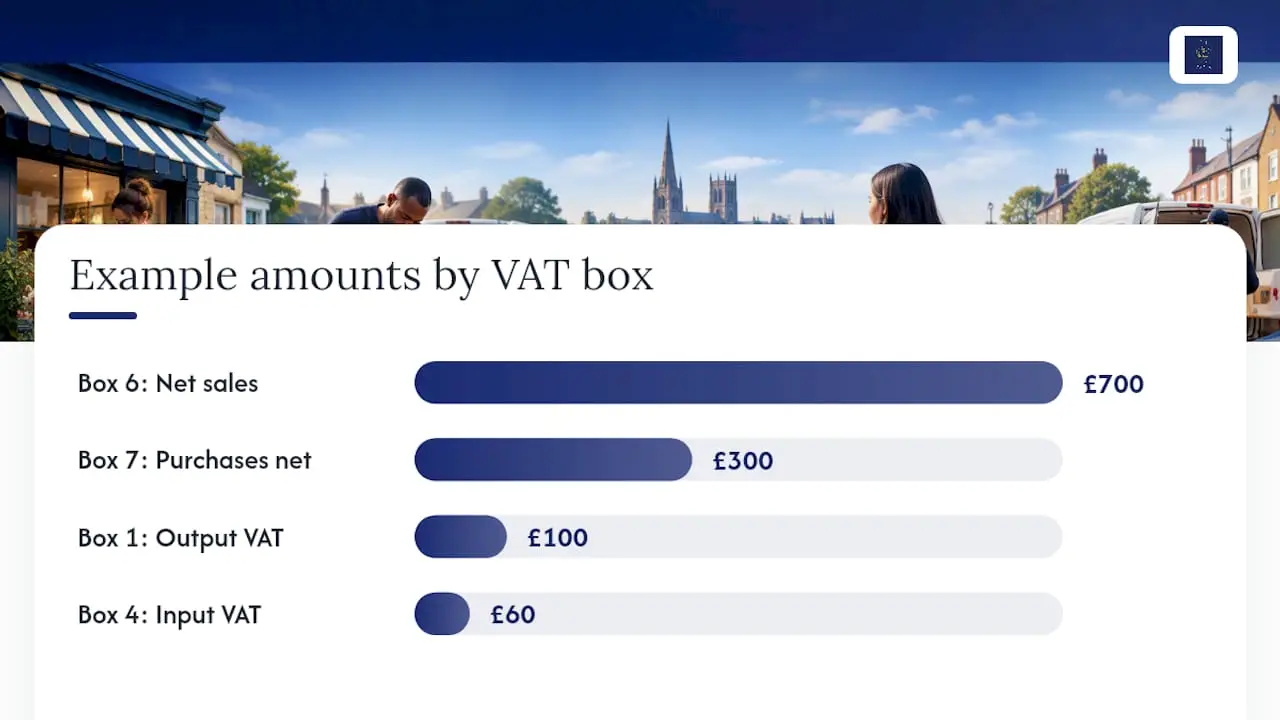
- A standard-rated sale. You invoice a client £500 plus VAT for consultancy work. Code it Standard, and QuickBooks adds £500 to Box 6 and £100 to Box 1.
- A zero-rated sale. You sell £200 of children’s clothing. Code it Zero Rated, and the £200 lands in Box 6, but nothing appears in Box 1 because there’s no VAT to charge.
- An exempt sale. You charge £150 for insurance-related work that falls under an exemption. Code it Exempt, and that £150 doesn’t touch Box 6 at all.
- A standard-rated purchase. You buy stock for £300 plus VAT. Code it Standard, and £60 goes into Box 4 as reclaimable input VAT, with £300 added to Box 7.
- A reverse-charge purchase. You receive a construction service invoice marked “reverse charge”. You self-account for VAT on both the sales and purchase sides of the return, even though the supplier charged you nothing.
The tax point, which is generally the invoice date rather than the date the payment clears your bank, decides which VAT period a transaction belongs to under HMRC’s VAT guide. An invoice dated the last day of one quarter but paid early in the next still belongs to the earlier period.
Pro Tip: Always code from the supplier invoice sitting in front of you, not from the description QuickBooks pulls through from your bank feed. The invoice is the legal record of the supply; the bank line is just a payment.
Special cases: imports, reverse charge and the Flat Rate Scheme
A handful of situations need coding that departs from the standard, reduced, zero and exempt pattern above, and getting these wrong tends to distort your VAT return by far more than a single miscoded sale.
- Postponed import VAT lets you declare and reclaim import VAT on the same return, using figures from your monthly online statement, rather than paying it at the border. It must be excluded from Flat Rate Scheme turnover, according to Gov.
- Domestic reverse charge applies to specified goods and services, including most construction work since March 2021. Invoices covered by it must reference “reverse charge” in the wording, as set out in VAT Notice 735, and you code both sides of the transaction yourself rather than paying VAT to the supplier.
- Overseas services you buy in, such as software subscriptions or advertising from an overseas supplier, often trigger a reverse charge too, so check the invoice carefully before defaulting to Standard.
- Flat Rate Scheme users generally can’t reclaim input VAT on standard purchases, and certain items are excluded from the flat-rate turnover calculation, including postponed import VAT.
- Cash versus accrual accounting changes when a sale or purchase counts for VAT purposes. Cash accounting recognises the transaction when money moves; accrual (standard) accounting recognises it on the invoice date, so switching schemes shifts your tax point.
What if you spot a wrong VAT code after filing?
Catching an error before you file is far less stressful than fixing one afterwards, so it’s worth building the checks in early.
- Run QuickBooks’ built-in error checker before every submission. It flags duplicate transactions, inconsistent VAT codes and missing entries, drawing on the tools described on QuickBooks’ VAT software page.
- Reconcile each coded transaction against the actual supplier invoice, not just the bank description, before you press submit.
- If you catch a mistake before filing, simply amend the transaction in QuickBooks and re-run the return.
- If you catch it after filing, small errors can often be corrected as an adjustment on your next return, while larger or more material errors may need a formal amendment or a call to HMRC.
Pro Tip: Keep a short note of every correction, what caused it and how you fixed it. That audit trail is exactly what you’ll want if HMRC ever asks questions about a past return. My guide to accurate bookkeeping covers this in more depth, including how sloppy coding habits tend to snowball.
Which QuickBooks features actually help with VAT coding?
QuickBooks Online has three built-in tools worth setting up properly rather than ignoring.
- The VAT error checker scans for duplicated transactions, codes that don’t match your registered scheme, and gaps in your records, flagging them before you submit rather than after.
- Correct VAT setup matters as much as the codes themselves: choosing the right accounting scheme, filing frequency, VAT registration number and Flat Rate Scheme option inside QuickBooks needs to match what you’ve told HMRC, following the steps on QuickBooks’ VAT setup guidance.
- Making Tax Digital authorisation links QuickBooks to HMRC so you can submit returns directly, and this authorisation needs periodic reauthorisation, so check it hasn’t lapsed before a filing deadline.
None of this replaces judgement. QuickBooks’ own guidance on its VAT error checker is clear that the software flags patterns, but it can’t read a supplier invoice for you. It codes what you tell it to code.
Author expertise and how CWABC can help with coding and VAT returns
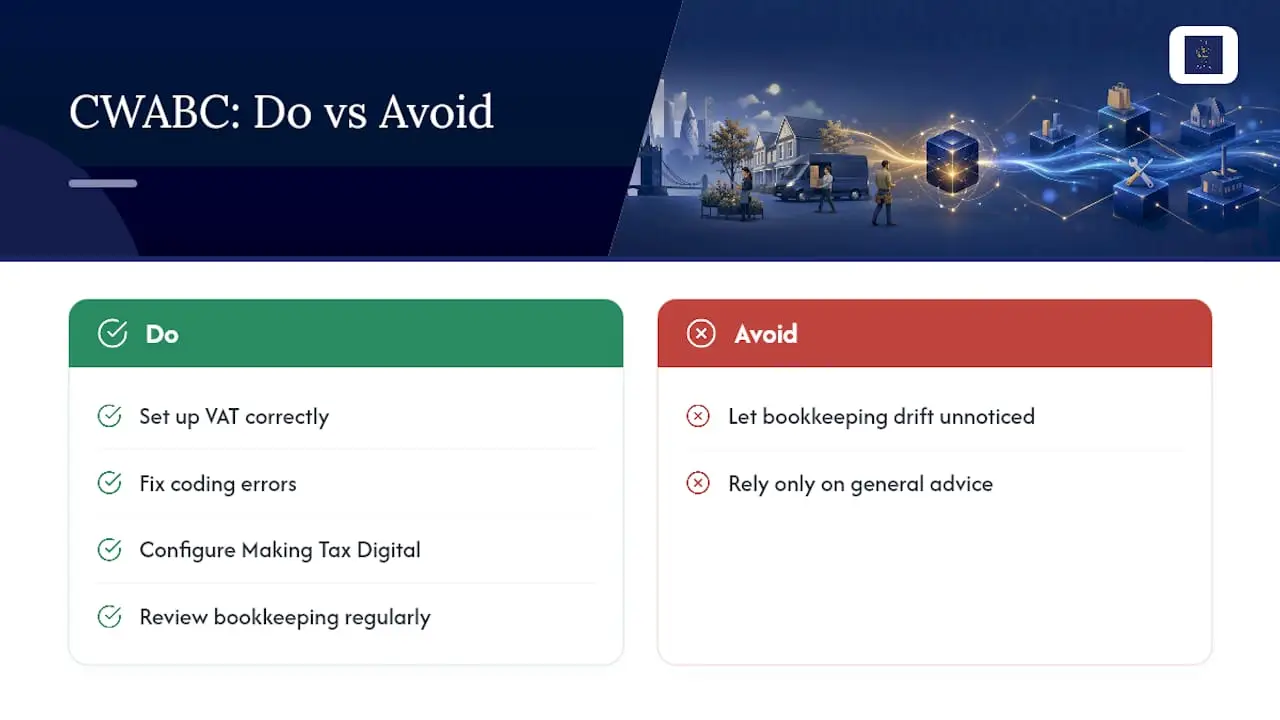
I’m Chris White, an AAT-licensed accountant running CWABC, working with QuickBooks, Xero and FreeAgent every week for sole traders, landlords and small companies. I help clients set up VAT correctly, fix coding errors, configure Making Tax Digital, and review bookkeeping regularly so nothing drifts unnoticed. For anything legally specific to your situation, always cross-check against current HMRC guidance too.
A note on the mistakes I see most often
The same handful of coding errors crop up again and again in small business accounts: zero-rated sales miscoded as exempt, reverse-charge purchases left as standard, and bank-feed suggestions accepted without checking the invoice behind them. One habit fixes most of it. Before you submit anything, match every coded transaction back to its supplier invoice.
— Chris
How CWABC can help with your VAT coding and returns
Getting QuickBooks VAT codes right every quarter takes ongoing attention, not a one-off setup. I run a paperless, AAT-licensed accounting practice that offers clear upfront pricing agreed before any work starts, so you know what to expect for a VAT return, bookkeeping review, or QuickBooks setup.
I offer VAT returns prepared and filed directly with HMRC, ongoing bookkeeping services to catch coding errors before they reach a return, and accounting software setup for QuickBooks, Xero or FreeAgent, including Making Tax Digital authorisation. Working with small business clients and landlords in various locations, I deal directly with clients rather than passing you between departments. If your bank feed keeps suggesting codes you’re not confident about, get in touch and I’ll take a proper look at your setup.
Sources
For anything code-specific, go straight to the source rather than relying on a summary. GOV.UK covers VAT rates, postponed import VAT, the reverse charge procedure and what to include on a VAT return. QuickBooks’ own VAT software pages explain the error checker and MTD submission process in more detail.
FAQ
What are the common VAT codes used in QuickBooks?
The core codes are Standard (20%), Reduced Rate (5%), Zero Rated (0%), Exempt and No VAT/Outside the Scope. Each affects the VAT return differently: standard and reduced rate populate Boxes 1, 4, 6 and 7 depending on whether it’s a sale or purchase, zero-rated affects Boxes 6 or 7 only, and exempt and outside-scope transactions are excluded from those totals entirely.
What are the different VAT codes in the UK?
UK VAT operates on three main rates, standard at 20%, reduced at 5%, and zero-rated at 0%, alongside exempt and outside-scope treatments that aren’t rates at all. The full item-level breakdown of what qualifies for each is on GOV.UK’s VAT rates page.
What do the T0 and T9 VAT codes represent?
T0 and T9 are legacy tax codes from older desktop accounting software, not standard QuickBooks Online terminology. QuickBooks Online uses named codes such as Zero Rated and No VAT instead, though the underlying treatment (0% VAT, or entirely outside the VAT system) is similar.
What are the VAT rules for small businesses in the UK?
VAT-registered small businesses must charge the correct rate on sales, reclaim eligible input VAT on purchases, and file returns through Making Tax Digital-compatible software like QuickBooks. My VAT return guide covers the filing process step by step, and CWABC’s VAT registration and returns service is available if you’d rather hand the whole process over.
What should I do if I’ve used the wrong VAT code after filing?
Small coding errors can often be corrected as an adjustment on your next VAT return, while larger errors may need a formal amendment or direct contact with HMRC. Keep a record of what went wrong and how you fixed it, and see my guide to correcting return mistakes for the full process.
Need help?
If your QuickBooks VAT coding needs a second pair of eyes, whether that’s setting up VAT correctly, fixing a past error, or handing over your returns entirely, get in touch with CWABC and I’ll talk you through it in plain English.