
The safest choice for most startups is an HMRC recognised cloud accounting platform with a reliable bank feed and easy accountant access, not the product with the longest feature list. Check the HMRC software finder for your obligation (VAT or Income Tax), then trial your shortlist with real transactions before committing. The rest of this guide walks through the shortlist, the comparison criteria, and how to budget the migration.
TL;DR:
- HMRC recognition for VAT and Income Tax Self Assessment software is separate; confirm the correct obligation on the HMRC software finder before choosing a platform.
- Bank feed reliability varies, with major providers like Xero and QuickBooks generally supporting most UK banks, but smaller banks may have connection issues.
- Testing invoice creation, receipt capture, and submitting sample quarterly updates during trials can prevent settlement delays and ensure familiarity with workflow.
- Migration costs typically average around £330 per business, requiring days to weeks, and should be scheduled outside key MTD reporting periods to avoid penalties.
- Trialing the software with real transactions alongside your accountant helps identify potential issues, especially with data export, support, and data transfer compatibility.
Table of Contents
- Which bookkeeping software should a startup shortlist?
- How do the main options compare on the features that matter?
- What should be on your buying checklist?
- What do bank feeds, receipts and invoicing actually save you?
- What MTD deadlines and software checks actually apply?
- How much does switching software really cost?
- What’s my honest take after years of setting this up for clients?
- Would you rather I set the software up for you?
- Need help?
- Sources
Which bookkeeping software should a startup shortlist?
Founders waste hours comparing thirty features they will never use. A better starting question is simpler: which of the mainstream UK platforms actually fits your structure, your VAT position, and the way you already work? Here is a practical shortlist.
- Xero suits a small business that expects to scale and wants a wide choice of add ons. Its bank feed coverage and multi user permissions make it a strong pick once you take on a bookkeeper, an accountant, and perhaps a co founder who needs visibility.
- QuickBooks Online works well for founders who want a familiar, low friction interface with tiered plans that grow with the business. Bank feed support is broad and the mobile app is straightforward for basic receipt capture.
- FreeAgent is built with sole traders and micro businesses in mind, with UK specific invoicing, tax estimates, and a simpler day to day workflow. It is worth noting that FreeAgent is sometimes included free with certain business bank accounts, though you should always verify current offers directly with the bank before assuming this applies to you.
- Sage Business Cloud fits a business that already expects to run payroll or wants more traditional accounting controls behind the scenes, drawing on Sage’s long history in UK small business accounting.
- Bridging software is a category rather than a single product: a spreadsheet linked to an HMRC recognised bridging tool. This suits a business with a settled spreadsheet habit that only needs the final submission handled digitally, and HMRC confirms you can combine a spreadsheet with bridging software provided the submission itself goes through compatible software.
- Mobile first apps such as Wave or Kashoo cover the basics (invoicing, simple bank feeds, receipt photos) and can suit a very early stage sole trader who mainly needs to stay tidy rather than run detailed reports.
Wider names worth knowing exist too. Zoho Books and FreshBooks compete on price and simplicity; Expensify handles expense heavy teams; Odoo, NetSuite, and Accounting Seed sit at the more complex end for businesses with layered operations; Bill.com, Tipalti, and MineralTree focus on payables automation; and Brex and Zeni target funded startups with more complex cash management needs. Patriot Accounting, SBS, Multiview, Canopy, Plus & Minus, OneUp, Accurants, AccountEdge, WorkingPoint, and ANNA each serve narrower niches, from very small micro businesses to specific industry setups. Most early stage UK founders will find their answer among the first five categories above, not the specialist end of the list.
Whichever you shortlist, confirm HMRC recognition for the obligation that actually applies to you. Being listed for VAT does not automatically mean a product is listed for Income Tax Self Assessment, and the two lists are checked separately.
How do the main options compare on the features that matter?
Feature comparisons only help if you’re comparing the things that genuinely change your day to day workload. The table below sets out the dimensions that decide most startup decisions: MTD compatibility, bank feeds, invoicing, receipt capture, accountant access, payroll, and typical entry pricing.
Two caveats matter here. First, pricing changes and promotional periods shift, so treat these as a general guide and check the provider’s own pricing page before you commit. Second, “MTD compatible” is not one blanket status. HMRC maintains separate recognition for VAT and for Income Tax Self Assessment, so a product recognised for one is not automatically approved for the other. Always check the specific list for your obligation on the HMRC software finder.
What should be on your buying checklist?
Before you sign up for anything, run through a short checklist. It takes twenty minutes and it saves months of frustration later.
- Confirm HMRC recognition for the correct obligation, VAT or Income Tax Self Assessment, using the software finder.
- Check the bank feed works with your actual bank. Not all feeds are equal, and a feed that drops connections weekly will cost you more time than any subscription saves.
- Test invoice creation and payment collection, including how quickly a client can pay via the built in payment link.
- Try receipt capture with a genuinely messy, crumpled receipt, not a pristine sample photo.
- Attempt a sample MTD update or bridging submission if the trial allows it, so you know what quarter end actually involves.
- Invite your accountant to a trial account and ask them to review the chart of accounts.
- Check the price after any promotional period ends, not just the headline offer.
While you’re trialling, ask the vendor directly about data export formats, support hours, and whether historical data transfers cleanly if you switch again later. Ask your accountant the same questions from their side: how easily can they pull reports, and will they charge extra to work with your chosen platform.
Pro Tip: Enter a fortnight of your own real bank transactions during the trial rather than the demo data. Demo data is always clean; your bank statement never is, and that gap is where most software disappointments happen.
If you’re starting from scratch, my guide to setting up an accounting system for a new business walks through the groundwork before you even open a trial account.
What do bank feeds, receipts and invoicing actually save you?
Each core feature earns its place differently, and it helps to know which ones genuinely reduce your workload and which merely look impressive in a demo.
- Bank feeds pull transactions in automatically, so reconciliation becomes a matter of matching rather than typing. Coverage of major UK banks is generally strong across Xero, QuickBooks Online, FreeAgent and Sage Business Cloud, though smaller or newer banks occasionally lag.
- Receipt capture reads a photographed receipt and extracts the amount and supplier, but accuracy varies and you should expect to check entries manually at first, especially for handwritten or faded receipts.
- Invoicing with built in payment links tends to get you paid faster, and recurring invoice templates plus automated payment chasing save real admin time for anyone billing the same clients monthly.
- Payroll and CIS need closer thought. A director only business might manage with a basic payroll module bundled into the accounting software, but a startup taking on subcontractors under the Construction Industry Scheme, or building a small team, often needs a dedicated payroll provider or a bookkeeper who understands CIS deductions properly.
- Integrations with payment processors, ecommerce platforms, and time tracking tools matter most once you have more than a handful of transactions a week; before that, they’re rarely worth the extra subscription cost. Businesses layering in marketing automation might also look at how their books connect with tools covered in AMW Media’s guide to marketing automation.
What MTD deadlines and software checks actually apply?
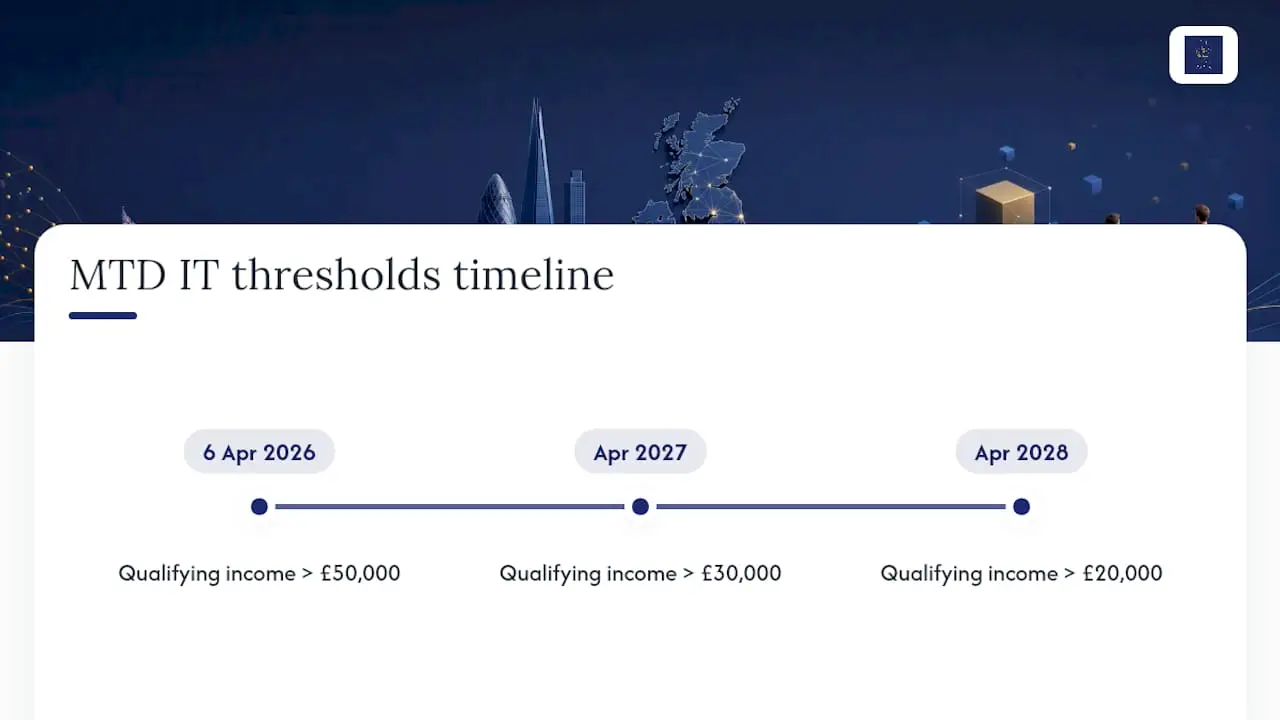
Making Tax Digital for Income Tax is being phased in by income level, not introduced for everyone at once, and the dates matter more than most founders realise until the quarter arrives.
Sole traders and landlords with qualifying income over £50,000 must comply from 6 April 2026. That threshold falls to £30,000 from April 2027, and £20,000 from April 2028, pulling in progressively smaller businesses each year.
“Compatible software” has a specific meaning under the regulations: it must keep digital records and send quarterly updates directly to HMRC, either as an all in one product or as a spreadsheet linked to bridging software. HMRC does not sell or endorse a single product; it publishes a list of recognised software instead.
Before your first quarterly update is due, confirm your software’s recognition status, set up digital records for the whole tax year (not just from your MTD start date), and agree with your accountant who submits each quarter. My checklist for MTD requirements covers the readiness steps in more detail, and the quarterly reporting guide explains what each submission actually involves.
How much does switching software really cost?
Migration is rarely free, even when the software subscription itself looks affordable. Budget for the following:
- A one off transition cost that typically covers exporting your chart of accounts, remapping categories, and entering opening balances; industry estimates put the average one off transition cost at around £330 per business.
- A realistic timeline of days to a few weeks, depending on how tidy your existing records are.
- Scheduling the switch outside your MTD reporting window, so you’re not mid migration when a quarterly update is due.
- A staged approach: trial with a subset of transactions first, then move everything once you and your accountant are confident. My guide to moving from Excel to cloud accounting covers the practical pitfalls of that transition.
What’s my honest take after years of setting this up for clients?
My decision framework is always the same order: compliance first, simplicity second, growth potential third. A feature rich system nobody in the business actually opens becomes worthless within a month.
Three red flags tell me a setup needs rethinking fast: a bank feed that keeps dropping for your specific bank, no confirmed MTD recognition for your obligation, and pricing or support that the vendor won’t explain plainly. None of those improve with time.
If you take one action from this guide, trial the shortlist with your accountant watching over your shoulder, reconciling real transactions, not demo data.
— Chris
Would you rather I set the software up for you?
As an alternative to trial-and-error software shopping for startups, expert help can select, configure and connect the right platform to your bank feed and HMRC obligations in one go.
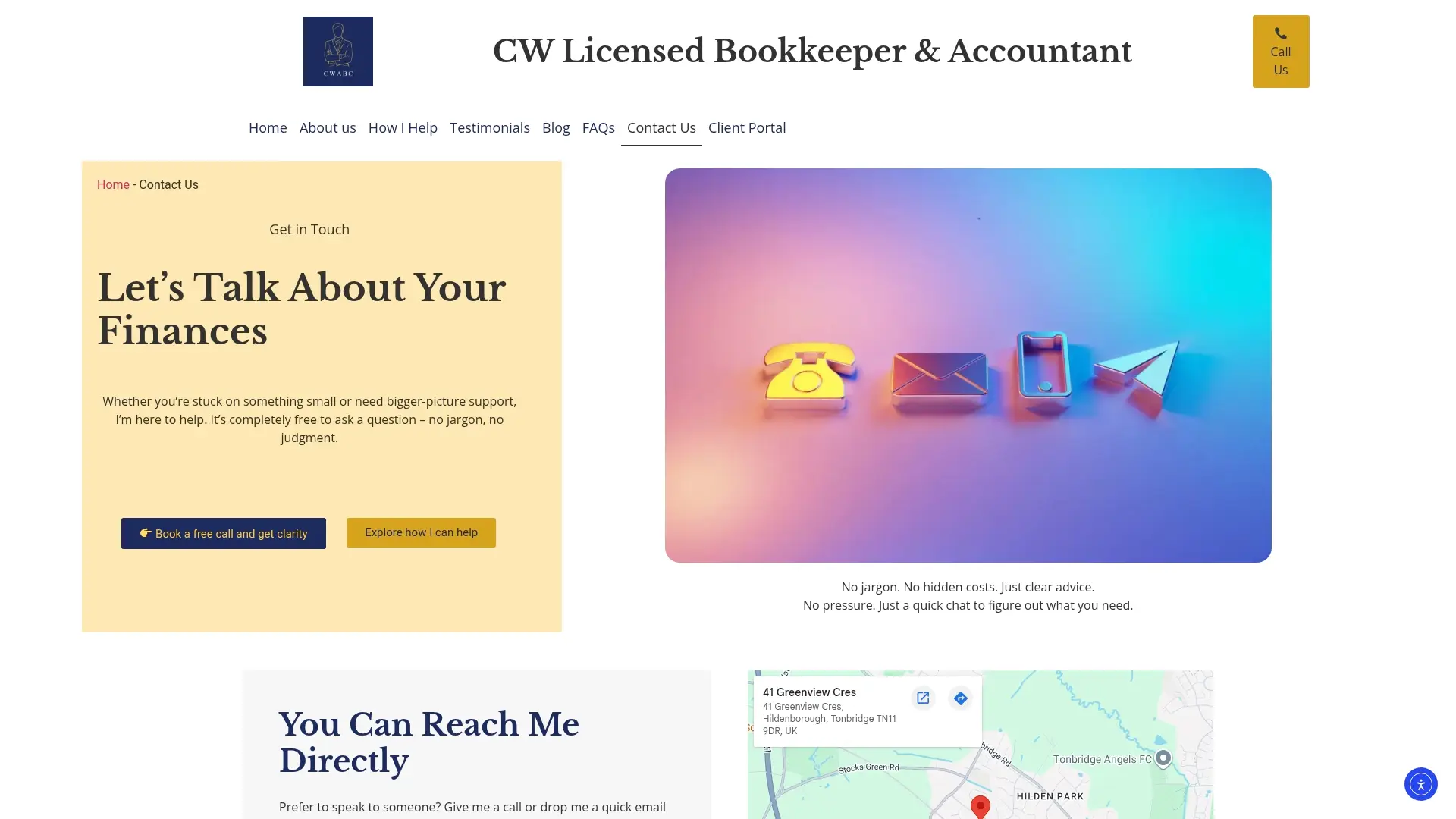
Software setup services can include selection based on your structure and income type, full setup including bank feeds and chart of accounts, accountant access configuration, MTD enrolment guidance, and hands-on training after go live. This route makes sense if you’re time poor, have income from more than one source, or have a quarterly deadline approaching and no spare weeks to experiment.
My software setup service covers Xero, QuickBooks and FreeAgent, and if you’re still weighing up whether to bring in help at all, my page on signs your bookkeeping needs professional support is worth a read first. Get in touch through my contact page to request a fixed quote for setup and training.
Need help?
If you’d rather have someone check your obligations, set up the right software, and get your records ready for HMRC, get in touch via my contact page and I’ll talk you through the options in plain English.
This article is general information, not a substitute for advice from a qualified financial advisor. Consult a qualified financial professional about your own circumstances before acting on anything here.