
Before anything else, confirm the exact period you’re reporting on, stop editing anything already reconciled, and gather your bank statements, platform exports and receipts in one place. That single step saves more accountant time than any other. From there, I work towards three outcomes: reconciled bank balances, organised supporting evidence, and a short, honest list of queries. HMRC’s own record-keeping guidance sets the standard, and at CWABC I use the same checklist with every client who needs their books brought up to date.
TL;DR:
- Confirm the tax year, company accounting period, or VAT quarter first, then export an untouched backup and leave already reconciled transactions unchanged.
- Sole traders keep records at least five years after the January 31 filing deadline; companies and VAT records must be retained for at least six years.
- VAT errors up to £10,000, or up to £50,000 if below 1% of quarterly turnover, can usually go on a later return; deliberate errors require separate notification.
- A reconciled bank feed does not prove completeness; check opening balances, duplicate imports, late fees, foreign exchange charges, and transfers misclassified as income or expenses.
- Seek professional catch up support for multiple unreconciled years, untraceable suspense balances, VAT errors above correction limits, or unexplained personal spending through a company.
Table of Contents
- Confirm the reporting period and preserve original records
- Gather bank, card and platform statements plus missing receipts
- Reconcile bank and credit card accounts, the backbone task
- Categorise transactions, remove duplicates and check for missing income or expenses
- Review unpaid invoices, bills and aged receivables and payables
- Check VAT records and document any VAT errors before filing
- Review payroll, CIS and employee or contractor costs
- Director’s loan accounts, drawings and personal spending
- Investigate suspense and clearing accounts
- Attach evidence, back up files and prepare a short queries sheet for the accountant
- Distinguish routine housekeeping from catch-up work that needs a professional
- Why I prioritise these checklist steps
- How I can help: CWABC bookkeeping and catch-up services
- FAQ
- Sources
Confirm the reporting period and preserve original records
Pick the right period before you touch a single transaction. For Self Assessment, that’s the tax year to 5 April. For a limited company, it’s your accounting period as registered officially. For VAT, it’s whichever quarter or monthly period HMRC has on file for you. Working to the wrong dates is the single most common reason a clean-up takes longer than it should.
Once you know the period, leave anything already reconciled exactly as it is. Don’t delete or edit matched transactions, even ones that look wrong. Take an unchanged copy or export before you make any adjustment, so there’s a record of what the books looked like before you started.
- Confirm the correct tax year, accounting period or VAT quarter before making any changes.
- Export or back up your current data before editing anything.
- Note the date you discovered any error, which matters for how it gets corrected later.
Legal retention periods matter here too. VAT and business record retention rules require sole traders to keep records for at least 5 years after the 31 January submission deadline, limited companies for at least 6 years after their accounting period ends, and VAT records for at least 6 years. Don’t throw anything away while you’re cleaning up, even if it looks irrelevant.
Gather bank, card and platform statements plus missing receipts
A clean-up only works if the evidence is complete, so start by collecting everything that moved money during the period.
- All business bank statements, covering every account used during the period, even dormant ones.
- Credit card and business card statements, including any personal cards occasionally used for business costs.
- PayPal, Stripe, Shopify, Amazon or other marketplace payout and fee reports.
- Card terminal and merchant remittance summaries, which often show gross sales separately from the net amount banked.
- Loan, finance and hire purchase statements for anything still being repaid.
Most banks and platforms let you download CSV statements going back several years from your online account; if a gap is older than that, request a paper or PDF copy directly. Organise everything in a simple folder structure: account name, then year, then month, so nothing gets missed or duplicated. PDF statements and CSV exports are both fine, as long as the figures are legible and complete.
Pro Tip: Save merchant remittance reports separately from bank statements. The gross sales figure on a card terminal report rarely matches the net amount that lands in your bank account, and that gap is where a lot of small clean-up queries come from.
Reconcile bank and credit card accounts, the backbone task
This is the step that everything else depends on. Export the statement for the period, tick off every transaction against your bookkeeping ledger, and note anything still outstanding, such as unpresented cheques or payments not yet cleared. The end result should be a reconciliation report where your ledger balance matches the bank statement balance, to the penny, at the close of each period.
Most bookkeeping software will flag a transaction as “reconciled” once it’s matched against a bank feed, which only confirms the two sides agree, not that every transaction has actually been captured. A feed can miss an import entirely, duplicate a transaction when two feeds overlap, or omit bank charges and foreign exchange adjustments that post days later. If your reconciled balance doesn’t match the statement, check these first:
- Opening balances carried forward incorrectly from a previous period.
- Duplicate entries from overlapping bank feeds or repeated CSV imports.
- Bank fees, interest or foreign exchange charges that haven’t been posted.
- Transfers between your own accounts miscoded as income or expenditure.
When you find a genuine discrepancy, don’t force the balance to match by posting a round-number adjustment. That hides the real error rather than fixing it. Note what you’ve found on your queries sheet and let your accountant decide whether it needs an adjusting journal or further investigation, particularly if it touches a period you’ve already filed a VAT return for.
Categorise transactions, remove duplicates and check for missing income or expenses
Once the bank side reconciles, look at how transactions have been categorised. Duplicate entries creep in most often when a transaction sits on two overlapping bank feeds, or when the same CSV gets imported twice after a connection error.
- Scan for identical amounts on the same date from the same payee, a classic sign of a duplicate import.
- For landlords, check that repairs are coded separately from improvements, since the tax treatment differs.
- For limited companies, check motor costs where a director uses one vehicle for both business and personal journeys.
- Look for income that’s landed in the bank but never been invoiced or recorded as a sale.
A quick way to spot wider problems is to run a profit and loss report for the period and scan it for anything sitting in a generic “sundry” or “other” category. A large balance there usually means several smaller items were coded lazily rather than properly categorised, and it’s worth a few minutes going back through them before handing the file over.
Review unpaid invoices, bills and aged receivables and payables
Your accountant needs to see what’s still owed in both directions, not just what’s already been paid.
- Run an aged receivables report listing every unpaid customer invoice, with invoice number, date and amount.
- Run an aged payables report doing the same for bills you still owe suppliers.
- Match every payment received against the invoice it relates to, including platform payouts that cover several invoices in one lump sum.
- Flag any invoice that looks genuinely uncollectable for discussion, rather than writing it off yourself.
- If you’ve chased a debt, note what you’ve done and when on your queries sheet, since that can support a bad debt claim later.
Don’t assume an invoice marked “paid” in your software actually was. Cross-check against the bank statement, especially for invoices settled through a payment platform that deducts fees before the payout lands.
Check VAT records and document any VAT errors before filing
If you’re VAT registered, your VAT account needs to tie back to the figures on each return you’ve filed. Before you touch anything already submitted, read the correction rules carefully: changing a filed VAT period without checking the consequences can create bigger problems than the original error.
- Keep a running note of any VAT error found: the date discovered, the periods affected and how the figure was calculated.
- Check whether the error falls within HMRC’s correction limits before assuming it can simply be adjusted on the next return.
- Attach the invoices or credit notes that support any correction, so your accountant can verify the figure quickly.
- Never amend a filed VAT return yourself without professional advice, since the correction method depends on the size and nature of the error.
HMRC’s guidance on correcting VAT errors sets specific thresholds for which corrections can go on your next return. If the net value is £10,000 or less, or between £10,000 and £50,000 but under 1% of your quarterly turnover, you can usually adjust it on your next return. Above that, or where the error was deliberate, it must be notified to HMRC separately. HMRC’s internal manual on return adjustments confirms deliberate inaccuracies always need separate notification, regardless of value. For a fuller walkthrough of these thresholds, see my VAT error checklist.
Review payroll, CIS and employee or contractor costs
If you run payroll, check that the figures in your bookkeeping match what was actually submitted and paid.
- Pull together payroll summaries, payslips and RTI submission confirmations for the period.
- Confirm PAYE and National Insurance payments to HMRC match what’s recorded in the ledger.
- If you work in construction, reconcile CIS deductions against your monthly CIS returns and check contractor payments against the amounts reported.
- Note any missing RTI or CIS submission on your queries sheet, along with the relevant payroll journal and date.
Gaps here are common when payroll runs on different software to the main bookkeeping system, so it’s worth checking the two against each other rather than assuming they already agree.
Director’s loan accounts, drawings and personal spending
If you run a limited company, reconcile the director’s loan account against the bank statement for the period and look for personal items paid through the business account: a family holiday, personal insurance, or a one-off purchase that has nothing to do with the company.
Each of these needs the right treatment. Personal costs paid by the company are usually debited to the director’s loan account rather than coded as a business expense. Some items might instead belong on payroll or a P11D as a benefit, depending on how they’re structured. Getting this wrong matters for tax: an overdrawn loan account left unpaid at the company’s year end can trigger a Section 455 Corporation Tax charge. HMRC’s directors’ loan accounts toolkit sets out exactly what checks to run and what to look for.
- List every personal item identified, with the date, amount and intended treatment.
- Note any repayments made to the loan account during the period, or transfers between the company and other related entities.
- Flag anything you’re unsure how to code rather than guessing.
If the loan account position also affects your personal borrowing plans, a director with an overdrawn loan account can face extra scrutiny when applying for a mortgage; specialist advice for limited company directors covers how lenders view this. For wider director record-keeping, see my guide to bookkeeping for limited company directors.
Investigate suspense and clearing accounts
A suspense account holds transactions your bookkeeping couldn’t confidently categorise at the time. A small balance is normal. A large one almost always means several separate errors sitting together, not one single mistake waiting to be found.
Work through it by value, largest first. Trace each entry back to its source document: the invoice, receipt or bank line it came from. Check supplier and customer ledgers for anything that should have been matched but wasn’t, and compare your trial balance against the previous period to see where the difference first appeared.

If you can’t clear every item yourself, that’s fine. Write up a short list of what’s left in suspense, the amount, and what you’ve already checked to rule out. That saves your accountant from repeating work you’ve already done.
Pro Tip: Never clear a suspense balance with a single round-number journal just to make it disappear. That hides the underlying errors rather than fixing them, and your accountant will usually have to unpick it anyway.
Attach evidence, back up files and prepare a short queries sheet for the accountant
Once reconciliations are done, package everything so your accountant can start straight away rather than chasing documents.
- Keep statements as PDFs, exports as CSVs and payroll reports in their original format, named by account, year and month.
- List every unexplained transaction, VAT query, overdue invoice and suspense item in one single queries sheet.
- Note what you’ve already checked for each item, so your accountant isn’t repeating your work.
- Send files through a secure method rather than unprotected email attachments.
- Keep one unchanged backup copy of everything before your accountant begins their own reconciliation.
A tidy, well-labelled handover is the single biggest factor in keeping clean-up costs down. My guide on digital record groups to give your accountant sets out a folder structure that works well for this.
Distinguish routine housekeeping from catch-up work that needs a professional
Some of this checklist is genuine housekeeping you can finish yourself in an afternoon. Other situations point to something bigger.
- More than one year of records missing or never reconciled.
- A suspense balance you can’t trace after checking the obvious causes.
- A VAT error that falls outside HMRC’s correction limits and needs formal notification.
- A director’s loan account with multiple years of unexplained personal spending.
If any of those apply, a catch-up engagement usually starts with a review of what exists, an agreed scope, and a fixed quote before any work begins. Before contacting an accountant, gather what you can using this checklist, even if it’s incomplete; a partial clean-up still saves time. My bookkeeping services page and contact page are the right starting points if you’d rather hand the rest over.
Why I prioritise these checklist steps
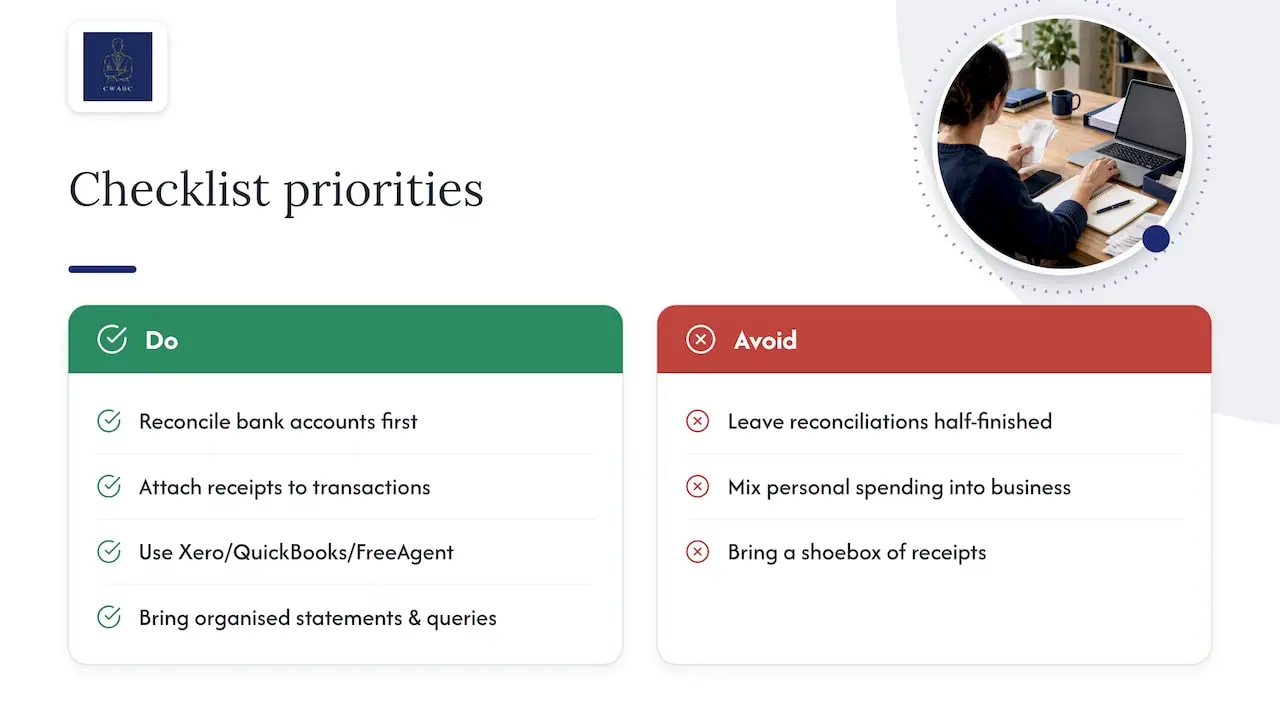
In practice, most messy records trace back to the same two causes: bank reconciliations left half finished, and personal spending mixed into the business account without a note explaining it. That’s why reconciliation and evidence come before anything else on this list; everything downstream depends on them being right first.
Working in Xero, QuickBooks or FreeAgent cuts down the back-and-forth considerably, because bank feeds and attached receipts sit against each transaction rather than in a separate pile. A client who arrives with statements organised by month and a short queries list, rather than a shoebox of receipts, typically has their clean-up finished in a fraction of the time.
— Chris
How I can help: CWABC bookkeeping and catch-up services
If your records need more than a tidy-up, I offer catch-up bookkeeping, VAT error correction support, Self Assessment preparation, Making Tax Digital guidance, and cloud software setup, managed directly rather than passed between different staff.

To get a quote, send over your bank statements, platform exports and a rough idea of how far back the gap runs. I’ll review what you have and agree a fixed price before any work starts. Get in touch through my contact page or see the full scope of my bookkeeping services to start the conversation.
FAQ
How do I do a bookkeeping clean-up?
Start by confirming your reporting period, then reconcile every bank and card account against the statements. Once balances match, check categorisation, chase unpaid invoices, and list anything unresolved, like suspense items or VAT queries, on a short sheet for your accountant.
How much does a bookkeeping clean-up cost?
Cost depends on how many months are missing and how messy the categorisation is, so there’s no single figure that applies to every business. Most practices, including mine, agree a fixed price after reviewing what you have, rather than quoting blind.
Can ChatGPT do my bookkeeping?
A general-purpose chat tool can help explain terms or draft a queries list, but it can’t access your bank feed, verify a VAT threshold against HMRC’s current rules, or spot a misposted director’s loan transaction. Bank reconciliation and VAT correction decisions need checking against your actual records and current HMRC guidance, not just a plausible-sounding answer.
What are the three golden rules of bookkeeping?
The commonly taught golden rules are: debit what comes in and credit what goes out for real accounts, debit the receiver and credit the giver for personal accounts, and debit expenses and losses while crediting income and gains for nominal accounts. They underpin double-entry bookkeeping, though in practice most small businesses apply them through their accounting software rather than manually.
Need help?
If you’ve worked through this checklist and still have unresolved queries, or you’d rather hand the whole clean-up over, get in touch through my contact page and I’ll talk you through next steps.