Organise receipts for bookkeeping digitally by capturing every receipt at source, attaching it to a digital record in MTD-compatible software, categorising it correctly, and reconciling it against your bank feed each week. That single habit keeps your books accurate, your VAT records clean, and your business ready for Making Tax Digital (MTD) for Income Tax, which begins its staged rollout from April 2026. This guide, put together by Chris at Cwabc (CW Licensed Bookkeeper & Accountant, Tonbridge), gives you the exact steps to follow.
Start this week:
- Download a receipt-capture app and photograph your next purchase immediately
- Connect your bank account to your bookkeeping software via a live bank feed
- Create a weekly 15-minute slot to match receipts to transactions
- Check your software is on HMRC’s list of MTD-compatible products
- Contact Cwabc if you want someone to set the whole system up for you
Key takeaways
Digitising your receipts with a consistent capture-attach-categorise-reconcile routine is the most practical way to stay MTD-ready and keep your books accurate throughout the year.
| Point | Details |
|---|---|
| Capture receipts immediately | Photograph every receipt at the point of purchase using a receipt-capture app. |
| Digital linkage is mandatory | MTD requires records to be digitally linked to submissions; manual retyping between systems is non-compliant. |
| Retain records for 5–6 years | Sole traders keep self-assessment records for 5 years; VAT records for 6 years after the submission deadline. |
| Weekly reconciliation prevents problems | A 15-minute weekly slot to match receipts to bank transactions surfaces missing items before they become an issue. |
| Cwabc can implement the system | Cwabc sets up MTD-compatible software, configures capture tools, and handles quarterly submissions for sole traders and landlords in Kent. |
Table of Contents
- Why should you digitise receipts now?
- What must a digital record include? HMRC checklist and retention rules
- A simple 5-step workflow to capture and reconcile receipts
- How to pick bookkeeping software that works with MTD
- Common mistakes when organising receipts digitally
- A weekly, monthly, and quarterly schedule that keeps books current
- A note from Chris at Cwabc
- Cwabc can set up your digital receipts system for you
- Need help?
- Sources
Why should you digitise receipts now?
Digitising your receipts reduces the time you spend on bookkeeping and lowers the risk of a compliance problem with HMRC. Paper receipts fade, get lost in coat pockets, and create a year-end scramble that costs far more time than the five seconds it takes to photograph them at source.
The practical benefits are real and immediate:
- Time saved: OCR scanning tools read supplier names, dates, and amounts automatically, cutting manual data entry
- Accuracy: Digital records matched to bank feeds catch duplicates and missing items before they become a problem
- Audit readiness: HMRC will accept scanned copies of receipts when stored as part of a compliant digital record
- Cashflow visibility: categorised records show you exactly where money is going, month by month
- MTD compliance: quarterly updates to HMRC must come from digitally linked records, not spreadsheets or manual notes
The MTD timetable matters here. The digital record-keeping direction for MTD for Income Tax sets a staged start: those with qualifying income over £50,000 enter from April 2026, those over £30,000 from April 2027, and those over £20,000 from April 2028. If you are a sole trader or landlord anywhere near those thresholds, the time to build the habit is now, not the month before your first quarterly update is due.
The most common mistake small businesses make is leaving all their receipt sorting until the end of the tax year. By then, receipts are missing, faded, or simply forgotten. A short weekly review — even just 15 minutes — transforms bookkeeping from a stressful annual event into a calm, manageable routine. Tax Confident puts it plainly: regular, small habits are the most effective way to avoid last-minute problems.
What must a digital record include? HMRC checklist and retention rules
HMRC requires you to keep records of all sales, income, and business expenses. If you use traditional accounting rather than the cash basis, you must also record amounts owed to you, commitments not yet paid, stock valuations, and year-end bank balances. Every digital record you create should capture the following fields.
Required fields for each digital record:
- Date of the transaction
- Amount (gross, net, and VAT where applicable)
- Supplier or customer name
- Expense or income category (e.g. travel, materials, professional fees)
- VAT treatment (standard rated, zero rated, exempt, or outside scope)
- Invoice or receipt reference number
- Payment method (card, bank transfer, cash)
Minimal record entry example:
15 March 2026 | £48.00 (£40.00 + £8.00 VAT) | Office Depot | Stationery | Standard rated | INV-2026-0341 | Card
That single line contains everything HMRC and your bookkeeping software need to process, categorise, and report the transaction correctly.
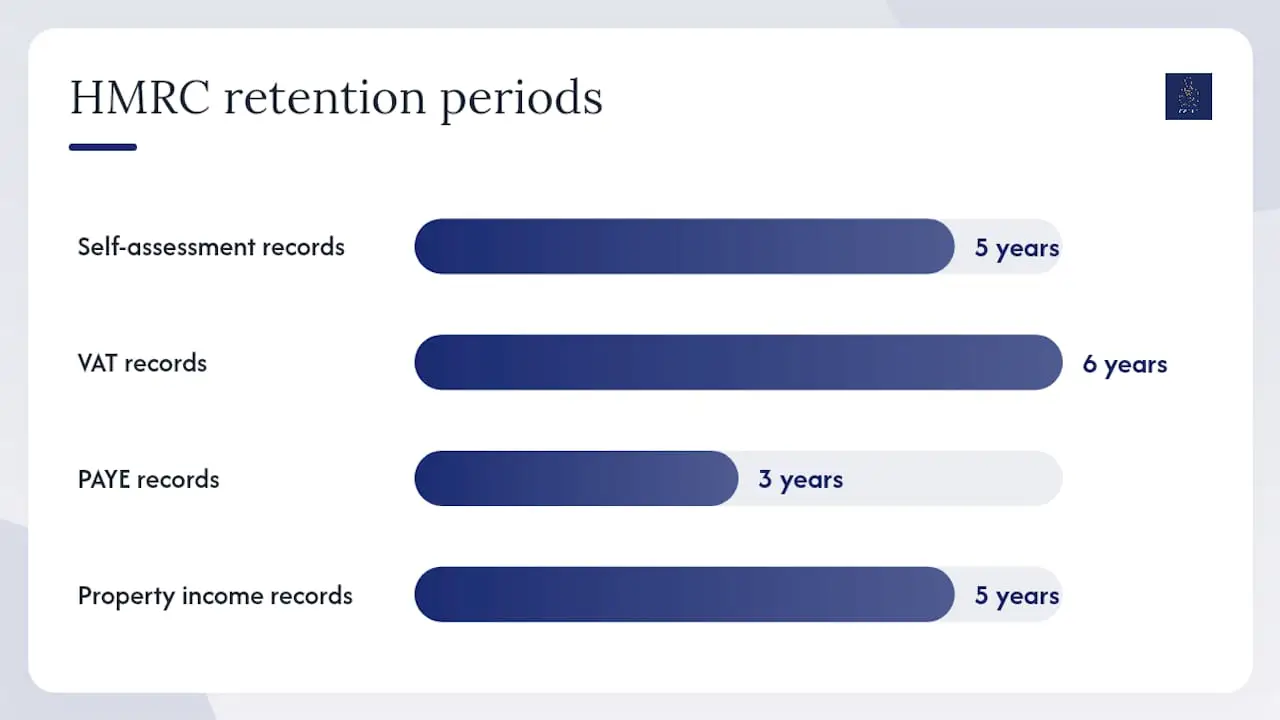
Retention periods for sole traders and landlords:
| Record type | How long to keep |
|---|---|
| Self-assessment records (sole trader) | 5 years after the submission deadline |
| VAT records | 6 years after the submission deadline |
| PAYE records | 3 years after the end of the tax year |
| Property income records (landlord) | 5 years after the submission deadline |
Retailers and low-turnover businesses may qualify for a permitted simplification under the digital record-keeping notice, which allows a single daily gross takings record in certain circumstances. Check the notice before adopting that approach, as specific inclusions (cash, card, credit, vouchers) still apply.
For a fuller breakdown of which records sole traders must keep, see Cwabc’s guide to types of sole trader financial records.
A simple 5-step workflow to capture and reconcile receipts
The five steps below form a repeatable routine. Follow them consistently and your books stay current, your quarterly MTD updates become straightforward, and year-end holds no surprises.
-
Capture at source. The moment you make a purchase, photograph the receipt with your phone. Apps such as Dext (formerly Receipt Bank), AutoEntry, and the built-in capture tools in Xero, QuickBooks, and FreeAgent use OCR to read the key fields automatically. Do not wait until you are back at your desk.
-
Attach to the digital record. Link the image directly to the transaction in your bookkeeping software. This creates the digital audit trail HMRC expects and means the receipt and the record are never separated.
-
Add metadata. Confirm or correct the supplier name, date, amount, and VAT treatment that OCR has read. Add a short description if the category is not obvious (e.g. “client lunch — [client name]”).
-
Categorise and match to your bank feed. Most MTD-compatible platforms import your bank transactions automatically. Match the receipt to the corresponding bank line. Reconciling digital receipts against bank statements regularly surfaces missing items quickly and keeps your books accurate.
-
Retain and back up. Cloud-based software stores images automatically. If you use a local folder structure as a secondary backup, name files consistently: YYYY-MM-DD_Supplier_Amount (e.g. 2026-03-15_OfficDepot_48.00). HMRC accepts scanned and photographed receipts as part of a compliant digital record.
Pro Tip: For cash purchases, photograph the receipt immediately and note “cash” in the payment method field. For refunds or credit notes, scan the credit note and attach it to the original transaction as a negative line. For shared expenses (e.g. a broadband bill split between personal and business use), record the full amount and add a note showing the business-use percentage you are claiming.
How to pick bookkeeping software that works with MTD
Choose software that creates digital records and sends quarterly updates to HMRC via a direct, digital link. MTD for Income Tax requires software that creates, stores, and corrects digital records and submits returns via compatible software; manually retyping data between platforms is not acceptable.
Features to prioritise:
- MTD compatibility (check HMRC’s recognised software list)
- Live bank feed connection
- OCR receipt capture or integration with a dedicated capture app
- Mobile app for on-the-go capture and review
- Multi-user access so your accountant or bookkeeper can work directly in the system
- Two-factor authentication for security
- VAT return filing directly from the software
Tool categories to consider:
- Full accounting suites (Xero, QuickBooks, FreeAgent): handle invoicing, bank feeds, VAT, payroll, and MTD submissions in one place. FreeAgent is included free with most NatWest and Royal Bank of Scotland business accounts.
- Dedicated receipt-capture apps (Dext, AutoEntry): sit alongside your accounting suite and specialise in OCR extraction, supplier rules, and bulk scanning. They push clean data into your main software automatically, removing the need for manual entry.
- Mobile-first capture tools: built into most accounting suites now; sufficient for lower transaction volumes without a separate subscription.
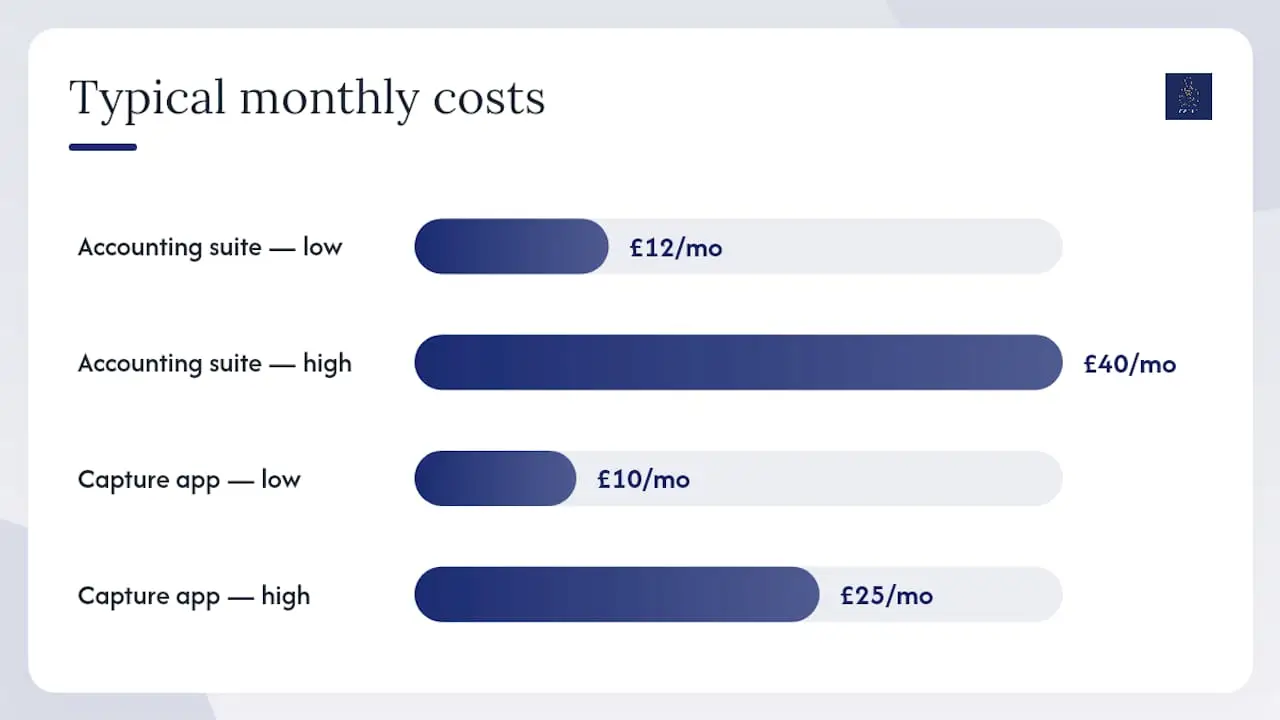
Typical monthly costs for small businesses range from around £12 to £40 per month for a full accounting suite, with dedicated capture apps adding a further £10 to £25 per month depending on volume. Cwabc offers accounting software setup in Kent including Xero, FreeAgent, and QuickBooks training, so you do not have to figure out the configuration alone.
Common mistakes when organising receipts digitally
Most compliance problems come from inconsistent capture and broken links between systems, not from deliberate errors.
- Manual retyping between apps: copying figures from a receipt app into a spreadsheet, then into bookkeeping software, breaks the digital link MTD requires. Use direct integrations only.
- Illegible receipts: if a receipt is too faded to read, note the amount, supplier, and date from memory and attach a brief explanatory note. A clear photograph taken at the time prevents this entirely.
- Missing receipts: create a “no receipt” note in your software with the transaction details and the reason (e.g. receipt not provided by supplier). HMRC may accept this in an enquiry if the expense is otherwise credible.
- Refunds and credit notes: always scan and attach the credit note to the original transaction. Do not simply delete the original entry.
- Cash and daily takings: reconcile your till report or cash summary daily and record it as a single gross takings entry if you qualify for the retail simplification, or as individual transactions otherwise.
- Unlinked systems: two apps that do not talk to each other directly require manual transfer, which is non-compliant for MTD. Check that your receipt app pushes data automatically into your accounting software.
For a broader look at errors to avoid, Cwabc’s guide on avoiding bookkeeping errors for the self-employed covers the most frequent traps in plain language.
A weekly, monthly, and quarterly schedule that keeps books current
Consistency matters more than perfection. A short, regular routine beats a long, infrequent one every time.
-
Weekly (15–30 minutes): photograph and upload any paper receipts; match captured receipts to bank transactions; flag any unmatched items for follow-up.
-
Monthly (30–60 minutes): review all categories for accuracy; reconcile the full bank statement; check VAT if you are registered and prepare the figures for your next return; file any invoices or statements received by post.
-
Quarterly (1–2 hours): review income and expense totals; prepare and send your MTD quarterly update via your compatible software; note any adjustments needed before year-end. The MTD quarterly reporting guide from Cwabc explains exactly what each update must contain.
-
Before meeting your accountant: export a transaction list and bank reconciliation report; gather any receipts still unattached; note any unusual transactions that need explanation.
This schedule fits around a working week without taking over it. Most sole traders find the weekly 15-minute slot is the single habit that makes everything else easier.
A note from Chris at Cwabc
The workflow above works because it removes the decision-making from bookkeeping. When the process is clear — capture, attach, categorise, reconcile — there is nothing to put off. The receipts are already in the system before the end of the week.
What I see most often with sole traders and landlords in Tonbridge and Kent is not a lack of effort, but a lack of structure. People keep receipts in good faith, but without a consistent system they end up with a mix of paper, email attachments, and phone photos that nobody can reconcile quickly. MTD will make that approach unworkable, because the rules require digital linkage from record to submission, not just digital storage.
Setting up the right software and a simple weekly habit takes an afternoon. After that, quarterly updates are a matter of clicking a button rather than reconstructing three months of spending from memory.
Cwabc can set up your digital receipts system for you
Getting the system right from the start saves hours later. Cwabc sets up MTD-compatible bookkeeping software, configures receipt-capture integrations, and runs quarterly updates for clients across Tonbridge and Kent, with clear, upfront pricing and no jargon.

Services include:
- Software setup and training: Xero, QuickBooks, and FreeAgent configured for your business, with a walkthrough so you feel confident using it
- Ongoing bookkeeping packages: monthly or quarterly, with all receipt matching and reconciliation handled
- MTD quarterly submission support: quarterly updates prepared and submitted on your behalf
- One-off catch-up bookkeeping: if your records are behind, we sort them out and hand back a clean set of books
Pricing is fixed and agreed upfront, so there are no surprises. If you are not sure whether your current setup meets MTD requirements, check Cwabc’s 5 signs your bookkeeping needs professional help or go straight to the Cwabc contact page for a free, no-obligation conversation.
Need help?
Ready to get your digital receipts system set up properly? Contact Cwabc for a free, no-obligation conversation about bookkeeping support, MTD setup, and accounting software training in Tonbridge and Kent.
This article is general information, not a substitute for advice from a qualified financial advisor. Consult a qualified financial professional about your own circumstances before acting on anything here.
Sources
The following primary sources underpin the guidance in this article. Check them directly for the latest rules and any timeline changes.
These are the primary sources for compliance decisions. If a rule or deadline looks different from what you have read elsewhere, the GOV.UK pages above take precedence.