
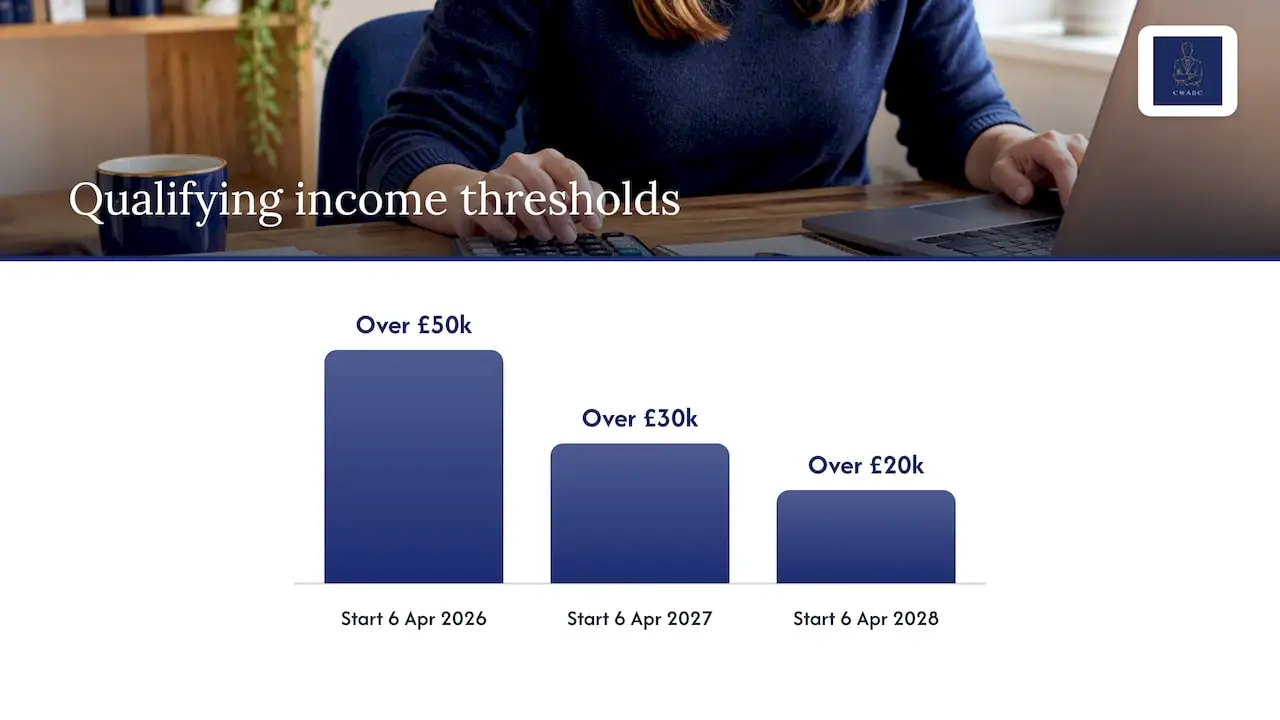
If your qualifying income is over £50,000, you must use MTD for Income Tax from 6 April 2026, with thresholds falling to £30,000 and £20,000 in later years. You then send quarterly updates by 7 August, 7 November, 7 February and 7 May. Late updates earn penalty points, though 2026/27 is a soft landing.
TL;DR:
- Qualifying income combines gross receipts from business and property before expenses, so landlords who also trade must add both sources when checking their threshold.
- Choose tax year or calendar month reporting periods before your first submission; software defaults to tax year, and you cannot change periods afterward.
- Each update covers year to date, with separate digital records required for every business you operate and for your property income.
- Outside 2026/27, missed updates earn penalty points; many taxpayers face a £200 penalty at four points, while late tax payments are penalized separately.
- HMRC authorization needs renewal every 18 months, and testing the software connection early leaves time to fix setup problems before a deadline.
Table of Contents
- Who needs MTD for Income Tax and when do you start?
- How do quarterly updates and deadlines work?
- What are the penalties, and what does the 2026/27 easement change?
- How do you set up software and authorisation?
- What is a practical MTD compliance checklist?
- My perspective as an accountant: why acting early helps
- How I can help you prepare for MTD
- FAQ
- Sources
Who needs MTD for Income Tax and when do you start?
Qualifying income is your total gross income from self-employment and property, counted before any expenses. A landlord and a sole trader combine their gross property and self-employment income, before expenses, when working out qualifying income. HMRC publishes the staged thresholds as follows:
- Over £50,000: you start on 6 April 2026.
- Over £30,000: you start on 6 April 2027.
- Over £20,000: you start on 6 April 2028.
To sign up, you must be registered for Self Assessment and have submitted a return in the last two years. You can also sign up early if you would like to practise before your start date.
Some people are exempt, and some find HMRC has signed them up when they should not be in scope. If an income source has ceased, or you disagree with HMRC’s assessment, HMRC’s guidance on what to do if HMRC has signed you up sets out how to update your details. Act on it quickly rather than hoping it sorts itself out.
How do quarterly updates and deadlines work?
A quarterly update is a summary of your totals, not a mini tax return. Compatible software takes the income and expense figures from your digital records and sends them to HMRC, as HMRC’s introduction to the service explains. If your records are up to date, preparing the update should be more straightforward.
You can choose between two update periods. Standard periods follow the tax year. Calendar periods follow calendar months. Both share the same deadlines, as set out in HMRC’s quarterly updates guidance.
A few practical points to keep in mind:
- Each update is year-to-date, so it builds on the last one rather than starting from scratch.
- You can send it any time from the end of the period up to the deadline.
- You need separate records and updates for each self-employed business and for your property income.
- You cannot change your update periods once you have sent an update, so decide first.
The first deadline for the 2026 starters is 7 August 2026, as shown in HMRC’s timeline.
What are the penalties, and what does the 2026/27 easement change?
HMRC’s system is points-based and designed to forgive the odd slip. You get one point for each missed quarterly update and one for a missed tax return deadline. When you reach the threshold, which is four points for many taxpayers, a £200 financial penalty follows. HMRC’s penalties guidance and Finance Act 2021 set out how points accrue, how they expire and how penalties are assessed.
Late payment is a separate matter. Late-payment penalties are separate from submission penalties. Check HMRC’s guidance for how they apply to your circumstances.
- Quarterly updates: points for lateness, with a penalty only once you reach the threshold.
- Annual obligations: the tax return and payment by 31 January still carry their own penalties.
- Late payment: charged on the tax itself, regardless of points.
For 2026/27, late quarterly updates do not earn penalty points, but late tax returns and late payments are still penalised.
My advice is not to treat the easement as permission to relax. Use the year to build the habit, because 2027/28 brings the full system.
How do you set up software and authorisation?
Your software must create and store digital records, send quarterly updates and submit your tax return. It must also handle every income source you have. HMRC explains how to choose the right software and does not recommend a specific product.
Authorisation follows HMRC’s software guidance:
- Open your chosen software and select the option to connect to HMRC.
- Sign in with your Self Assessment credentials.
- Complete any identity checks HMRC asks for.
- Give the software permission to act on your behalf.
- Diarise a refresh, because the authorisation must be renewed every 18 months.
Choose standard or calendar periods before your first submission. Software defaults to the tax year, so if your accounting period runs 1 April to 31 March, switch to calendar periods first.
Pro Tip: Forgotten authorisation refreshes cause most failed submissions near the 7th-day deadlines, so add a calendar reminder for month 17.
Other pitfalls are using two products for one income source and assuming your software handles property income without checking.
What is a practical MTD compliance checklist?
Work through this in order and MTD becomes routine rather than stressful:
- Check your qualifying income against the thresholds.
- Confirm HMRC has signed you up, or sign up yourself.
- Choose compatible software and authorise it.
- Set the correct accounting period.
- Create digital records from your start date.
- Schedule reminders ahead of each 7th-day deadline.
- Reconcile your records monthly.
- Plan for the 31 January payment.
- Keep records for at least five years after the submission deadline.
If you sign up mid-year, catch up your digital records and send any overdue updates as soon as possible.
Pro Tip: Check that your software and HMRC authorisation are working well before your first deadline, so there is time to fix any problems.
My perspective as an accountant: why acting early helps
I would rather you meet MTD in a quiet month than in the week of a deadline. Starting early can expose software problems while there is still time to fix them, and help make quarterly updates more manageable.
Common pitfalls include forgotten authorisation, the wrong accounting period, records split across several tools and reconciliations left to the last minute. All four are avoidable if you follow the checklist above. None of this needs to be frightening, and help is there if you want it.
— Chris
How I can help you prepare for MTD
I support sole traders and landlords with the practical side of MTD, working with you directly and without jargon. My Making Tax Digital for Income Tax support covers:
- Software setup and HMRC authorisation, through accounting software setup in Kent on Xero, FreeAgent or QuickBooks.
- Preparing your quarterly updates from tidy digital records.
- Annual filing through Self Assessment tax returns, from £250 one-off.
- Ongoing bookkeeping so your records stay compliant.
Pricing is agreed clearly upfront, and I work with you from setup through your first submissions.

If you would like a calm, practical start, get in touch and I will talk you through it.
This article is general information, not a substitute for advice from a qualified financial advisor. Consult a qualified financial professional about your own circumstances before acting on anything here.
FAQ
Do sole traders have to comply with MTD?
Sole traders must comply once their qualifying income passes the threshold for their start date, beginning with income over £50,000 on 6 April 2026. Below the threshold you are not yet required to join, though the limits drop in 2027 and 2028.
What are the penalties for late filing under MTD?
Each missed quarterly update or tax return deadline can earn a penalty point, but late quarterly updates in 2026/27 do not earn points. When you reach the threshold, usually four points, a £200 penalty follows. The 2026/27 easement removes points for late quarterly updates.
What happens if I miss an MTD deadline?
You receive a penalty point for a late quarterly update, unless it falls in 2026/27. Send the update as soon as you can, because late payment of any tax due is penalised separately.
What needs to be reported for MTD?
You send summary totals of income and expenses for each self-employed business and for property income, built from your digital records. You then submit your annual tax return and pay by 31 January.