
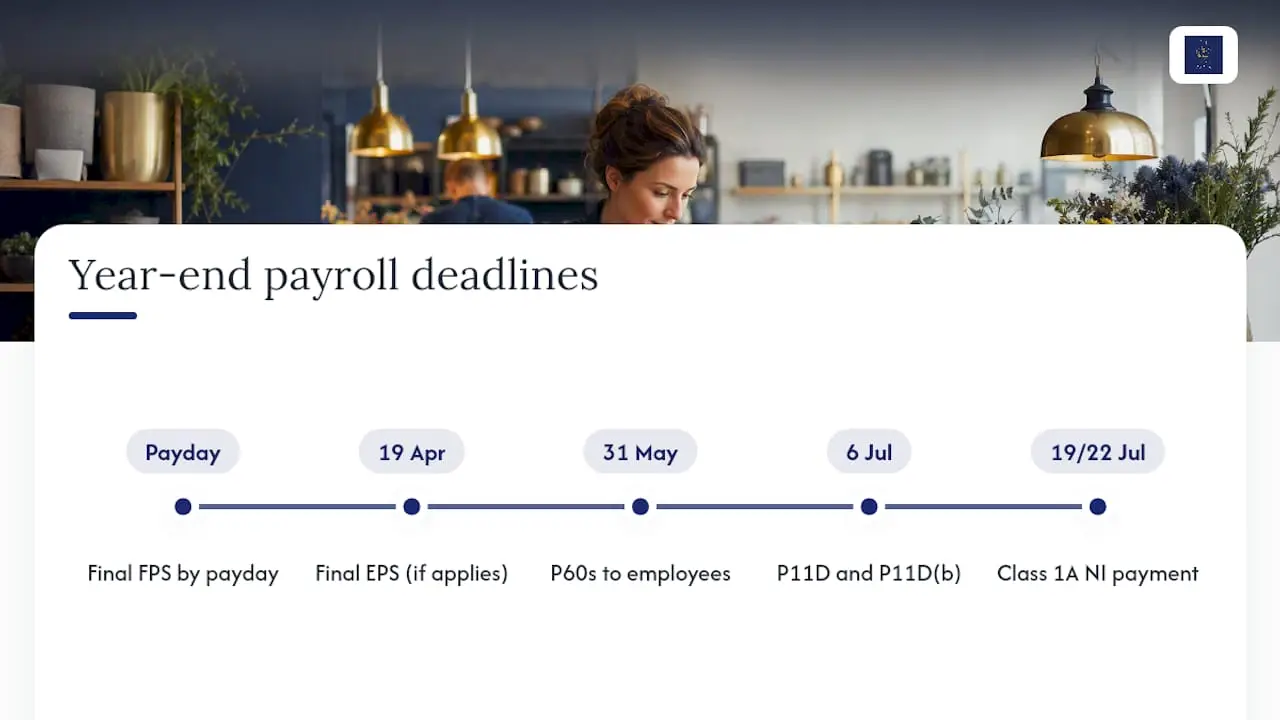
Finish your final pay run, submit the final Full Payment Submission marked as final, and issue P60s. That trio completes the practical side of payroll year end, and the key dates to lock in your diary are 5 April (tax year end), 19 April (final submissions where required), 31 May (P60s), 6 July (P11D/P11D(b)) and 19 or 22 July (Class 1A NICs).
Start now by checking employee details and running your final payroll.
TL;DR:
- Ensuring the “final submission for this tax year” flag is correctly set and submitted on or before your payroll payday prevents HMRC rejection or recognition issues.
- Mismatched employee details, outdated tax codes, or benefits not logged properly can trigger queries or corrections in June if overlooked at year end.
- Final P60s must be issued to employees by 31 May, and P11Ds for non-payrolled benefits are due by 6 July to avoid late reporting penalties.
- Reconciliation of payroll totals, NICs, and statutory payments against bank and accounting records helps identify and fix errors before submission.
- Updating payroll software with current tax codes, wage rates, and thresholds on April 6 and running test payslips reduces mistakes for the new tax year.
Table of Contents
- Your payroll year end checklist, step by step
- How and when do you submit the final FPS and EPS?
- What’s the difference between a P60 and a P45?
- How do you reconcile payroll before closing the year?
- What changes on 6 April and how do you prepare payroll?
- What are the most common payroll year end mistakes?
- Why year-round bookkeeping makes payroll year end painless
- Get your payroll year end handled properly
- Sources
- FAQ
Your payroll year end checklist, step by step
Work through this in order. Skipping steps is exactly how small employers end up making corrections in June that should have taken two minutes in March.
1. Validate employee data before you touch the final pay run. Check National Insurance numbers, names, addresses, current tax codes, and pension and student loan statuses for every employee still on your books. A mismatched NINO is one of the most common reasons HMRC queries a submission months later.
2. Work out whether an extra pay period applies to you. If you pay weekly and this tax year happens to include 53 pay days rather than the usual 52 (sometimes called week 53, or week 54/56 for two or four weekly payrolls), your software needs to know so it doesn’t apply a full year’s tax-free allowance twice.
3. Process the final pay run and send the final FPS. This must go to HMRC on or before payday, and it needs the “final submission for the year” indicator switched on, not left for a later correction.
4. Submit a final Employer Payment Summary if one applies to you. You only need an EPS if you’re reclaiming statutory payments (SMP, SPP, and similar) or claiming Employment Allowance for the year. The deadline is 19 April.
5. Generate and send out P60s. Every employee on your payroll on 5 April needs one by 31 May.
6. Pull together P11Ds for anything you haven’t payrolled. Company cars, private medical cover, and other benefits not run through payroll during the year still need reporting on a P11D and P11D(b) by 6 July, with Class 1A National Insurance paid by 19 or 22 July depending on payment method.
7. Roll the whole system forward into the new tax year. Apply the P9X tax code changes, update National Minimum and Living Wage rates, statutory payment amounts, and National Insurance thresholds, then run a test payroll before you pay anyone for real in April.
Pro Tip: Build your own year-end calendar in whatever tool you already use (a shared spreadsheet is fine) with each HMRC date entered as a hard deadline, not a soft target. Most retrospective corrections happen because a date was known but not diarised.
If your business runs more than one PAYE scheme, or you have directors on irregular pay, do this validation and final run separately for each scheme. Bundling them together is where errors creep in.
How and when do you submit the final FPS and EPS?
The mechanics matter as much as the timing. Get the indicator wrong and HMRC’s systems may not recognise your year as closed.
- Set the “final submission for this tax year” flag. Every major payroll package has this as a checkbox or dropdown on the last FPS of the year; if you use HMRC’s Basic PAYE Tools, the option sits in the same submission screen.
- Submit on or before your normal payday, not after. There’s no separate “year end submission date” distinct from your usual FPS deadline.
- Send the final EPS by 19 April if you’re reclaiming statutory payments or Employment Allowance, and only if you haven’t already flagged the year as final on your last FPS.
- Check for HMRC acceptance. Most software shows a confirmation status within minutes; a rejection usually flags a mismatched employer reference or a duplicate submission.
- If you’re past the deadline, you can still submit an additional FPS or EPS for correction, but contact HMRC’s employer helpline if a rejection won’t clear on resubmission.
What’s the difference between a P60 and a P45?
A P60 goes to every employee still working for you on 5 April, showing their total pay and deductions for the year. A P45 goes to someone who’s left your employment during the year, whenever they leave, not just at year end. Confusing the two is a common mistake for newer payroll administrators.
Practical points to note:
- P60s must reach employees by 31 May, by paper or electronically.
- Most modern payroll software (Xero, QuickBooks, FreeAgent, Sage) generates P60s automatically once the final FPS is filed; if yours can’t, HMRC’s Basic PAYE Tools will produce one instead.
- Keep a copy of every P60 issued. If an employee loses theirs, they can view the equivalent detail through their personal tax account, or you can reissue a duplicate marked as such.
- Cross-check the figures on each P60 against your final FPS before sending. Discrepancies here are a frequent trigger for HMRC queries the following year.
How do you reconcile payroll before closing the year?
Reconciliation is the unglamorous bit that saves you hours of backtracking later. Match your total gross pay, PAYE deducted, employee and employer National Insurance, and student loan repayments against your accounting records and the actual amounts paid out of your bank account.
- Confirm that statutory payments (SMP, SPP, SSP) and any Employment Allowance claimed agree with what’s shown in your payroll reports.
- Recheck NINOs, tax codes and pension enrolment status for every employee, not just new starters.
- Build a simple reconciliation sheet, even a basic spreadsheet comparing payroll totals to bank payments and nominal ledger entries, so you have evidence of the check if HMRC ever asks.
Most payroll advisory guides point to the same handful of checks catching the majority of year-end errors: reconciling gross pay, PAYE and NICs before final submission tends to surface issues while there’s still time to fix them without a retrospective correction.
What changes on 6 April and how do you prepare payroll?
The new tax year brings a fresh set of numbers, and applying them correctly before your first payslip is where most software updates matter.
- Get the current year’s P9X and read the tax code instructions. HMRC publishes it annually to tell you exactly which codes carry forward unchanged and which need uplifting, and it’s not a document you can skip.
- Update your statutory rates. National Minimum Wage and National Living Wage bands, Statutory Sick Pay and Statutory Maternity Pay amounts, and National Insurance thresholds and contribution rates all typically change from 6 April, and most cloud packages update automatically but should still be checked manually.
- Handle week 53 correctly if it applied to you. Employees may need switching to a week 1 or month 1 basis for the new year if their code was on a cumulative basis previously.
- Run a test payroll before you pay anyone. Process a dummy pay run or check sample payslips against expected net pay for a handful of employees, checking tax, National Insurance and pension deductions land where you’d expect.
Pro Tip: Don’t trust an automatic software update blindly. Even well regarded systems occasionally lag on a threshold change in the first week of April, so manually spot check two or three payslips against the new P9X figures before the payroll goes live.
What are the most common payroll year end mistakes?
The errors that cause the most grief are avoidable, and mostly come down to rushing the final submission.
- Forgetting to tick the “final submission” indicator, leaving HMRC’s systems expecting more FPS filings for a closed year.
- Mismatched NINOs or names between your payroll records and HMRC’s, often from a marriage name change never updated.
- Carrying an outdated tax code into April because the P9X wasn’t checked properly.
- Leaving P11D compilation until the last week of June, when benefit values from earlier in the year are hardest to track down.
Pro Tip: Run a five-point smoke test the day before your final submission: confirm the final indicator is set, NINOs match HMRC records, tax codes reflect the current P9X, benefits are logged for P11D, and your reconciliation sheet balances. If any one of those fails, fix it before you submit, not after.
Why year-round bookkeeping makes payroll year end painless
Most of the stress at year end comes from problems that started months earlier and went unnoticed. As an AAT-licensed practitioner running payroll and bookkeeping for small employers, I see the same pattern repeatedly: a NINO typo from October, a benefit never logged in July, a tax code change missed in an earlier P9X. None of these are hard to fix in isolation. They’re hard to fix all at once in April.
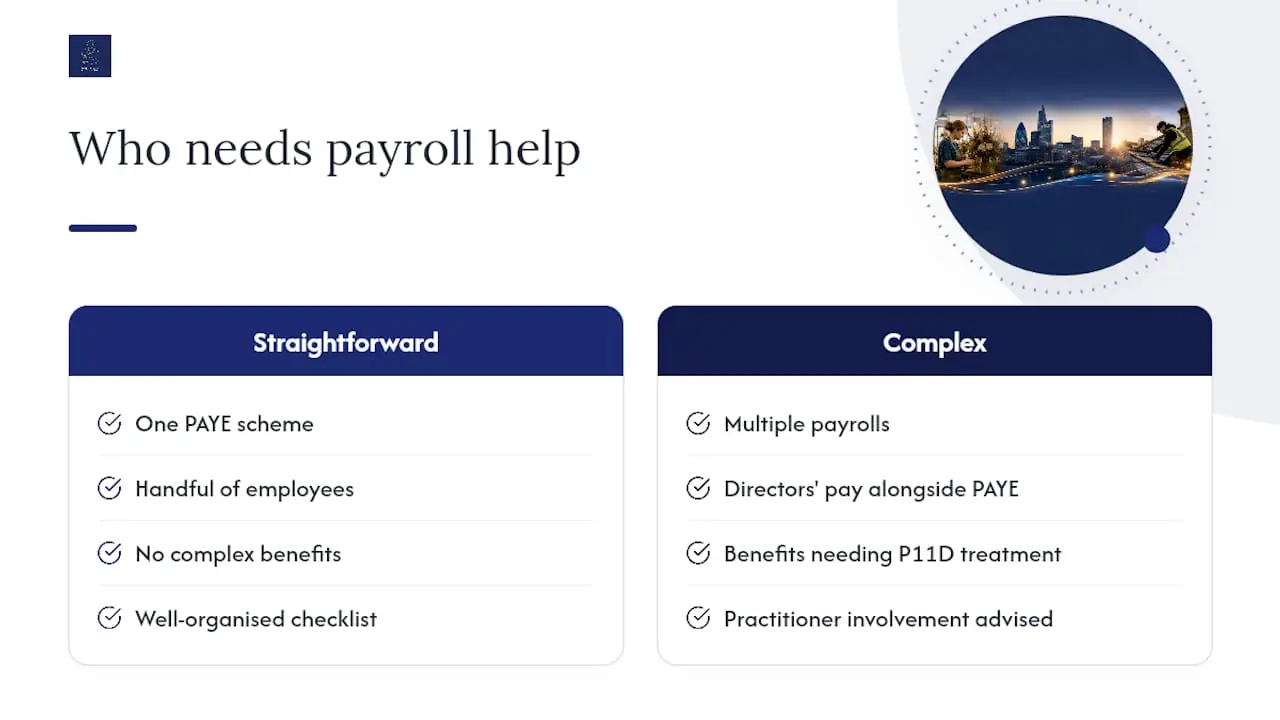
If your payroll is straightforward, one PAYE scheme, a handful of employees, no complex benefits, a well-organised checklist and a bit of discipline around dates will get you through cleanly. Where I’d get involved is multiple payrolls, directors’ pay alongside PAYE, or benefits that need proper P11D treatment. If that sounds like your situation, my contact page is the quickest way to start a conversation.
— Chris
Get your payroll year end handled properly
Managing year end can be challenging and time consuming, especially close to deadlines. Working directly with a single knowledgeable AAT-licensed practitioner experienced in payroll can simplify the process and provide personalised support.

Year-end payroll services typically include the final pay run, P60 and P11D preparation, and updating payroll software for the new tax year with current tax codes and statutory rates applied and tested before payments are made, using reliable Amazon Profit and Loss Software to ensure accuracy. Many providers work paperless, using cloud platforms such as Xero, QuickBooks and FreeAgent, and agree pricing clearly upfront to avoid surprises. If you’d rather hand off payroll management than chase deadlines yourself this April, get in touch through my contact page and I’ll talk you through what year-end support would look like for your business.
Sources
FAQ
What does end-to-end payroll actually include?
End-to-end payroll covers everything from calculating gross pay, tax, National Insurance and pension deductions each period through to final submissions, P60 issuance, and preparing the system for the next tax year. A managed service like the one I offer at CWABC typically handles the full cycle rather than just the monthly run.
What is a payroll checklist for?
A payroll checklist is a step-by-step list of tasks, submissions and deadlines that keeps a payroll cycle (or year end specifically) compliant and error-free, so nothing gets missed under time pressure.
What are the main payroll changes employers should watch for in 2026?
Employers should check the current P9X for tax code changes, updated National Minimum and Living Wage rates, revised statutory payment amounts, and new National Insurance thresholds, all of which typically take effect from 6 April.
What does a typical UK payroll cycle look like?
Most small employers run payroll monthly, calculating pay and deductions, submitting an FPS on or before payday, and reporting any starters, leavers or tax code changes as they happen throughout the year, before the annual year-end tasks close the cycle.
How do I finalise payroll at year end?
Finalising payroll means processing your last pay run, submitting the FPS marked as final (with an EPS by 19 April if you’re claiming statutory payments or Employment Allowance), and issuing P60s to employees by 31 May.
Need help? If your payroll year end feels like more than you want to handle alone, whether that’s multiple schemes, benefits reporting, or simply wanting it off your plate, get in touch via my contact page and I’ll talk you through the options.