What is the HMRC Personal Tax Account and how do I set it up?
Your HMRC Personal Tax Account (PTA) is a free, 24/7 digital service where you can view and manage your personal tax affairs directly with HMRC. Think of it like online banking, but for your tax records. No waiting on hold, no posting letters, no guesswork about what HMRC holds on you.
Setting it up is straightforward and requires Government Gateway credentials or, if you are a new user registering from 9 February 2026 onwards, a GOV.UK One Login account. Before you start, gather these:
- Your National Insurance (NI) number (found on a payslip, P60, or previous HMRC letter)
- A valid email address you can access immediately
- A UK mobile number for two-factor authentication
- Photo ID such as a UK passport or DVLA photocard driving licence
Once logged in and verified, your PTA gives you access to:
- Your current Income Tax estimate and tax code
- Self Assessment returns (submit, view, and manage)
- Income history from the previous five years
- State Pension forecast and NI contribution record
- Marriage Allowance and Child Benefit management
- Tax refund claims
- Your NI number and Unique Taxpayer Reference (UTR)
- Employer benefits such as company car details
Identity verification happens once. After that, your phone or email is used for two-factor authentication to log in.

What can you actually do with your Personal Tax Account?
The PTA is far more than a place to check your tax code. It is a working tool that replaces most routine reasons you would otherwise call HMRC’s helpline.
Key features available once you are signed in:
- Check and correct your tax code — see the full breakdown of how HMRC calculated it, including any benefits in kind or outstanding tax being collected
- View income reported by employers — PAYE figures submitted in real time by each employer you have worked for
- Manage Self Assessment — file your annual return, view previous submissions, check payments on account, and see upcoming deadlines
- Claim tax refunds — if HMRC issues a P800 showing an overpayment, you can request a bank transfer directly through the PTA
- Check your State Pension forecast — see qualifying years, projected weekly amount, and any gaps in your NI record
- Manage Marriage Allowance — claim, update, or cancel it without a phone call
- Track submitted forms — see confirmation that HMRC has received documents you have sent online
- Update personal details — change your address or name without writing to HMRC
Pro Tip: Switch your PTA communications to paperless as soon as you log in. Go to Settings > Messages and select digital correspondence. You will receive tax code changes, PAYE refund notices, and HMRC alerts directly in your PTA inbox rather than waiting for a letter to arrive.
One confusion worth clearing up: Government Gateway is the login system, not the dashboard itself. Having a Government Gateway user ID does not automatically mean your PTA is fully set up or that your identity has been verified. You need to complete the identity verification step within the PTA before all features become available.
Step-by-step guide to setting up your HMRC Personal Tax Account
Getting your account up and running is straightforward when you know what to expect at each stage.
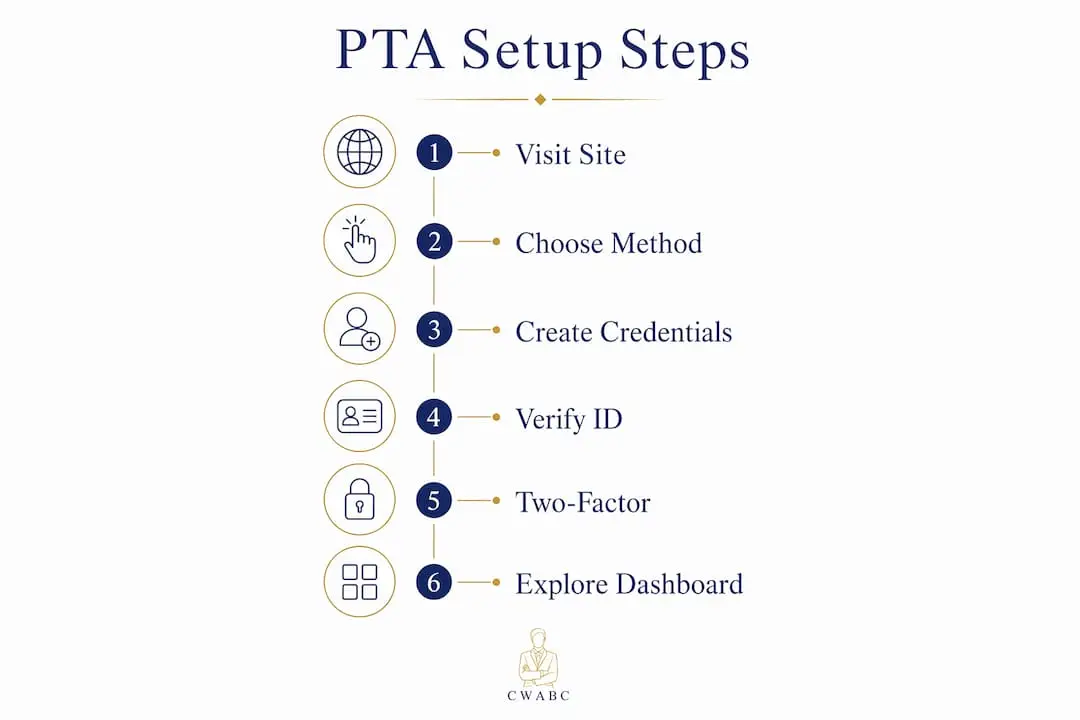
Step 1: Visit the HMRC sign-in page
Go to gov.uk/personal-tax-account and click “Sign in or set up your personal tax account.”
Step 2: Choose your sign-in method
You will see three options:
- Government Gateway — use this if you already have a user ID (up to 12 characters) and password from previous HMRC dealings
- GOV.UK One Login — the newer system, now available for new HMRC customers from 9 February 2026
- Create new sign-in details — select this if you have never used HMRC online services before
If you already have a Government Gateway account, continue using it. HMRC will contact you when it is time to switch to GOV.UK One Login. Do not create a new One Login account to replace your existing Gateway credentials during the transition period.
Step 3: Create your credentials (new users only)
For GOV.UK One Login, you will need:
- An email address and a password
- Two-factor authentication via mobile number or an authenticator app (such as Microsoft Authenticator, Authy, or 1Password)
For Government Gateway, you will receive a 12-character user ID by email after registering.
Step 4: Verify your identity
Identity verification uses one of the following:
- A valid UK passport
- A DVLA photocard driving licence
- A payslip from the last three months or a P60 from your most recent tax year
- Details from a Self Assessment return you have previously submitted
- Information held on your credit record (loans, credit cards, or mortgages)
This step happens once. If the document scan fails, try an alternative document or check that your photo ID image is clear, well-lit, and straight-on with no glare.
Step 5: Set up two-factor authentication
HMRC recommends an authenticator app over SMS text codes, as it is more secure. Setup is quick: open the app, scan the QR code HMRC displays, and complete sign-in. From that point, you log in with your password plus a six-digit code from the app.

Step 6: Explore your dashboard
Once inside, spend ten minutes on your first session. Check your tax code, review your income history, and enable paperless correspondence. Those three actions alone will save you time and potential tax headaches later.
Common setup problems and how to avoid them:
- “Your identity could not be verified” — try a different document or ensure your scan is clear
- “No record of you as a taxpayer” — this can happen if you are in your first job and your employer has not yet submitted payroll data; try again after your first payslip
- “NI number format not recognised” — the correct format is two letters, six numbers, one letter (for example, AB 12 34 56 C), with no special characters
Using your Personal Tax Account for essential tax management tasks
Once your account is active, the real value comes from using it regularly rather than logging in once and forgetting about it.
Checking and correcting your tax code
Your tax code tells your employer how much tax to deduct from your pay. The most common tax code reflects the standard Personal Allowance for the current tax year. Log in, click “Check your Income Tax,” and review the full breakdown. If you see an unexpected code such as 0T (emergency tax, no Personal Allowance applied) or a W1/M1 suffix, update your income details or contact HMRC via the portal to correct it.
Managing Self Assessment
If you are registered for Self Assessment, your PTA links directly to the Self Assessment portal. You can file your annual return, view previous submissions, check payments on account, and make payments toward your bill. Deadlines are visible within the account, so there is no excuse for missing the 31 January online filing date.
Claiming tax refunds
If HMRC identifies an overpayment, it issues a P800 tax calculation, usually around May or June following the end of the tax year. You will see this in your PTA and can request a bank transfer refund directly. Refunds for employment expenses (such as working from home) can also be claimed through the account using a P87 form.
Checking your State Pension and NI record
Your PTA shows your projected State Pension at your State Pension age, the number of qualifying years you have built up, and any gaps in your record. You need 35 qualifying years for the full new State Pension. If you have gaps, the PTA shows the cost of buying voluntary Class 3 NI contributions to fill them, and you can pay directly through the account.
Other tasks you can complete in the PTA
- Update your address or name with HMRC
- Claim or update Marriage Allowance
- Check or update Child Benefit details
- Review employer-reported benefits such as company car or private medical insurance
- Find your UTR number if you are already registered for Self Assessment
Practical tips for sole traders and small business owners
If you run your own business, the PTA is one of the most useful compliance tools available to you, and most sole traders do not use it to its full potential.
Here is how to get the most from it:
- Review your income history regularly. Your PTA shows what each employer or PAYE source has reported to HMRC. If you have had multiple income streams, check that all figures match your own records. You have up to six years to contest discrepancies between employer-reported figures and your P60 or payslips.
- Monitor your Self Assessment submissions. Once you file a return, the PTA shows HMRC’s acknowledgement and any outstanding balance. Use this to track payments on account and avoid surprises.
- Check your State Pension forecast annually. As a sole trader, your NI contributions depend on your profits. Gaps can appear in years where profits fell below the Small Profits Threshold. Catching these early gives you the option to fill them at a lower cost.
- Use the PTA to verify your tax code before each new tax year. An incorrect code can mean overpaying or underpaying tax for an entire year without realising it.
- Track any voluntary NI contributions you make. The PTA updates your NI record once payments are processed, so you can confirm gaps have been filled.
Pro Tip: Many sole traders confuse having a Government Gateway login with having a fully functioning Personal Tax Account. They are not the same thing. If you have never completed the identity verification step inside the PTA, your account may be incomplete and some features will be unavailable. Log in and check your verification status today.
The HMRC mobile app is worth mentioning here too. It offers a simplified version of the PTA, covering quick checks of your tax code, State Pension forecast, income history, and Marriage Allowance. It does not support full Self Assessment management or Child Benefit features, but it is handy for a quick check on the go.
For year-round tax preparation, logging into your PTA quarterly rather than once a year means you catch errors early, stay on top of deadlines, and avoid the last-minute scramble that leads to mistakes. HMRC encourages this approach precisely because it reduces unexpected tax bills and cuts down on helpline demand.
Cwabc can take the stress out of your tax account and returns
Setting up your HMRC Personal Tax Account is a solid first step. But for sole traders and landlords, the real challenge is knowing what to do with the information once you are inside. That is where Cwabc comes in.
Cwabc is a licensed bookkeeper and accountant based in Tonbridge, working with sole traders, landlords, and small business owners across the UK. The approach is simple: plain English, no jargon, and clear upfront pricing. Whether you need help filing your Self Assessment return, setting up your digital tax records, or making sense of a tax code that does not look right, Cwabc handles it calmly and accurately.
With Making Tax Digital expanding its reach, getting your digital tax setup right now saves a great deal of trouble later. Cwabc helps clients build the right systems from the start, so compliance does not become a crisis. If you are unsure whether your bookkeeping needs professional support, a free, no-obligation conversation is the easiest way to find out. Get in touch with Cwabc today at cwabc.co.uk/contact-us and take the next step with confidence.
Key takeaways
Your HMRC Personal Tax Account is the most direct way to manage your UK tax affairs online, and setting it up correctly from the start prevents costly errors and missed deadlines.
| Point | Details |
|---|---|
| Free 24/7 access | The PTA is a free HMRC service available at any time, covering tax codes, Self Assessment, refunds, and State Pension. |
| Identity verification is a one-off step | Verify once using a passport, driving licence, or payslip, and standard login applies from then on. |
| Government Gateway and PTA are different | Having a Gateway login does not mean your PTA is fully set up; complete identity verification to unlock all features. |
| Paperless settings speed up notifications | Switching to digital correspondence under Settings > Messages means you receive tax alerts and refund notices faster than by post. |
| Cwabc supports sole traders and landlords | Cwabc offers plain-English bookkeeping and Self Assessment support to help you act on what your PTA tells you. |
Need help?
If your PTA raises questions you are not sure how to answer, or if Self Assessment feels like more than you want to handle alone, Cwabc is here to help. Book a free, no-obligation conversation at cwabc.co.uk/contact-us and get straightforward advice from a licensed bookkeeper who understands exactly what sole traders and landlords need.